
How to Set Up GoHighLevel Properly (Without Wasting Weeks)
Setting up GoHighLevel for the first time can feel overwhelming. You’ve just invested in one of the most powerful all-in-one marketing platforms available, but now you’re staring at a dashboard with dozens of tabs, settings, and options that seem to go on forever.
Here’s the reality: most agency owners and marketers spend 2-3 weeks fumbling through GoHighLevel’s initial setup, missing critical configurations that cost them leads, automated workflows that break halfway through, and integrations that never quite work right.
The good news? It doesn’t have to be this way.
In this guide, I’ll walk you through exactly how to set up GoHighLevel properly from day one. No fluff, no confusing jargon—just a clear, step-by-step process that gets your account working like a well-oiled machine in days, not weeks.
Why Your GoHighLevel Setup Actually Matters
Before we dive into the technical steps, let’s address something important: your initial setup determines everything that comes after.
A proper foundation means:
- Your automations run smoothly without constant troubleshooting
- Client communications look professional from day one
- You can scale operations without rebuilding everything
- Your team can navigate the platform without confusion
Skip steps during your first-time GoHighLevel setup, and you’ll spend months fixing problems that could have been avoided in hours.
The GoHighLevel Setup Step-by-Step Blueprint
Let’s break down the gohighlevel onboarding process into manageable phases. Each section builds on the previous one, so resist the urge to jump around.
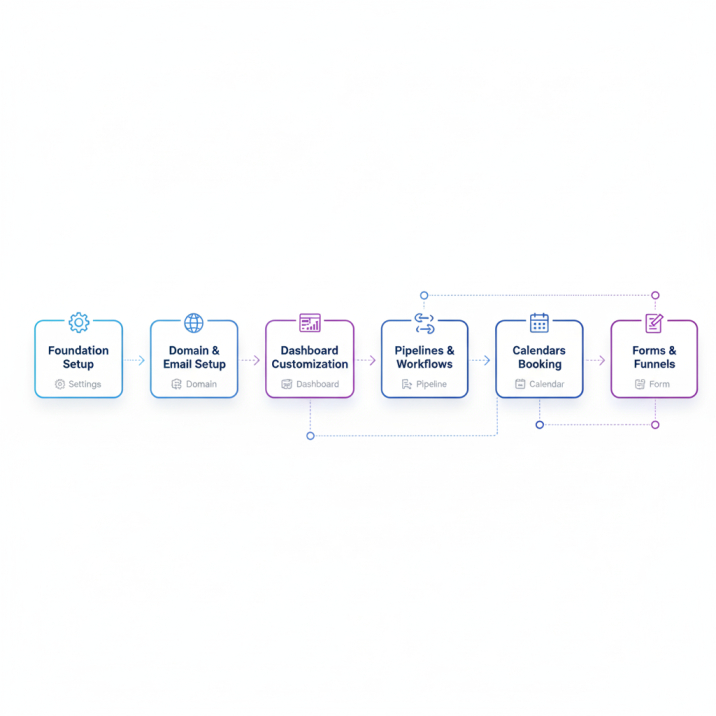
Phase 1: Foundation Setup (Day 1)
Create Your Agency Account Structure
Start by organizing your account hierarchy correctly. GoHighLevel works on a tiered system: Agency > Sub-Accounts (Locations) > Contacts.
Think of your agency account as mission control. This is where you’ll manage everything, but you won’t use it for client-facing activities. That happens at the sub-account level.
Quick setup checklist:
- Complete your agency profile with accurate business information
- Set your timezone (this affects all scheduling and reporting)
- Configure your agency branding colors and logo
- Establish user roles if you have team members
Configure Your Agency Settings
Navigate to Settings > Business Profile and fill out every field. Yes, every single one. This information flows down to sub-accounts and affects how your communications appear to clients.
Pay special attention to:
- Business hours (affects calendar availability)
- Default email signature
- Phone number formatting preferences
- Currency settings for payments
Phase 2: Domain and Email Setup
This is where most people hit their first roadblock. The domain configuration process is critical—mess this up, and your emails land in spam folders or don’t send at all.
Connect Your Domain in GoHighLevel
You have two main options: use a subdomain or connect your root domain. For most agencies, a subdomain works perfectly and keeps things organized.
Recommended approach:
- Choose a subdomain like
app.youragency.comorclients.youragency.com - Access your domain registrar (GoDaddy, Namecheap, Cloudflare, etc.)
- Add the DNS records GoHighLevel provides
- Verify the connection in your GHL dashboard
The DNS records you’ll need:
- A record pointing to GoHighLevel’s IP address
- CNAME record for www version
- MX records for email routing
- SPF, DKIM, and DMARC records for email authentication
Pro tip: DNS changes can take 24-48 hours to propagate. Set this up first thing so it’s ready when you need it.
Set Up Email and SMS Infrastructure
The GoHighLevel email SMS setup determines your communication deliverability. This isn’t optional—it’s essential.
For email:
- Connect your sending domain (can be different from your main domain)
- Warm up your domain gradually (don’t blast 1,000 emails on day one)
- Configure email authentication records
- Set up a professional sender name and reply-to address
For SMS:
- Purchase a dedicated phone number through GHL
- Consider A2P registration for better deliverability
- Set up auto-responses for common keywords
- Test message delivery before launching campaigns
Phase 3: Dashboard and Workspace Customization
Your GoHighLevel dashboard setup should make sense for how you actually work, not just use the default layout.
Customize Your Navigation
Remove tabs you won’t use and prioritize the ones you’ll access daily. Most agencies live in:
- Opportunities (pipeline management)
- Conversations (unified inbox)
- Contacts
- Calendars
- Marketing (campaigns and funnels)
Create Your First Sub-Account
This is where the magic happens. Sub-accounts are individual workspaces for each client or internal business division.
When creating a sub-account:
- Use a clear naming convention (ClientName – Service or ClientName – Location)
- Copy settings from a template if you’re managing multiple similar businesses
- Assign the appropriate subscription level
- Set up user permissions carefully
Phase 4: Pipeline and Workflow Configuration
The GoHighLevel pipeline setup is your visual sales process. Get this right, and you’ll never lose track of a lead again.
Build Your Default Pipeline
Start with a simple structure that matches your actual sales process. A basic service business might use:
- New Lead – Initial contact received
- Contacted – First conversation completed
- Qualified – Budget and fit confirmed
- Proposal Sent – Waiting on decision
- Closed Won – Client signed
- Closed Lost – Opportunity didn’t convert
Each stage should trigger specific actions:
- Automated follow-up sequences
- Task assignments for team members
- Tag applications for segmentation
- Notifications to relevant stakeholders
Create Essential Automations
Here’s where GoHighLevel truly shines. Your workflows should handle repetitive tasks automatically.
Must-have workflows for beginners:
- New lead nurture sequence
- Appointment confirmation and reminders
- Post-meeting follow-up
- Abandoned form completion reminders
Start simple. A workflow with 3-5 steps that runs reliably beats a complex 20-step automation that breaks constantly.
Phase 5: Calendar and Booking Setup
The GoHighLevel calendar setup connects your availability to actual booked appointments.
Configure Your Calendar Settings
Create calendar slots for different appointment types:
- Discovery calls (15-30 minutes)
- Strategy sessions (45-60 minutes)
- Service delivery appointments (custom duration)
For each calendar:
- Set availability windows that match your actual schedule
- Add buffer time between appointments
- Configure confirmation and reminder sequences
- Customize booking page branding
Integrate with External Calendars
Sync with Google Calendar or Outlook to prevent double-bookings. This two-way sync ensures your GoHighLevel calendar reflects your true availability.
Setup steps:
- Go to Settings > Integrations
- Select your calendar provider
- Authorize the connection
- Choose which calendars to monitor for conflicts
- Test by creating an appointment in both systems
Phase 6: Forms and Funnels Foundation
Before you launch campaigns, set up the infrastructure to capture and process leads properly.
Create Your Core Forms
Every business needs at least:
- Contact form (for general inquiries)
- Lead magnet opt-in form
- Appointment booking form
- Survey or questionnaire
Keep forms short. Each additional field reduces conversion rates by approximately 11%. Ask only for information you’ll actually use.
Build Your First Funnel
A funnel is a series of pages designed to guide visitors toward a specific action. Start with a simple lead capture funnel:
Page 1: Landing page with value proposition Page 2: Thank you page with next steps Optional: Order form or application page
Use GoHighLevel’s funnel builder to create these pages, or integrate with external tools like WordPress if you prefer.
Common Setup Mistakes (And How to Avoid Them)
After helping dozens of agencies through their GoHighLevel setup, I’ve seen the same errors repeatedly.
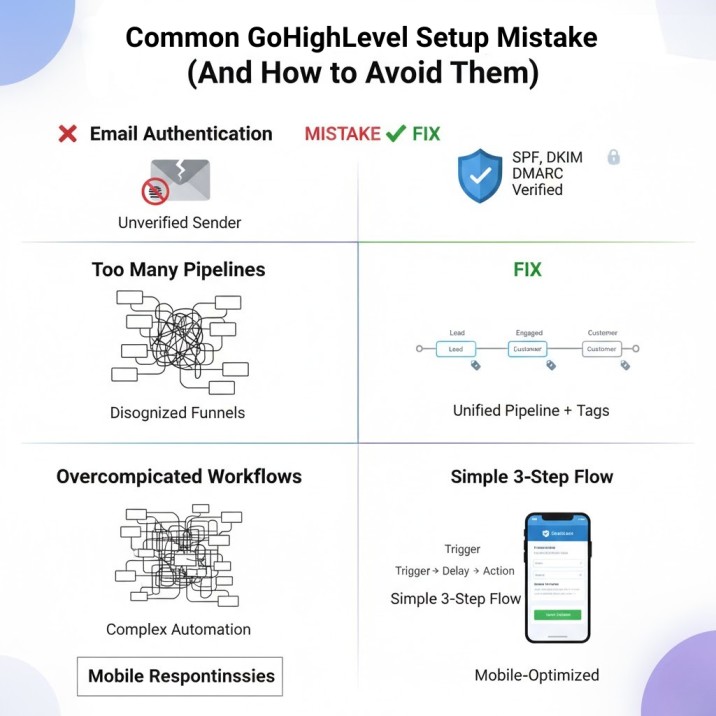
Mistake #1: Skipping Email Authentication
Sending emails without proper SPF, DKIM, and DMARC records tanks your deliverability. Take 30 minutes to set these up correctly rather than spending months wondering why your open rates are terrible.
Mistake #2: Creating Too Many Pipelines
New users often create a separate pipeline for every service or client. Start with one master pipeline and add custom fields to differentiate. You can always expand later.
Mistake #3: Overcomplicating Initial Workflows
Your first automation should do one thing well. Don’t try to build an intelligent, multi-branch decision tree on day one. Simple, reliable workflows beat complex, broken ones every time.
Mistake #4: Ignoring Mobile Responsiveness
Over 60% of emails are opened on mobile devices. Check how your forms, funnels, and emails look on phones before launching anything.
Essential Integrations to Set Up Early
GoHighLevel connects with hundreds of tools, but these integrations provide the most immediate value:
Zapier or Make (Integromat): Connects GHL to virtually any other software Google My Business: Syncs reviews and manages local listings Facebook Lead Ads: Automatically imports leads into your pipeline Stripe or PayPal: Processes payments directly in the platform
| Integration | Purpose | Setup Time |
|---|---|---|
| Zapier | Connect to 5,000+ apps | 15-30 min |
| Google Calendar | Prevent double-bookings | 10 min |
| Stripe | Accept payments | 20 min |
| Facebook Leads | Auto-import leads | 15 min |
| Mailgun (optional) | Enhanced email delivery | 30 min |
Week One Checklist: Your GoHighLevel Setup Roadmap
Use this as your reference guide during the first week:
Day 1-2:
- Complete agency profile and settings
- Start domain DNS configuration
- Set up your first sub-account
- Configure basic email settings
Day 3-4:
- Verify domain connection
- Create default pipeline
- Set up calendar with availability
- Build first contact form
Day 5-6:
- Create welcome automation workflow
- Test email and SMS delivery
- Customize dashboard layout
- Add team members with appropriate permissions
Day 7:
- Run end-to-end test of entire system
- Create process documentation
- Schedule training session with team
- Launch soft rollout with test contacts
Getting Help When You’re Stuck
Even with this gohighlevel setup guide, you’ll hit roadblocks. Here’s where to find reliable help:
Official Resources:
- GoHighLevel Support Portal (support.gohighlevel.com)
- Official YouTube channel with video tutorials
- In-platform chat support (response time varies)
Community Resources:
- GoHighLevel Facebook community groups
- Reddit discussions on r/gohighlevel
- Agency-specific mastermind groups
When to Hire Setup Help:
Consider professional GoHighLevel setup help if:
- You’re migrating from complex existing systems
- You need custom integrations or automations
- Your team lacks technical experience
- Time-to-market is critical for your business
Maintaining Your Setup: Beyond Initial Configuration
Setup isn’t a one-time event. Plan for ongoing optimization:
Monthly tasks:
- Review automation performance and fix broken workflows
- Update calendar availability
- Audit email deliverability metrics
- Clean up unused pipelines or tags
Quarterly tasks:
- Evaluate new features and integrations
- Retrain team on best practices
- Update templates based on performance data
- Review user permissions and access levels
Frequently Asked Questions
How long does it take to set up GoHighLevel properly?
A basic, functional setup takes 5-7 days if you follow a structured process. Complex configurations with multiple integrations and custom automations can take 2-3 weeks. The key is getting core functionality running quickly, then iterating based on real usage.
Can I use GoHighLevel without connecting a custom domain?
Yes, but it’s not recommended for professional use. GoHighLevel provides a default domain, but it looks unprofessional and hurts email deliverability. Budget 1-2 hours to connect a custom domain properly—it’s worth it.
What’s the difference between agency account and sub-account setup?
Your agency account is the control center where you manage billing, branding, and overall settings. Sub-accounts are individual workspaces for each client or business location. Think of it like a building (agency) with separate offices (sub-accounts) inside.
Should I set up everything before adding clients?
Create your foundational infrastructure first: domain, email authentication, one tested pipeline, and basic workflows. You don’t need every feature configured. Add complexity as you discover actual needs rather than anticipated ones.
How do I know if my setup is working correctly?
Run test scenarios: submit a form, book a calendar appointment, send yourself through an automation workflow. If leads move through your pipeline, communications send properly, and appointments sync to your calendar, your core setup is solid.
Can I migrate my setup to a new GoHighLevel account?
GoHighLevel allows you to export snapshots (templates) of your funnels, workflows, and settings. However, some elements like contacts and opportunity history don’t transfer easily. Plan your account structure carefully from the start to avoid migration headaches.
Your Next Steps
Setting up GoHighLevel properly doesn’t require weeks of frustration or an expensive consultant. What it requires is a clear plan and disciplined execution.
Start with the foundation: get your domain connected, email authenticated, and one solid pipeline working. Everything else builds from there.
The agencies that succeed with GoHighLevel aren’t the ones with the most complex setups—they’re the ones who get the basics right and then optimize based on real results.
Take it one phase at a time, test everything before you launch, and don’t be afraid to start simple. You can always add complexity later, but you can’t easily fix a complicated mess built on a shaky foundation.
Ready to build your GoHighLevel system the right way? Pick one phase from this guide and complete it today. Tomorrow, move to the next one. By this time next week, you’ll have a setup most agencies take a month to achieve.
Final Thoughts
GoHighLevel is a powerful platform, but like any sophisticated tool, it performs best when configured correctly from the start. The setup process outlined in this guide has been tested across hundreds of agency implementations and consistently delivers results.
Remember: your initial setup is an investment in your future efficiency. Spend the time now to build it right, and you’ll save countless hours of troubleshooting and rebuilding later.
Whether you’re a solo entrepreneur managing your first few clients or an established agency scaling to new heights, a proper GoHighLevel foundation makes all the difference between a platform that works for you and one that creates more work.
If you found this guide helpful, bookmark it for reference as you work through each phase. And if you ever feel stuck or need expert guidance on more advanced configurations, remember that autoesta specializes in helping businesses maximize their GoHighLevel potential with proven strategies and hands-on support.
Now stop reading and start building. Your perfectly configured GoHighLevel account is waiting.