What does a GoHighLevel setup agency actually deliver?
A GoHighLevel setup agency builds a working system inside GoHighLevel: pipelines, contact structure, automations, calendars, messaging, forms and funnels, integrations, and the documentation and training your team needs to run it.
Some people call this GoHighLevel implementation, a done-for-you GoHighLevel CRM setup, or an agency setup, and search for a Go High Level agency or a GHL setup agency. It is the same job: we design, build, test and hand over the account. If you would rather do it yourself, our step-by-step GoHighLevel setup guide covers the order we follow.
Related: GoHighLevel funnels for the pages that feed the CRM, and GoHighLevel migration if you are coming from another CRM.
The important word is system. GoHighLevel gives you a large box of tools. Nothing in the box tells you how your leads should move, what should happen in the first five minutes after an enquiry, or what your team does when someone stops replying. A setup agency turns your sales and service process into that configuration, so the platform does the repetitive work and your people handle the conversations that need a human.
A good setup ends with three things you can verify: a lead from any source lands in the right place, the right follow-up starts without anyone remembering to start it, and you can see what is happening in one view. If you already have an account and it is misbehaving, that is a different job, covered on our GoHighLevel expert page. If you want to see the full step order first, our GoHighLevel setup guide walks through it before you decide whether to hire it out.
How does a GoHighLevel setup agency work, step by step?
- Discovery call (free). We look at how you sell today, where leads are lost, and what you already use. If GoHighLevel is not the right tool, we will say so.
- Design before build. We write down the pipeline, workflows, fields, and integrations before touching the platform. You approve the design, which is far cheaper than approving a finished build and asking for changes.
- Build and configure. The system is built in your account (or a fresh one), following the design.
- Test with real scenarios. We run test leads through every path: new enquiry, reply, no reply, booking, cancellation, no-show. We check that messages actually arrive, not just that the workflow reports success.
- Launch and train. Go live with your team trained, documentation delivered, and six months of maintenance included.
- Optimise. After real leads have flowed through, we adjust based on what the data shows.
| Size of build | Typical timeline |
|---|---|
| Small (one pipeline, core automation) | 5 to 7 business days |
| Medium (several pipelines, messaging, integrations) | 2 to 3 weeks |
| Large (AI agents, advanced automation, snapshots) | 3 to 4 weeks |
Timelines depend on complexity, the number of integrations, and how quickly feedback is returned. Waiting on SMS registration approval can also add days that are outside anyone's control.
What does a GoHighLevel setup agency build?
These are the components, in the order we normally design them, and what "done properly" means for each.
1. Contact structure: fields, tags, and matching rules
Everything else depends on clean contact data. We decide which custom fields you need (and, just as important, which you do not), how tags are named and used, and how duplicates are prevented. Getting this wrong at the start is the most expensive mistake to undo later, because every workflow and report inherits it.
2. Pipelines that match how you actually sell
A pipeline is a sequence of stages an opportunity moves through. We define the stages from your real process, decide what moves a lead from one stage to the next, and set ownership rules so every opportunity has one responsible person. A dental practice, a roofing company, and a coaching business each need a different pipeline, and a copied template rarely fits any of them.
3. Workflows for follow-up, nurture, and internal tasks
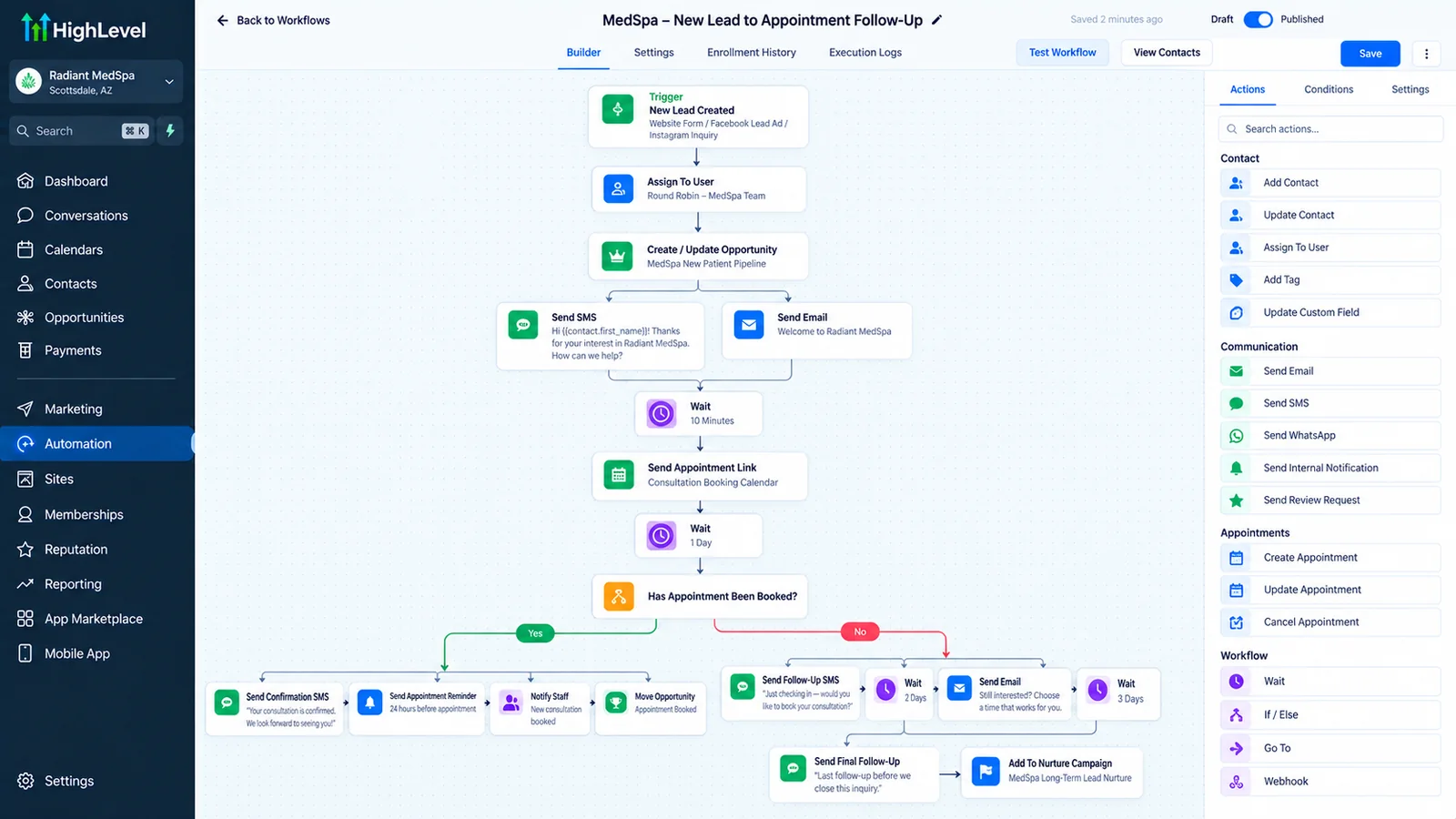
Workflows are the automation layer: when something happens, do something. Typical builds include instant response to new enquiries, multi-step follow-up that stops when the lead replies, appointment reminders and confirmations, missed-call text-back, no-show recovery, review requests after a completed job, and internal alerts and tasks for your team. We design each with clear entry conditions, exit conditions, and a deliberate re-entry rule, because those three settings cause most workflow bugs. If you have seen "workflow," "trigger," and "campaign" used interchangeably and want the actual difference, see our guide to GoHighLevel workflows vs triggers vs campaigns.
4. Calendars and booking
Calendars cover services, staff availability, buffers, lead time, and two-way sync with Google or Outlook so busy time on your real calendar blocks slots in GoHighLevel. Booking flows are connected to the pipeline so a booked appointment moves the opportunity automatically. See appointment booking automation for how this reduces no-shows.
5. Messaging: SMS, email, and phone
This includes sending domains and email authentication, number setup, and (in the US) A2P 10DLC registration so text messages are actually delivered. We also write the message templates, because a workflow is only as good as what it says. Compliance basics (consent wording, opt-out handling, quiet hours) are built in from the start. More on this below.
6. Forms, surveys, and landing pages
Forms capture leads and write them straight into the pipeline with the right fields and tags. Where you need a dedicated page for a campaign, we build it in GoHighLevel's funnel and website builder so there is no separate integration to break. Our landing page development page covers the conversion side.
7. Integrations
Most businesses have other tools: accounting, a scheduling app, a database, an ad platform. Simple connections can use Zapier; higher-volume or more complex ones are better built with n8n. Data that does not belong in a CRM pipeline can live in Airtable and sync back.
8. AI agents
Where it fits, we add AI calling agents and AI chat agents that answer, qualify, and book, connected to the same pipeline. These are optional and are what separates a mid-size build from a large one (see the pricing below).
9. Reporting
We set up the dashboards and reports that answer the questions you actually ask: where leads come from, how fast you respond, how many book, how many show, how many close.
10. Documentation and training
A recorded walkthrough and a written map of what runs where. The system should not depend on us being available.
How much does GoHighLevel setup cost?
At the time of writing, a full GoHighLevel setup from Autoesta typically costs $2,000 to $5,000 depending on scope. Audits are free, cleanup or verification starts from $200, a small automation build starts around $1,000, white-label builds run $4,000 to $7,000, and multi-location builds (five or more locations) run $5,000 to $10,000. Six months of maintenance is included. GoHighLevel's own subscription is separate and paid to GoHighLevel.
A small build starts at about $1,000. That covers a proper check of your account, tracking and sending setup before we build anything, so the automations work on day one. Every build includes 6 months of free maintenance: if something we built breaks, we fix it at no charge. Full setups run $2,000 to $5,000. Paid monthly support (from $200) is optional and only starts after the 6 free months.
| Service | What it covers | Typical investment |
|---|---|---|
| Audit | Review of your existing account, written findings, and a prioritised fix plan | Free |
| Cleanup or verification | Fixing a messy account, or verifying one that already works | From $200 |
| Automation build | A small set of two to three automations connected to your CRM | From about $1,000 |
| Full GoHighLevel setup | CRM structure, pipelines, workflows, calendars, messaging, integrations, reporting, and training | About $2,000 to $5,000, depending on scope |
| White-label build | A branded system and snapshot an agency can resell to its own clients | $4,000 to $7,000 |
| Multi-location build | Five or more locations or sub-accounts, with shared standards and reporting | $5,000 to $10,000 |
| Monthly support | Ongoing changes and improvements, with extra hours available in any month | From $200 a month (optional, after the 6 free months) |
What you get at each price
| Build | Scope | Typical timeline | Price at the time of writing |
|---|---|---|---|
| Small build | One pipeline, core follow-up automation, a proper check of tracking and sending | 5 to 7 business days | About $1,000 |
| Full setup | Several pipelines, calendars, messaging, integrations, reporting, texting registration and training | 2 to 3 weeks for a medium build, 3 to 4 weeks with AI agents | $2,000 to $5,000 |
| White-label or multi-location | A branded snapshot for resale, or five or more locations with shared standards | Scoped after the call | $4,000 to $7,000 white-label, $5,000 to $10,000 multi-location |
For how our prices compare with what other GoHighLevel agencies publish, see our GoHighLevel agency pricing research and the best GoHighLevel agencies in the USA, both with sources and dates.
Final scope and price are confirmed after the strategy call, which is free. Confirm the current GoHighLevel subscription tiers with GoHighLevel directly; at the time of writing they start at $97 per month. See our full breakdown of GoHighLevel's subscription plans for what each tier includes and what usage costs sit on top.
What does the six-month maintenance include?
Every build includes six months of maintenance at no extra charge. If something we built breaks, we fix it, because it is our responsibility. This covers the workflows, pipelines, integrations, and agents we delivered. It does not cover changes made by third-party platforms outside our build, or new features you request later, which are scoped separately. If you want more hours in a given month, or ongoing support after the six months, monthly support starts at $200 a month (optional, after the six free months).
What makes a setup cost more?
- Several distinct pipelines (for example, sales plus onboarding plus retention).
- Many integrations or custom API work.
- Migrating a large or messy contact database.
- Multiple locations or sub-accounts.
- AI voice or chat agents with detailed scripts.
- Complex compliance requirements.
Is it cheaper to set it up yourself?
The cash cost is lower, but the time cost is real, and GoHighLevel's flexibility makes it easy to build something that appears to work and quietly loses leads. A reasonable rule: if you are comfortable with the platform and your process is simple, build it yourself and pay for an audit once it is running. If your process has several stages, several team members, or compliance requirements, a professional build usually pays back the difference.
What each service typically costs
How long each size of build takes
What GoHighLevel builds can you check?
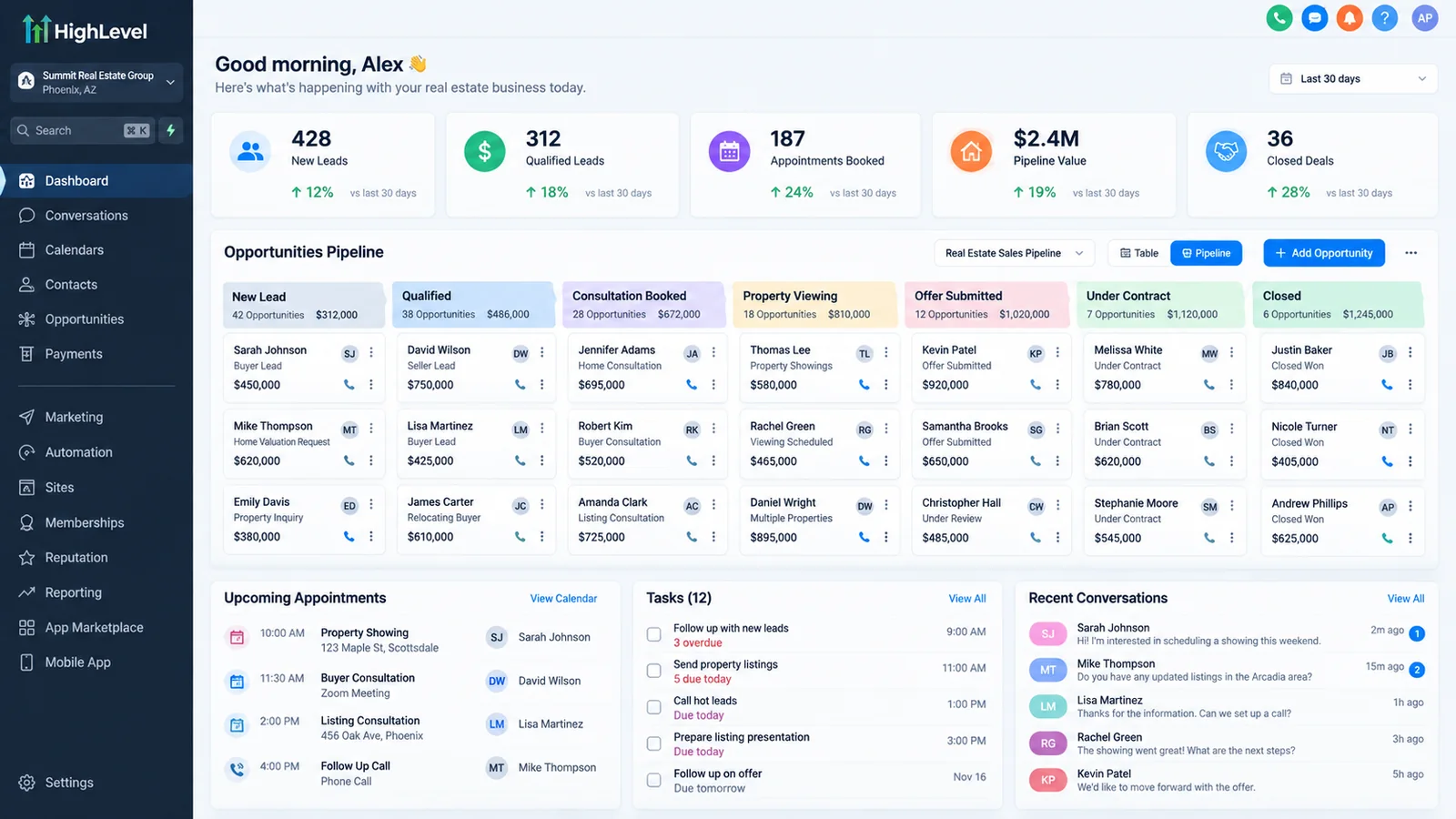
Four finished builds are written up as case studies: a gym and a handyman company, shown as dated snapshots read from the clients' own GoHighLevel accounts, and a dental practice and a real estate brand, shown with results the clients reported to us.
- Gym (SVNP). Source tagging on every lead entry point, an 11-stage pipeline and coach-based follow-up. The account held 2,088 contacts and 65 opportunities from the previous 30 days on 13 October 2026. Read the case study.
- Handyman company (Noma Home Pros). GoHighLevel connected to Jobber, review-request workflows that ran 353 times since April 2026, and four phone registrations approved. Read the case study.
- Dental practice (Smile Bright). First response cut from 45-90 minutes to under 5, as reported by the client. Read the case study.
- Real estate brand (Realeshome). First response cut from about 90 minutes to under 5, as reported by the client. Read the case study.
The two snapshots are not before-and-after results. In the clients' own words: "Before this system, leads from Google, website, and ads were difficult to manage and often delayed. Now everything flows into one CRM, patients are contacted within minutes, and even after-hours inquiries are handled automatically." (Dr. Collen Chambers, Founder, Smile Bright). "Earlier, we were losing leads simply because we couldn't respond fast enough. After Autoesta built the system, every lead is contacted within minutes." (Michael, Founder, Realeshome.) Both quotes are shared with permission.
How does GoHighLevel compare with HubSpot and Salesforce?
GoHighLevel suits service businesses and agencies that want one all-in-one tool with funnels, texting and calendars built in, and it can be white-labelled; HubSpot and Salesforce go deeper on reporting and governance and cost more as you add seats. Prices change often, so check each vendor's site, and see our GoHighLevel vs HubSpot pricing comparison for the cost-per-contact math.
Who is a GoHighLevel setup agency best for, and who should not use one?
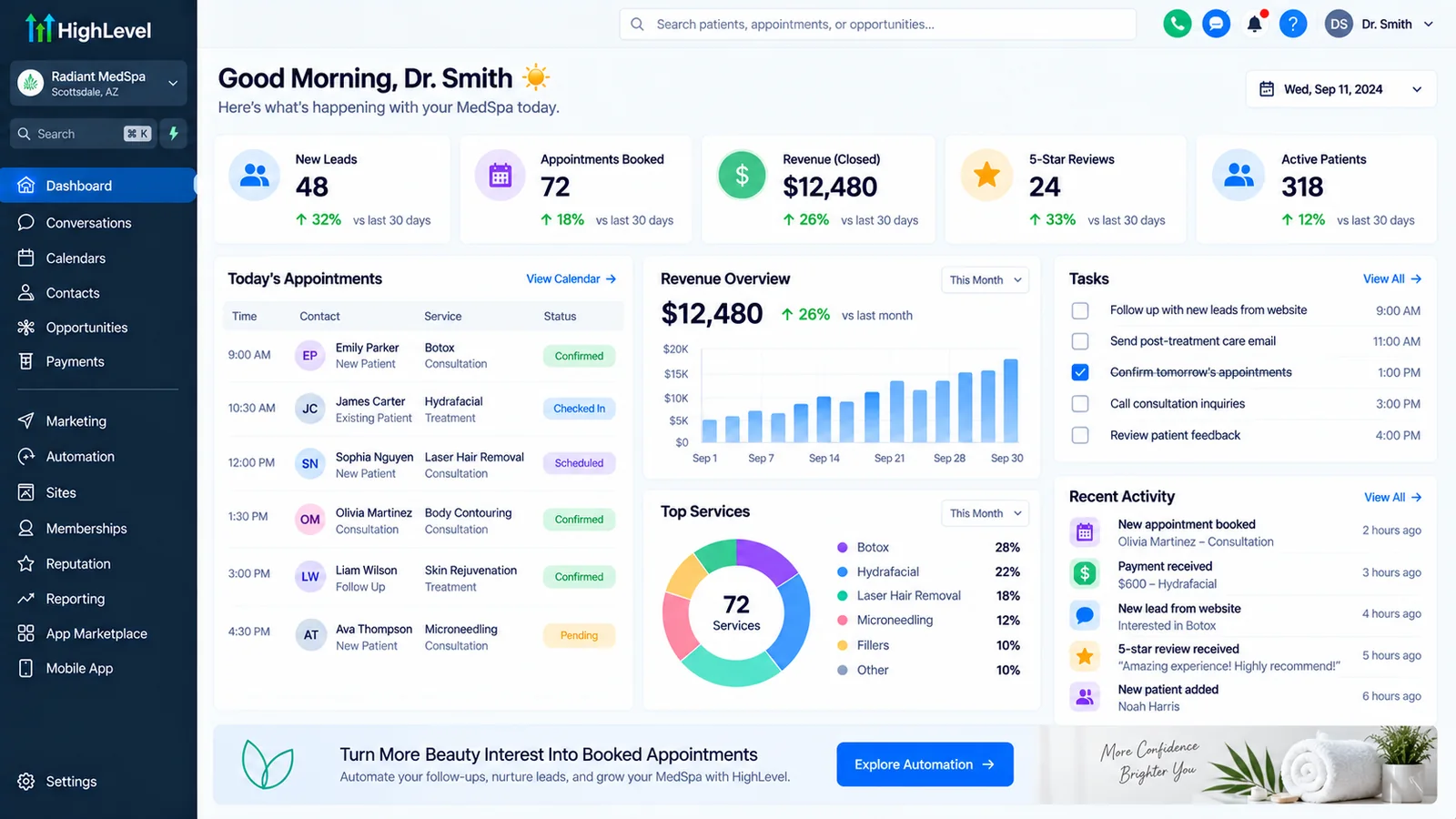
Industry setups we document in detail: GoHighLevel for real estate, GoHighLevel for HVAC, GoHighLevel for weight loss and TRT clinics and GoHighLevel setup for med spas. See every industry guide on the GoHighLevel by industry page.
Clinic owners can read the GoHighLevel for healthcare clinics guide. If you are still comparing providers, the best GoHighLevel experts in the USA scorecard shows how to score them.
A strong fit
- Local service businesses: dental and medical practices, home services, real estate, med spas, fitness.
- Coaches and consultants who sell through calls and funnels.
- Agencies that manage marketing and CRM for many clients and want white-label.
- Any business where speed to respond, follow-up consistency, and booking are the main levers. See our dental and real estate case studies.
A weaker fit
- Organisations that need heavy custom object modelling and enterprise governance.
- Teams with no one willing to own and maintain the system.
- Businesses whose main need is a data warehouse or complex operational database (a case for Airtable or a dedicated tool alongside the CRM).
How do you choose a GoHighLevel setup agency?
Choose the GoHighLevel setup agency that audits your own account first, shows you the design in writing, tests with real scenarios, and leaves you owning the account and the documentation. Compare two or three agencies on those points before you compare price.
- An audit or discovery call before a quote. A fixed price for a build nobody has looked at is a guess. Ours starts with a free call and a written audit.
- A written design you approve. Pipelines, fields, workflows and integrations on paper first. Changing a design is cheap; changing a finished build is not.
- Testing you can see. Ask for test leads run through new enquiry, reply, no reply, booking, cancellation and no-show, with proof that messages arrived.
- A2P 10DLC and consent included. In the US, texting that is not registered can be blocked. Ask who registers it and who writes the consent wording.
- Ownership and access. The account, workflows and documentation are yours, and you keep admin access from day one.
- Support after launch. Ask what happens when a workflow breaks in month three. Ours includes six months of fixes on what we built.
GoHighLevel setup agency, freelancer or DIY: which fits?
| Option | Best when | Watch for | Autoesta terms |
|---|---|---|---|
| Setup agency | The build touches pipelines, texting, calendars and integrations together, or several people will use it daily | Named builders, written scope, support after launch | Full setup $2,000 to $5,000, free audit first, 6 months of free fixes, account stays in your name (ownership terms) |
| Freelancer | One defined task, such as a single workflow or a calendar fix | Who covers the account when they are unavailable | Cleanup from $200 for a single fix |
| DIY with the setup guide | Your process is simple and you are comfortable in the platform | Silent lead loss: it looks finished but a trigger never fires | Free audit once it is running |
To score agencies side by side, use our 100-point GoHighLevel expert scorecard, and see how to tell a real expert from a template reseller. If your account already exists and misbehaves, you need a GoHighLevel expert audit instead of a new build.
What should you prepare before a GoHighLevel setup?
You can shorten the project and improve the result by having these ready:
- Your real sales process, written as the steps a lead goes through, including the messy ones.
- Every lead source: website forms, ad platforms, phone, referrals, directories.
- Your services and pricing rules, at least the ones that affect qualification.
- Existing contacts, in a spreadsheet or exportable from your current CRM.
- Business details for SMS registration: legal name, address, tax ID, website, and how customers opt in.
- Calendar rules: hours, buffers, who takes which appointment types.
- Brand and tone: how you want messages to sound.
- Access: domain, email, and existing tool logins.
What do you need to know about SMS compliance and A2P 10DLC?
In the US, businesses that text customers from standard 10-digit numbers must register their brand and campaign (A2P 10DLC), and must have consent to message people.
Unregistered traffic can be filtered or blocked by carriers. Registration takes time and requires accurate business information, and rejections are common when the description of how you collect consent is vague. We prepare the registration, write consent wording for your forms, and build opt-out handling into workflows so a customer who replies STOP is actually removed from future messages.
Can you migrate from another CRM into GoHighLevel?
Yes. Common migrations are from HubSpot, Salesforce, Pipedrive, Zoho or spreadsheets: we audit and clean the source data, map fields, import in stages, verify counts and rebuild the automations, because workflows rarely translate one-to-one. The steps, timeline and pitfalls are on our GoHighLevel migration page.
How do agencies use snapshots, sub-accounts, and white-label?
Agencies that manage many clients build a reusable snapshot of pipelines, workflows, forms and calendars, then deploy it into each client sub-account, with client details held in custom values so a deployment needs only those values changed. We cover provisioning, versioning and white-label resale in GoHighLevel SaaS setup and GoHighLevel automation for agencies, and the account structure in agency account vs sub-account.
What are the most common mistakes in a DIY GoHighLevel setup?
- Importing a template pipeline and changing the names instead of the logic.
- Building workflows without exit conditions, so contacts keep getting messages after they reply or book.
- Skipping SMS registration and assuming delivery.
- Letting every lead source create contacts differently, producing duplicates.
- Automating a bad process. Automation makes a slow, confusing process faster and more confusing.
- Never testing the unhappy paths: no reply, cancellation, wrong number, unsubscribe.
- Giving everyone admin access.
- No documentation, so only the builder understands the system.
If your account already has several of these problems, a full rebuild is not always the answer. Our guide to fixing a messy GoHighLevel account covers the order to clean it up without losing your existing contact data.
What should you measure after launch?
Track speed to first response, contact rate, booking rate, show rate, and close rate by lead source, weekly for the first two months. Speed to response usually improves first and show rate is where reminders pay off; if a number is not moving, tighter follow-up sequences or AI calling come in. The build timeline FAQ shows what to expect and when.
For trades, see how GoHighLevel automation for local service businesses connects missed-call text-back, dispatch, reviews, and estimate follow-up.
Running an aesthetic practice? Our med spa setup service breaks the same build down into med spa deliverables, timeline and price.
Not sure whether you need a builder or a fixer? Our guide to how to hire a GoHighLevel expert in the US covers what to ask and what it should cost.
Not sure GoHighLevel is the right fit? We compare which CRM suits a Dubai brokerage.
Before you buy, read the honest look at what GoHighLevel automation delivers.
If you are moving off Salesforce, read what to add when replacing Salesforce with GoHighLevel first.
More questions about GoHighLevel setup
How much does a GoHighLevel setup agency charge?
At the time of writing, a full setup from Autoesta is about $2,000 to $5,000, a small automation build starts around $1,000, and the audit is free. The pricing table above shows every tier, and the GoHighLevel subscription is paid to HighLevel separately.
Is a GoHighLevel setup agency worth it?
It is worth it when your process has several stages, several users or texting compliance, because the rework from a quiet mistake usually costs more than the build. If your process is simple and you are comfortable in the platform, set it up yourself and pay for an audit once it runs.
Do I need to already be on GoHighLevel?
No. We can help you choose the right plan, create the account, and build everything. If you already have an account that is not working, start with the audit instead.
Will my team be able to run it without you?
That is the goal. Every build includes training, documentation, and six months of maintenance. Some clients continue with a monthly optimisation arrangement; it is optional.
What is the difference between the packages?
A small build gets you a working CRM with one pipeline and core automation. A larger one adds several pipelines, messaging sequences, integrations, and a funnel. The largest add AI agents, advanced automation, and snapshots.
Can you set up GoHighLevel for my industry?
Yes. We have built for real estate, dental, agencies, coaches, local services, and healthcare-adjacent businesses. For regulated data such as patient information, compliance decisions belong to you and your counsel; we configure the platform accordingly but do not certify compliance.
Some markets need extra settings. For Miami and Fort Lauderdale, for example, we add Florida consent wording, English and Spanish workflows and a weather-closure reschedule flow; see GoHighLevel agency in Miami.
Does the setup include the GoHighLevel subscription?
No. You pay GoHighLevel directly for the platform. Our fee covers the design, build, testing, training, and support.
How do I get started?
Book a free strategy call on the contact page. We will look at your process and tell you what we would build, and whether GoHighLevel is the right fit.
How long does a GoHighLevel setup take?
A small setup with one pipeline and core automation usually takes 5 to 7 business days. Larger builds with several pipelines, messaging, integrations or AI take longer and are scheduled after the scoping call. A2P 10DLC registration can add time, so it starts on day one.
What is included in a GoHighLevel setup?
A done-for-you GoHighLevel setup covers pipelines, calendars, forms, the core follow-up and reminder workflows, phone numbers and A2P registration, email sending domain and deliverability settings, and testing before launch. At the time of writing a full setup is $2,000 to $5,000, with six months of maintenance included.
Is a GoHighLevel onboarding service different from a setup service?
Usually not. "GHL setup services", "Go High Level setup" and "onboarding service" describe the same work: configuring a new account so it runs. HighLevel's own onboarding call explains the platform; a setup agency builds your account for you.
Related: GoHighLevel pricing calculator, GoHighLevel mistakes, GoHighLevel agency near me, how to register A2P 10DLC in GoHighLevel, what an automation project costs and how long an automation build takes.
Related services: CRM automation for the workflows on top of the setup, and CRM migration if you are moving from HubSpot, Salesforce or another CRM.
Related questions
- Why is my GoHighLevel inbound webhook not firing?
- How GoHighLevel inbound webhooks work, step by step