
GoHighLevel Dental Recall System: Automated Patient Reactivation for Dentists in 2026
The average dental practice loses $150,000+ annually due to patient lapses and forgotten recall appointments. This comprehensive guide reveals how forward-thinking dentists are using GoHighLevel dental CRM automation to bring dormant patients back, reduce no-shows by 67%, and increase practice revenue without spending more on ads.
If you’re a dentist searching for ways to fill your appointment book with existing patients instead of constantly chasing new ones, this guide will show you exactly how to build an automated recall system that works 24/7.
Table of Contents
- What Is a Dental Recall System & Why It Matters in 2026
- The Hidden Revenue Problem in Dental Practices
- How GoHighLevel Transforms Dental Recall Automation
- Step-by-Step: Building Your Dental Recall System
- Patient Reactivation Campaigns That Actually Work
- Measuring Recall Success: Key Metrics
- Real Results: How One Practice Recovered $180K
- Frequently Asked Questions
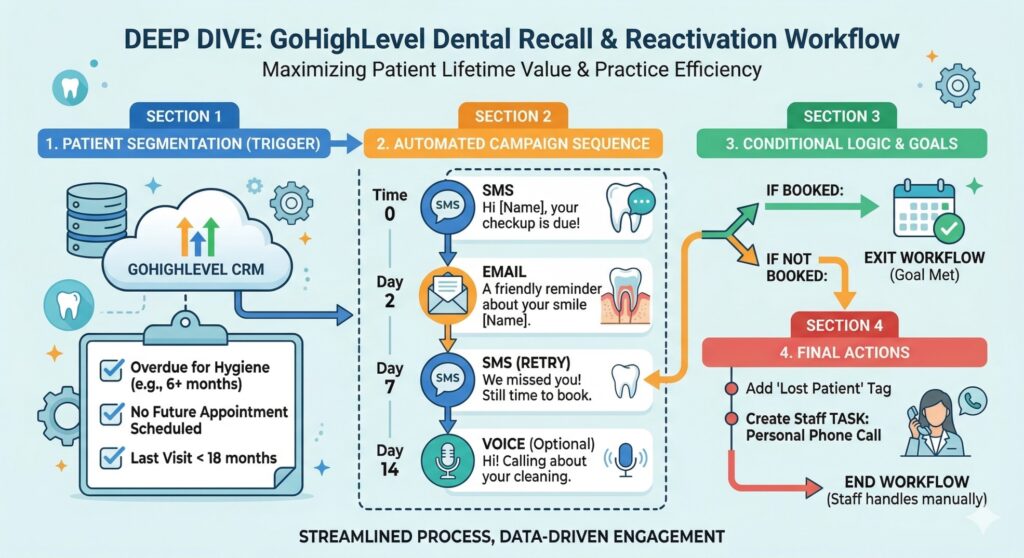
What Is a Dental Recall System & Why It Matters in 2026
A dental recall system is an automated process that reminds patients to schedule their next appointment—whether it’s a routine cleaning every six months or a follow-up from a previous treatment. In 2026, with patient acquisition costs at an all-time high, keeping existing patients engaged has become more critical than ever.
According to the American Dental Association, 30-40% of patients who visit a dental practice never return for their recommended recall appointment. This isn’t because they found another dentist—it’s simply because life gets busy, and without a proper reminder system, appointments fall through the cracks.
- 40% of new dental patients never return for recall visits
- $250 average lifetime value of a recalled patient
- 67% reduction in no-shows with automated recall systems
- 35% increase in practice revenue from reactivation campaigns
- $150,000+ annual revenue lost by average dental practice due to lapsed patients
This is where dental CRM automation changes everything. Instead of relying on front desk staff to manually call or email patients, GoHighLevel automates the entire recall process—starting from the moment a patient completes their appointment.
The Hidden Revenue Problem in Dental Practices
Most dental practices focus heavily on new patient acquisition—running Google Ads, Facebook campaigns, and offering new patient specials. While this is important, it’s significantly more expensive than reactivating existing patients.
| Patient Acquisition Method | Average Cost | Conversion Rate |
|---|---|---|
| Google Ads (Dental) | $150-300 per lead | 3-8% |
| Facebook/Instagram Ads | $80-150 per lead | 2-5% |
| Patient Reactivation (Automated) | $5-15 per patient | 15-30% |
As shown in our dental CRM automation case study, practices that implement automated recall systems dramatically outperform those relying solely on manual outreach.
Common Recall Failures in Dental Practices
- Manual reminder systems that depend on staff availability
- Inconsistent follow-up—some patients get reminders, others don’t
- Single-channel approach—only phone calls or only emails
- No personalization—generic messages that feel impersonal
- No tracking system—no visibility into which recalls convert
- After-hours gaps—no way for patients to book outside office hours
Research shows that patients who don’t hear from their dental practice within 6 months of their recommended recall date are 70% less likely to ever return. The longer you wait, the less likely reactivation becomes.
How GoHighLevel Transforms Dental Recall Automation
GoHighLevel (GHL) is the most comprehensive all-in-one CRM platform for dental practices in 2026. Unlike basic reminder systems, GoHighLevel creates a complete patient lifecycle management ecosystem.
1. Automatically Triggers Recall Sequences
The moment a patient completes their appointment, GoHighLevel automatically sets their recall date based on your practice’s recommendation (6 months, 12 months, etc.). When that date approaches, the system automatically initiates the recall sequence—no manual intervention required.
2. Multi-Channel Patient Outreach
Not all patients respond to the same communication channel. GoHighLevel’s appointment booking automation allows you to reach patients through multiple channels simultaneously:
- SMS/Text Messages — 98% open rate, immediate response
- WhatsApp — Preferred by younger demographics
- Email — Detailed information and booking links
- Voice/AI Calls — Personal touch for high-value patients
- Facebook/Instagram — Retargeting dormant patients
3. AI-Powered Patient Communication
Our AI calling agents and AI chat agents can handle patient responses automatically. When a patient replies with questions or requests to book, the AI engages instantly—24/7, even outside office hours.
4. One-Click Appointment Booking
GoHighLevel integrates directly with your practice’s calendar, allowing recalled patients to book appointments with a single click. No phone calls, no waiting—just instant confirmation.
5. Real-Time Tracking & Analytics
Every recall message sent, every response received, and every appointment booked is tracked in real-time. You’ll know exactly which campaigns work, which need optimization, and your return on investment for every dollar spent.
The most successful dental recall systems use a “3-Touch Rule”—patients receive three different messages across three different channels before being marked as “reactivation campaign complete.” This approach typically achieves 25-35% conversion rates.
Step-by-Step: Building Your GoHighLevel Dental Recall System
Here’s how Autoesta builds dental recall automation systems that deliver consistent results:
Step 1: Patient Pipeline Setup
Create specific pipeline stages in GoHighLevel for different patient types:
- New Patient
- Active Patient (seen within 6 months)
- Recall Due (6-12 months since last visit)
- Lapsed Patient (12+ months since last visit)
- Reactivation Campaign Active
- Reactivated – Appointment Scheduled
Step 2: Automated Recall Date Calculation
Configure automated workflows that calculate recall dates based on:
- Treatment type — Cleanings, restorative, cosmetic
- Dentist recommendation — 3, 6, or 12-month intervals
- Insurance renewal dates
- Patient history patterns
Step 3: Multi-Touch Recall Sequences
Design your recall message sequences with strategic timing:
- Day 1: Friendly SMS/WhatsApp reminder with direct booking link
- Day 3: Email follow-up with educational content about oral health
- Day 7: AI voice call offering to schedule on their behalf
- Day 14: Special offer or incentive if applicable
- Day 21: Final reminder with practice testimonial
Step 4: Segmentation & Personalization
Not all patients should receive the same message. Segment your lists based on:
- Treatment history — Mention their previous treatments
- Patient preferences — Use their preferred name and channel
- Insurance status — “Your insurance renews in January—schedule now!”
- Life events — “Back to school season—kids’ dental checkups available”
Step 5: 24/7 Booking Availability
Enable automated appointment booking so patients can book instantly, anytime:
- Calendar integration with real-time availability
- Automated confirmation messages
- Reminder sequences (24 hours, 2 hours before)
- Rescheduling options for easy modifications
Step 6: Review & Referral Automation
Don’t forget to leverage reactivated patients! After their visit:
- Automated review request via preferred channel
- Referral program invitation
- Exclusive offers for referring new patients
- Social media sharing prompts
Patient Reactivation Campaigns That Actually Work
Beyond routine recall, some patients have been gone for 12+ months and need a dedicated reactivation campaign. Here’s a framework that works:
The “We Miss You” Campaign
Sample SMS: “Hi [Name], it’s been [X] months since your last visit to [Practice Name]. We just updated our technology and would love to show you! Book your comeback appointment today and receive [incentive]. [Booking Link]”
The “Insurance Window” Campaign
- December Campaign: “Use your remaining benefits before they expire!”
- January Campaign: “New year, new smile—start with a cleaning!”
- Open Enrollment: “Has your insurance changed? We accept most plans!”
The “New Treatment” Campaign
For patients who had incomplete treatment:
- Unfinished restorations: “Your treatment plan is still available—complete your smile!”
- Cosmetic consultations: “New smile technology available—free consultation!”
- Orthodontic follow-ups: “Invisalign/Six Month Smiles check-in available!”
Measuring Recall Success: Key Metrics to Track
| Metric | What It Measures | Target Benchmark |
|---|---|---|
| Recall Conversion Rate | % of recalled patients who book | 25-35% |
| Response Rate | % of patients who engage with messages | 40-60% |
| No-Show Rate | % of recalled appointments missed | Less than 5% |
| Revenue Per Reactivated Patient | Average treatment value | $250-500 |
| Recall ROI | Revenue vs. automation cost | 10:1 or higher |
| Time to Book | Days from first touch to booking | Less than 7 days |
Use A/B testing for your recall messages. Test different subject lines, offers, sending times, and call-to-action buttons. Small improvements in conversion rates mean significant revenue gains at scale.
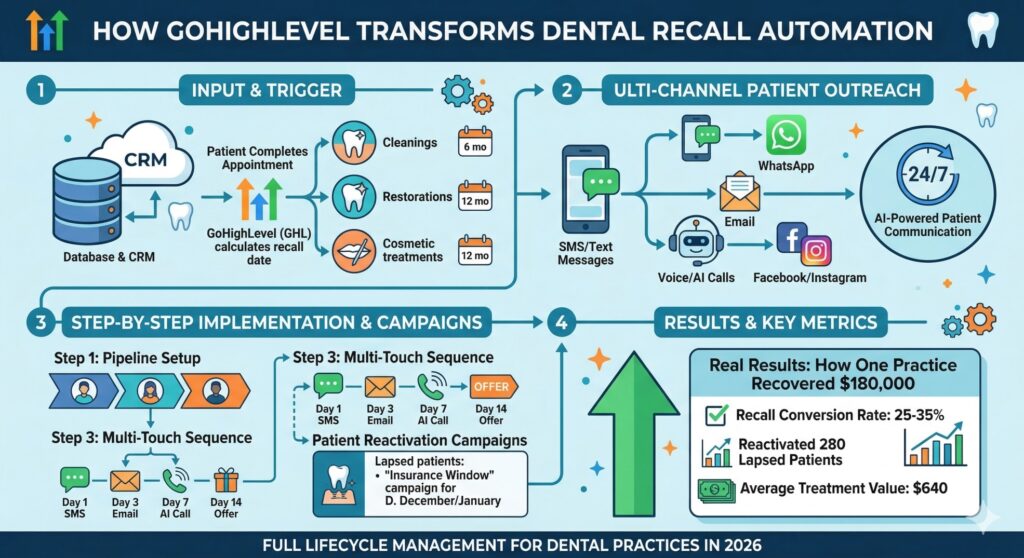
Real Results: How One Dental Practice Recovered $180,000
One of our dental clients—a three-location practice in Florida—was struggling with patient retention. Despite spending $80,000 annually on Google Ads, they were losing 35% of patients after their first visit.
After implementing our GoHighLevel dental automation system with a focus on recall and reactivation:
- Immediate 24/7 booking availability increased recall responses by 45%
- Automated reactivation campaigns brought back 280 lapsed patients in 90 days
- Average treatment value per reactivated patient: $640
- Total revenue recovered from lapsed patients: $179,200
- Reduction in new patient acquisition costs: 30%
Before vs. After: The Recall Transformation
- Patient retention rate: 65% → 87%
- Recall conversion rate: 8% → 34%
- Annual lapsed patient revenue loss: $180,000 → $22,000
- Time spent on recall by staff: 40 hours/week → 2 hours/week
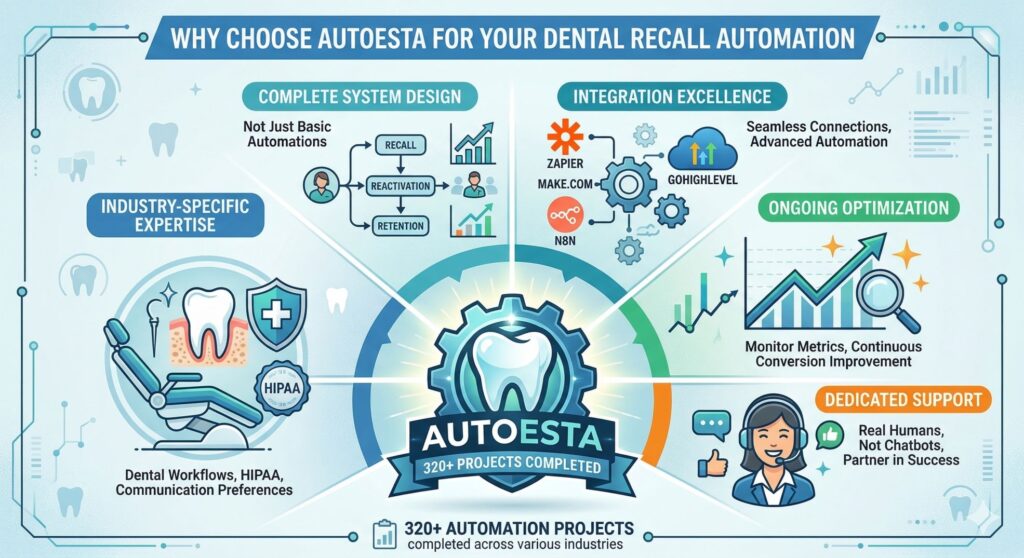
Why Choose Autoesta for Your Dental Recall Automation
At Autoesta, we’ve helped 38+ dental practices implement GoHighLevel systems that work. Our approach differs from generic setup services:
- Industry-Specific Expertise: We understand dental practice workflows, patient communication preferences, and HIPAA considerations
- Complete System Design: We build recall, reactivation, and retention systems—not just basic automations
- Integration Excellence: We connect your existing tools with GoHighLevel seamlessly using Zapier and Make.com automation and n8n advanced automation
- Ongoing Optimization: We monitor your recall metrics and continuously improve conversion rates
- Dedicated Support: Real humans, not chatbots, helping your practice succeed
Our team has completed 320+ automation projects across various industries, including dedicated dental CRM automation systems.
Frequently Asked Questions
How long does it take to set up a GoHighLevel dental recall system?
A complete dental recall and reactivation system typically takes 3-4 weeks to implement fully. This includes pipeline setup, workflow configuration, calendar integration, testing, and staff training.
How much does dental recall automation cost?
GoHighLevel pricing starts at $99/month for the base CRM. Our setup and automation services are custom-quoted based on your practice size. Most practices see a 10:1 or better ROI within the first 90 days.
Is GoHighLevel HIPAA-compliant for dental practices?
Yes, GoHighLevel offers HIPAA-compliant features including business associate agreements (BAAs) and secure data handling. We help dental practices configure their systems to meet HIPAA requirements.
What happens if a patient doesn’t respond to recall messages?
Our reactivation campaigns include multiple touchpoints across different channels. If a patient doesn’t respond after the initial sequence, they enter a secondary campaign with different messaging. Research shows many patients respond to the 3rd-5th contact.
Can I integrate GoHighLevel with my existing practice management software?
Yes! We integrate GoHighLevel with Eaglesoft, Open Dental, Dentrix, and others using Zapier and Make.com automation along with n8n advanced automation.
What’s the difference between recall and reactivation?
Recall targets patients who are due for their regular appointment (6-12 months since last visit). Reactivation targets patients who have been gone for 12+ months and need special outreach. Both are important, and GoHighLevel automates both processes.
How do you measure the ROI of dental recall automation?
We track every recall message sent, response received, appointment booked, and revenue generated. Our dashboards show real-time metrics including cost per reactivated patient, average treatment value, and overall recall ROI.
What’s the best timing for sending recall messages?
Optimal recall timing includes: early morning SMS (7-8 AM) for working professionals, evening messages (6-8 PM) for flexible schedules, and mid-week emails (Tuesday-Thursday) for highest open rates.
Related Articles
- Dental CRM Automation Case Study
- GoHighLevel for Dentists: Complete Guide
- Appointment Booking Automation
- AI Calling Agents for Dental Practices
About the Author
Alpit Patel is a certified GoHighLevel expert and automation specialist at Autoesta. With over 5+ years of experience in marketing automation and CRM systems, Alpit specializes in building dental CRM automation systems that reduce manual work and increase patient retention for dental practices across the United States.
At Autoesta, Alpit has helped 320+ businesses replace manual follow-ups, broken CRMs, and disconnected tools with clean, scalable GoHighLevel systems.
Connect with Alpit Patel on LinkedIn
Published: March 22, 2026 | Read Time: 15-17 minutes
“`html