Most agencies don’t fail because their marketing sucks.
They fail because someone called at 9:47 PM, got voicemail, and never heard back. They fail because a lead filled out a form on Saturday and went cold by Monday. They fail because appointments were booked but half the clients never showed up.
Here’s the truth: your ads might be great, your offer might be solid, but if your follow-up system has gaps, you’re bleeding revenue every single day. At Autoesta, we’ve built GoHighLevel systems across dozens of agencies, and we’ve seen the same pattern—agencies that automate their follow-up consistently outperform those that don’t, often by 40% or more.
This isn’t about replacing the human touch. It’s about making sure the human touch actually happens. When a lead comes in at midnight, automation doesn’t sleep. When your sales team is in back-to-back calls, automation keeps the pipeline warm. When someone no-shows, automation gives them a second chance before they disappear forever.
Let’s walk through the seven automations every agency needs to build in 2026—and more importantly, how to build them the right way.
Why Automation Is the Backbone of a Profitable Agency
Think about what happens in your agency right now when a lead comes in.
If it’s during business hours and someone’s available, great. But what about the lead that hits your form at 11:47 PM? Or the one that comes in Sunday afternoon? By the time your team gets to them Monday morning, that lead has already contacted three of your competitors.
Speed matters. Research shows that companies responding within 5 minutes are significantly more likely to connect with a lead than those who wait 30 minutes or longer.
But here’s what most agency owners miss: automation isn’t just about speed. It’s about consistency. When you reply manually, your messaging changes based on mood, energy level, who’s handling it. When you automate, every lead gets the same high-quality experience. Every time.
And let’s talk money. If you’re paying someone $20/hour to manually text back missed calls, send appointment reminders, and chase no-shows, you’re spending thousands per month on tasks a $97 software can handle in seconds. That’s not about cutting jobs—it’s about letting your team focus on high-value activities like closing deals and serving clients.
Automation is revenue protection. Plain and simple.
1️⃣ Missed Call Text Back Automation (Revenue Saver)
Here’s a scenario that happens in every agency: someone calls, you’re on another call, it goes to voicemail. They don’t leave a message. You call back 45 minutes later. No answer. You try again tomorrow. Nothing.
That lead is gone.
A missed call text back automation solves this instantly. The second someone calls and you don’t pick up, they get a text message. Immediately. While they still have their phone in their hand.
What It Does
Automatically sends an SMS within seconds when an incoming call isn’t answered.
How to Set It Up Properly
Here’s the trigger logic that actually works:
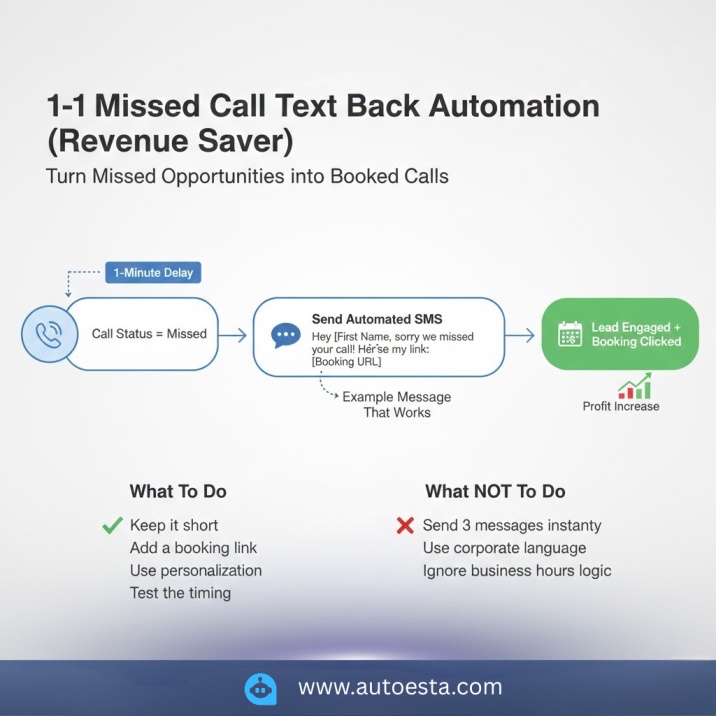
Trigger: Call status = missed
Filter: Only during business hours (optional—some agencies text 24/7)
Action: Send SMS
Delay: 1 minute (gives you a chance to call back first)
Secondary Action: Notify sales rep via Slack or email
The key is the one-minute delay. If someone on your team grabs the phone and calls back within 60 seconds, you can cancel the automation. But if not, the text fires automatically.
Example Message That Works
“Hey [First Name], sorry we missed your call! I can get you on the calendar for a quick chat—here’s my link: [Booking URL]. Or just reply with a good time and I’ll reach out.”
Notice what this does:
- Acknowledges the missed call
- Gives them control (book themselves or tell you when)
- Includes a direct booking link
- Sounds human, not robotic
What To Do
✔ Keep it short—People don’t read paragraphs in texts
✔ Add a booking link—Remove friction, let them self-schedule
✔ Use personalization—First name at minimum
✔ Test the timing—Some industries respond better with a 2-minute delay
What NOT To Do
❌ Don’t send 3 messages instantly—It feels spammy and desperate
❌ Don’t use corporate language—”We apologize for the inconvenience” sounds like a robot
❌ Don’t ignore business hours logic—Texting someone at 3 AM is not a good look
Why This Works (Psychology)
When someone calls and doesn’t get an answer, their brain immediately starts looking for alternatives. They’re literally about to Google another solution. An instant text interrupts that pattern. It keeps you top-of-mind and shows you’re responsive, even when you’re busy. That’s the difference between a saved lead and a lost one.
2️⃣ Lead Nurture Sequence (Conversion Engine)
Most agencies think nurturing is just “send some emails and hope they book.”
That’s not nurturing. That’s hoping.
Real nurturing is a structured system that moves people from “just looking” to “ready to buy” through strategic touchpoints over time. The problem is most agency owners either send too much too fast, or they send one email and give up.
Structure Framework (The Right Way)
Here’s the timeline that actually converts:
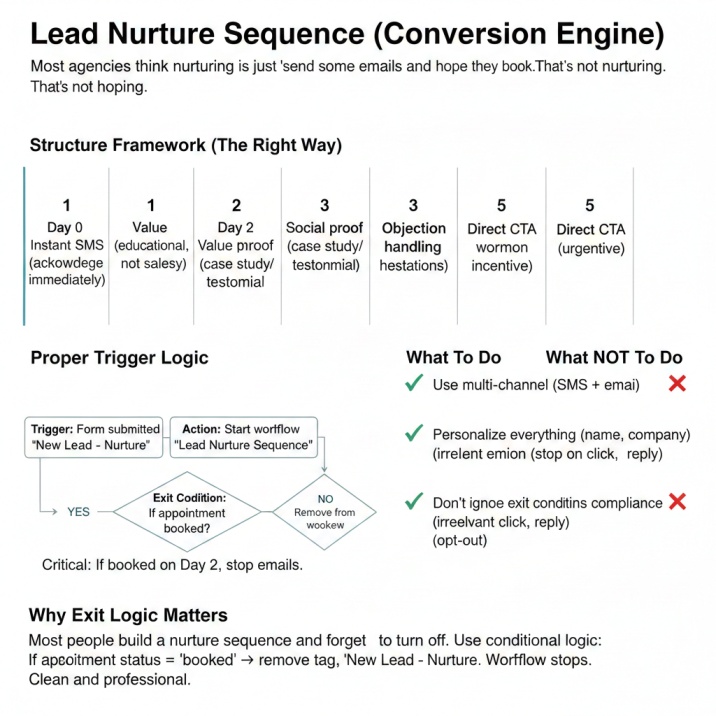
Day 0: Instant SMS confirmation (they just filled out a form, acknowledge it immediately)
Day 1: Value email—educational content, not a sales pitch
Day 2: Social proof—case study, testimonial, or result you’ve delivered
Day 3: Objection handling—address the most common hesitation in your industry
Day 5: Direct CTA—clear call to action with urgency or incentive
This isn’t random. It’s designed around how people make decisions. Day 1 establishes trust. Day 2 proves credibility. Day 3 removes doubt. Day 5 asks for the sale.
Proper Trigger Logic
Trigger: Form submitted
Action: Add tag “New Lead – Nurture”
Action: Start workflow “Lead Nurture Sequence”
Exit Condition: If appointment booked → remove from workflow
That exit condition is critical. If someone books a call on Day 2, they don’t need to keep getting nurture emails. Remove them immediately.
What To Do
✔ Use multi-channel—Combine SMS and email for better reach
✔ Personalize everything—Use first name, company name, referral source
✔ Add clear exit points—Stop the sequence when they convert
✔ Track engagement—Tag people who open, click, or reply
What NOT To Do
❌ Don’t send 10 emails in 3 days—You’ll end up in spam and burn the relationship
❌ Don’t forget exit conditions—Nothing kills trust faster than irrelevant emails
❌ Don’t ignore unsubscribe compliance—Always include an opt-out option
Why Exit Logic Matters
Here’s what most people get wrong: they build a nurture sequence and forget to turn it off. So someone books a call, and then they keep getting emails about booking a call. It looks sloppy and automated (even though it is automated—it shouldn’t feel that way).
Use conditional logic. If appointment status = “booked,” remove tag “New Lead – Nurture.” Workflow stops. Clean and professional.
3️⃣ Appointment Reminder Automation (Reduce No-Shows)
Let’s be honest—no-shows are brutal. You block off time, prep the call, and then… crickets.
Service-based businesses often experience significant no-show rates without reminders. With a proper reminder system? That number drops dramatically.
The reason is simple: people forget. It’s not personal. They booked the call three days ago, life happened, and it slipped their mind. A reminder system keeps you top-of-mind and reduces friction.
Ideal Reminder Timeline
Immediately after booking → Confirmation (thanks for booking, here’s what to expect)
24 hours before → First reminder (we’re excited to talk tomorrow)
3 hours before → Second reminder (your call is in 3 hours, here’s the link)
15 minutes before → Final reminder (we’re live in 15 minutes, see you soon)
You don’t have to use all four. But at minimum, do 24 hours and 1 hour.
Smart Optimization
Add these elements to each reminder:
- Calendar link—Let them add it to their Google Calendar or iCal
- Reschedule link—Make it easy to move if needed
- Confirmation reply—”Reply YES to confirm” (creates micro-commitment)
That last one is powerful. When someone types “YES,” they’re psychologically more committed to showing up.
What To Do
✔ Include timezone—Avoid confusion, especially for remote businesses
✔ Keep reminders short—One sentence + link is enough
✔ Add a reschedule option—Better to reschedule than no-show
What NOT To Do
❌ Don’t over-message—Five reminders is overkill and annoying
❌ Don’t send long paragraphs—People skim texts, not read them
❌ Don’t forget the reschedule option—If they can’t make it, let them move it easily
The Psychology Behind This
Reminders work because of two principles: recency and commitment. The closer the reminder is to the event, the more likely someone is to remember. And when you ask for confirmation (“Reply YES”), you’re activating the commitment bias—people want to be consistent with what they’ve said they’ll do.
4️⃣ No-Show Reactivation Automation
Here’s what most agencies do when someone no-shows: nothing. Or worse, they write them off as a “bad lead.”
That’s a mistake. People no-show for all kinds of reasons—they forgot, an emergency came up, they got cold feet, they weren’t sure it was worth it. Most of them are still interested. They just need a nudge.
A no-show reactivation sequence gives you a second chance to convert that lead without burning the relationship.
Trigger
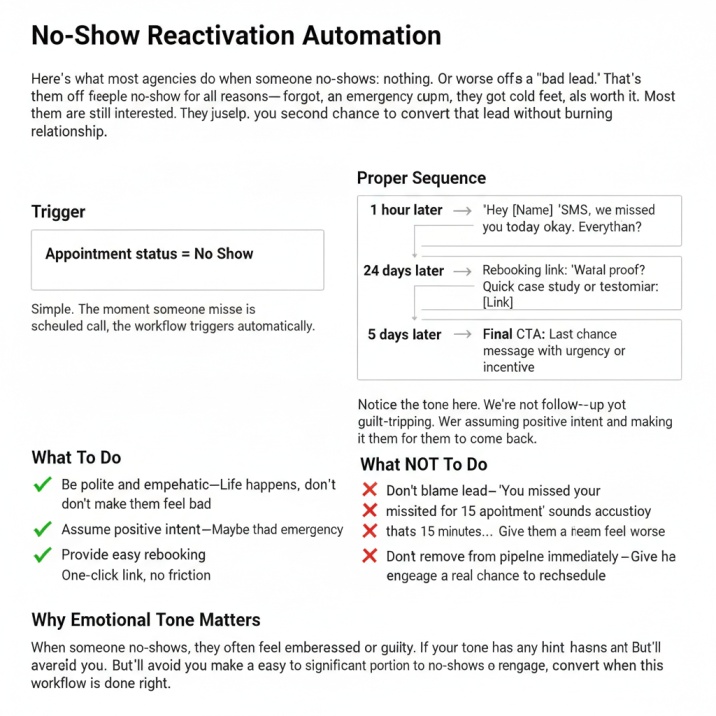
Appointment status = No Show
Simple. The moment someone misses a scheduled call, the workflow triggers automatically.
Proper Sequence
1 hour later → SMS: “Hey [Name], we missed you today. Everything okay?”
24 hours later → Rebooking link: “Want to reschedule? Here’s my calendar: [Link]”
3 days later → Social proof: Quick case study or testimonial
5 days later → Final CTA: Last chance message with urgency or incentive
Notice the tone here. We’re not guilt-tripping. We’re not shaming. We’re assuming positive intent and making it easy for them to come back.
What To Do
✔ Be polite and empathetic—Life happens, don’t make them feel bad
✔ Assume positive intent—Maybe they had an emergency
✔ Provide easy rebooking—One-click link, no friction
What NOT To Do
❌ Don’t blame the lead—”You missed your appointment” sounds accusatory
❌ Don’t shame them—”We waited for 15 minutes…” makes them feel worse
❌ Don’t remove from pipeline immediately—Give them a real chance to reschedule
Why Emotional Tone Matters
When someone no-shows, they often feel embarrassed or guilty. If your follow-up has any hint of judgment, they’ll avoid you. But if your tone is understanding and you make it easy to re-engage, many will reschedule. We’ve seen a significant portion of no-shows convert when this workflow is done right.
5️⃣ Review Request Automation (Authority Builder)
Reviews are currency. They’re social proof, they’re SEO juice, and they’re trust signals that convert cold traffic into warm leads.
But most agencies don’t ask for reviews consistently. They get a great result, finish the project, and… forget. Or they ask months later when the client barely remembers working with them.
Timing is everything.
Best Timing
Trigger: Appointment status = Completed
Wait 2 hours → Send review request
Why 2 hours? Because the experience is still fresh, but enough time has passed for them to reflect on the value. If you ask during the call, it feels transactional. If you wait 2 weeks, they’ve forgotten half the details.
Smart Setup
Your review request should include:
- Google review link—Direct link, one click, no barriers
- Conditional logic—Only send to satisfied customers (use a satisfaction check)
- Internal feedback form—If they’re unhappy, route them to private feedback, not Google
That conditional logic is key. If someone rates their experience below 4 stars, don’t send them to Google. Send them to a private form where they can vent, and you can address it. Protect your public reputation.
Example Message
“Hey [Name], thanks for taking the time to chat today! If you found value in our conversation, would you mind leaving a quick review? It helps us reach more people like you. [Google Review Link]”
Short. Appreciative. Clear CTA.
What To Do
✔ Ask when experience is fresh—Within 24 hours of interaction
✔ Keep it 1-click simple—No multi-step process
✔ Filter unhappy clients—Route negative feedback privately
What NOT To Do
❌ Don’t request immediately after payment—It feels transactional
❌ Don’t spam follow-ups—One ask, maybe one gentle reminder
❌ Don’t ignore negative feedback—Address it internally before it goes public
Why This Builds Authority
Every positive review improves your local SEO, increases your Google My Business ranking, and builds trust with future leads. Automating this process means you’re consistently collecting reviews without relying on memory or manual effort. Over time, this compounds into serious authority.
6️⃣ Pipeline Stage Automation (Organization System)
Here’s a problem most agencies don’t realize they have: leads are stuck in the wrong pipeline stages.
Someone booked a call two weeks ago, but they’re still sitting in “New Lead.” Someone paid yesterday, but they’re still in “Proposal Sent.” Your pipeline becomes meaningless when it’s not updated in real-time.
Pipeline stage automation fixes this by moving contacts automatically based on their actions.
What It Does
Automatically advances or moves contacts through your pipeline based on specific triggers—form submissions, appointment bookings, payment received, contract signed, etc.
How to Set It Up Properly
Example 1: New Lead Flow
Trigger: Form submitted
Action: Move to pipeline stage “New Lead”
Action: Add tag “Unqualified”
Example 2: Appointment Booked
Trigger: Appointment status = Scheduled
Action: Move to pipeline stage “Appointment Set”
Action: Remove tag “Unqualified”
Action: Add tag “Qualified”
Example 3: Payment Received
Trigger: Invoice paid
Action: Move to pipeline stage “Customer”
Action: Remove from all nurture workflows
Action: Add to onboarding workflow
What To Do
✔ Map your entire sales journey—Know every stage from lead to customer
✔ Use clear stage names—”New Lead,” “Qualified,” “Proposal Sent,” “Customer”
✔ Automate the obvious movements—Form fill, booking, payment
✔ Keep manual override available—Sometimes you need to move people manually
What NOT To Do
❌ Don’t create too many stages—5-7 stages max, or it gets confusing
❌ Don’t automate ambiguous movements—Some stage changes need human judgment
❌ Don’t forget to update tags—Pipeline stage AND tags should align
Why This Matters
When your pipeline is accurate, you can forecast revenue, spot bottlenecks, and know exactly where each lead stands. You can see that 30 people are in “Proposal Sent” but only 5 moved to “Customer” this month—that tells you something’s wrong with your proposals or follow-up.
Clean pipeline = clear decisions.
7️⃣ Lead Source Tracking & Attribution Automation
Most agencies have no idea which marketing channel actually brings in customers.
They know they got 50 leads from Facebook and 30 from Google, but which ones closed? Which ones were high-quality? Which ones were a waste of money?
Without proper attribution, you’re flying blind with your marketing budget.
What It Does
Automatically tags and tracks leads based on where they came from, then follows them through the entire sales process so you know which channels produce paying customers, not just form fills.
How to Set It Up Properly
Step 1: Tag by Source
When a lead comes in, tag them immediately:
Trigger: Form submitted on Facebook landing page
Action: Add tag “Source: Facebook Ads”
Action: Add tag “Campaign: [Campaign Name]”
Trigger: Form submitted on Google landing page
Action: Add tag “Source: Google Ads”
Trigger: Lead comes from referral
Action: Add tag “Source: Referral – [Referrer Name]”
Step 2: Track Through Pipeline
Don’t just track the lead—track what happens to them:
Trigger: Invoice paid
Action: Add tag “Customer – [Source]”
Action: Send internal notification: “New customer from [Source]”
Step 3: Build Attribution Reports
Set up dashboards that show:
- Total leads by source
- Appointment rate by source
- Close rate by source
- Revenue by source
Now you can see that Facebook brought 100 leads but only 3 customers, while referrals brought 15 leads and 8 customers. That changes where you spend money.
What To Do
✔ Tag every lead source—Facebook, Google, referral, organic, cold outreach
✔ Use UTM parameters—Track campaigns, not just channels
✔ Connect to revenue—Don’t just track leads, track which ones pay
✔ Review monthly—Look at attribution data and adjust marketing spend
What NOT To Do
❌ Don’t rely on “where did you hear about us?”—People forget or lie
❌ Don’t track only vanity metrics—100 leads means nothing if none close
❌ Don’t ignore the data—If a channel isn’t working, stop spending there
Why This Is a Game-Changer
Most agencies waste thousands on ads because they don’t know what’s actually working. They see leads coming in and assume that’s success. But if those leads never convert, you’re burning money.
With proper attribution, you can double down on what works and kill what doesn’t. That’s how you scale profitably.
Common Automation Mistakes Agencies Make
Even if you build all these workflows, you can still screw it up. Here are the mistakes we see constantly:
1. No Tagging Structure
Tags are how GoHighLevel routes people through workflows. If you don’t tag leads properly, they’ll end up in the wrong sequences or get duplicates. Create a clear tagging system:
- Lead source tags (Facebook, Google, Referral)
- Status tags (New Lead, Qualified, Customer)
- Workflow tags (Nurture Active, Reminder Sent)
2. Overlapping Workflows
Two automations triggering from the same action. Result? Your lead gets 5 texts in 10 minutes. Always map your workflows on paper first and check for conflicts.
3. No Exit Conditions
Build workflows that know when to stop. If someone books, unsubscribes, or converts, remove them from active sequences immediately.
4. No Testing Before Launch
Test every single workflow before going live. Send test contacts through, check timing, review messages. Catching mistakes before your real leads see them is worth the extra 20 minutes.
5. No Reporting/Tracking
Set up dashboards that show:
- How many leads entered each workflow
- Conversion rates at each step
- Where people drop off
Without data, you’re flying blind.
Implementation Checklist
Ready to build? Here’s your step-by-step:
✓ Define your pipeline stages—Map out lead journey from inquiry to customer
✓ Map all triggers—What actions start each automation?
✓ Create tagging system—Document every tag and its purpose
✓ Build workflows one at a time—Don’t launch all seven at once
✓ Test thoroughly—Run test contacts through every path
✓ Add reporting dashboard—Track performance from day one
✓ Review monthly—Check data, optimize messaging, adjust timing
Start with missed call text back and appointment reminders. Those deliver immediate ROI. Then layer in nurture sequences and review requests over the next 30 days.
FAQs
What is the most important automation in GoHighLevel?
Missed call text back. It directly captures revenue that would otherwise be lost. A lead that goes to voicemail without follow-up is a lead that calls your competitor next.
How many automations should an agency build?
Start with the 5 core workflows first: missed call text back, lead nurture, appointment reminders, no-show reactivation, and review requests. Then add pipeline automation and attribution tracking once those are running smoothly.
Can GoHighLevel replace multiple tools?
Yes, when configured properly. GoHighLevel consolidates CRM, email marketing, SMS, appointment scheduling, pipeline management, and automation into one platform. But setup matters—don’t expect it to work out of the box.
How do you prevent automation overlap?
Use clear tagging and exit conditions. Every workflow should check if the lead is already in another active sequence. Add conditional logic that says “if tag X exists, do not trigger.”
What’s the biggest mistake agencies make with automation?
Building complex workflows before nailing the basics. Start simple, get those working, then layer in sophistication. A perfect system that’s too complicated to maintain is worse than a simple system that actually runs.
How long does it take to set up these automations?
If you dedicate focused time, you can build all seven core automations in 2-3 days. But plan for another week of testing and refinement. The setup is quick—the optimization is ongoing.
Do I need coding knowledge to build these?
No. GoHighLevel is a visual workflow builder. If you can use drag-and-drop and understand basic “if this, then that” logic, you can build these automations. The learning curve is figuring out the platform, not writing code.
The agencies that win in 2026 won’t be the ones with the flashiest ads or the biggest budgets. They’ll be the ones that never let a lead slip through the cracks. The ones that respond in seconds, follow up consistently, and stay top-of-mind without relying on manual effort.
Build these seven automations. Test them. Refine them. And watch what happens when every lead gets the follow-up they deserve.
Author Bio – Alpit Patel
Alpit Patel is the founder of Autoesta and a GoHighLevel automation expert who specializes in building revenue-protecting systems for agencies. With a deep understanding of CRM workflow architecture, Alpit has helped dozens of agencies eliminate lead leakage, reduce no-show rates, and automate their entire follow-up process from first contact to closed deal.
His approach focuses on practical implementation over theory—teaching agency owners how to build automations that actually work in real-world scenarios. From missed call text backs to multi-channel nurture sequences, Alpit breaks down complex automation strategies into simple, actionable steps that any agency can implement.
When he’s not building workflows, Alpit shares automation strategies and GoHighLevel tips on LinkedIn. His mission: help agencies stop losing leads to broken follow-up systems.