Why aren't your GoHighLevel follow-up sequences converting?
Most GoHighLevel follow-up sequences that fail have one of six causes: messages that never reach the inbox or phone, a slow first touch, no stop condition after a reply or booking, a sequence that is the wrong length, one channel doing all the work, or an offer that gives the lead no reason to answer. Check them in that order, because the first problem hides the rest.
The five layers a sequence depends on
The order matters. If your texts are being filtered, no amount of rewriting will change your results, and you will conclude the copy is bad when nobody read it. If your emails land in spam, your open rate tells you about your domain, not your subject line. So before you touch a single message, confirm that the messages arrive.
This guide walks the causes in the order we check them when we audit a sequence. It includes a diagnostic table you can run against your own account in an afternoon, and a concrete example sequence that we label plainly as design guidance, not a benchmark. We have not published conversion numbers for sequences, and we do not invent any here.
- Deliverability: texts and emails have to arrive before anything else counts.
- Speed: the first touch has to happen while the lead still remembers asking.
- Stop conditions: a lead who replied or booked must leave the sequence immediately.
- Length and channel mix: how many touches, spread over how long, on which channels.
- Offer and copy: what you are actually asking the lead to do.
This page also covers what used to live on two older Autoesta guides about follow-up automation and lead capture. If you arrived from one of those, everything from the form to the last follow-up touch is here.
What does a sequence that isn't converting actually look like inside GoHighLevel?
A non-converting sequence usually shows one of three patterns in the account: delivery statuses full of failures, contacts who replied but kept getting messages, or a long tail of enrolled contacts with no booking and no reply. Each pattern points to a different fix.
What the symptoms tell you
Open the Conversations view and a few enrollment histories before you form a theory. Look at real contacts, not the workflow canvas, because the canvas shows what you intended and the history shows what happened.
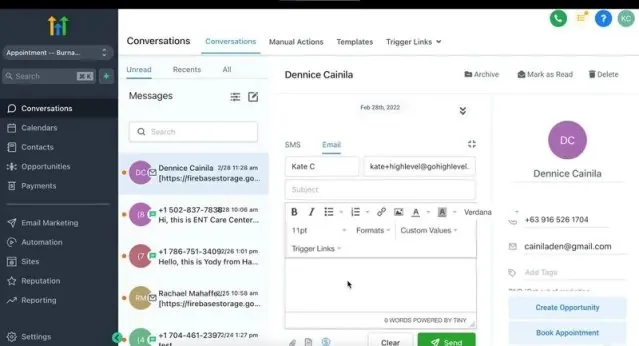
Here is how the three patterns map to causes:
- Failed or undelivered messages piling up. This is a deliverability problem: SMS registration, a bad number, or email authentication.
- Replies followed by more automated messages. This is a stop-condition problem, and it is the pattern that costs the most goodwill. A lead who wrote "yes, call me" and then gets an automated "just checking in" text stops trusting you.
- Delivered, opened, ignored. This is a timing, offer, or channel problem. The messages arrived and the lead had no reason to act.
In audits, the accounts with the weakest results are rarely the ones with the worst copy. They are the ones where nobody ever looked at a single contact's full message timeline. The first hour of a diagnosis is reading twenty of them, start to finish, as the lead would have experienced them.
How do you check whether your follow-up messages are being delivered?
Confirm three things before anything else: your US texting registration (A2P 10DLC) is approved, your sending domain passes SPF, DKIM, and DMARC, and your spam complaint rate is under the 0.10% Google asks bulk senders to stay below. Until those pass, treat every conversion number as unreliable.
Is your A2P 10DLC registration approved?
HighLevel's own documentation states that A2P 10DLC registration is required when a business sends SMS or MMS to US recipients from standard 10-digit local numbers. In HighLevel you register under Settings, Phone System, Trust Center: first the brand, then the campaign. HighLevel's guidance is to complete the brand first and then match the campaign details to your real consent flow.
Registration is not a checkbox you can rush. HighLevel's own approval best-practices article lists the common rejection reasons: sample messages that do not match the stated use case, unclear or unverifiable consent, broken website or policy links, preselected consent checkboxes, missing sender identification, and inconsistent business names across fields. The same article says that following its recommendations improves submission quality but does not guarantee approval.
The first-hand pattern we see: a campaign is approved for one use case, and then the sequence quietly grows a second one (promotions, reactivation blasts) that the registration never described. If the messages your workflow sends do not match the sample messages you registered, you have a mismatch worth fixing before you blame the copy. Check the registration status, then read your live sequence next to the registered samples.
Does your email domain pass SPF, DKIM, and DMARC?
Google's bulk-sender guidelines require senders of 5,000 or more messages a day to Gmail addresses to set up SPF, DKIM, and DMARC, with a DMARC policy that can be set to none. They also require valid forward and reverse DNS records, a TLS connection, and alignment between the From domain and the SPF or DKIM domain. Marketing messages need one-click unsubscribe, meaning the List-Unsubscribe and List-Unsubscribe-Post headers.
Yahoo's sender requirements say all senders should implement SPF or DKIM at a minimum. Bulk senders need SPF, DKIM, and a published DMARC policy of at least p=none, plus a working list-unsubscribe header and a visible unsubscribe link in the body. Yahoo asks senders to honor unsubscribes within two days.
You may well be below the 5,000-a-day line. Those rules are written for bulk senders, but they describe what mailbox providers treat as a legitimate sender, and a small sender with no authentication looks worse than a large one with it. Set it up regardless.
In HighLevel, the setup lives under Settings, Email Services, Dedicated Domain and IP. HighLevel's guide recommends a dedicated sending subdomain such as mg.yourbrand.com rather than your root domain, so the main domain's reputation is protected. With a shared domain, HighLevel rewrites your From address into a plus-format address on its own sending domain, which is one reason a sender's identity looks less consistent to a recipient. HighLevel also says to warm up any brand-new domain before emailing large lists.
Is your spam complaint rate low enough?
Google says to keep the spam rate below 0.10% and to avoid ever reaching 0.30% or higher. Yahoo says to keep its rate below 0.3%. These numbers are small on purpose. A sequence that keeps emailing people who already replied, booked, or asked to stop is the fastest way to earn complaints, which links directly to the stop-condition section below.
If you send meaningful Gmail volume, Google Postmaster Tools reports domain-level reputation for your sending domain, which your HighLevel open-rate report cannot show you.
None of this is legal advice. Consent, quiet hours, and opt-out handling for texting and email are governed by rules that depend on where your leads live and how they opted in. Have counsel review your consent language, and read our note on appointment booking automation for how confirmations and reminders fit alongside a sales sequence.
How fast should the first follow-up go out?
As fast as you can make it happen automatically, ideally within minutes of the form submission or missed call, because the lead's interest is highest at the moment they reached out. A first touch that waits for a person to notice a notification is the most common timing failure we find.
Harvard Business Review's 2011 article on the short life of online sales leads, by Oldroyd, McElheran, and Elkington, opens with its finding that most companies are not responding nearly fast enough to online inquiries. We are citing the direction of that finding, not a specific multiplier, because we could not verify the exact figures from the article page itself. Treat any blog that quotes a precise "X times more likely" number without linking the study with suspicion.
The practical design choice is what the first touch contains. It should be useful on its own: confirm you got the request, say who is following up and when, and give one easy next step. A vague "thanks for your interest" adds nothing and trains the lead to ignore you.
Three timing details we check on every account:
- The trigger. Does the workflow start on form submission, or on a tag a human adds later? If a human is in the loop, the first touch is only as fast as that human.
- The Time Window setting. HighLevel lets you restrict when messages send, for example to business hours. That protects you from a 2 a.m. text, but it can also silently delay the first touch by twelve hours for an evening lead. Decide deliberately whether the first message ignores the window.
- The lead's own clock. If your leads span time zones, a fixed window set in your time zone sends messages at the wrong time for half of them.
Speed does not replace a good message. It only gives a good message a chance to be read while the lead still cares. If the first touch is already fast, the next thing to examine is whether the sequence ever stops.
Does your sequence stop when a lead replies or books?
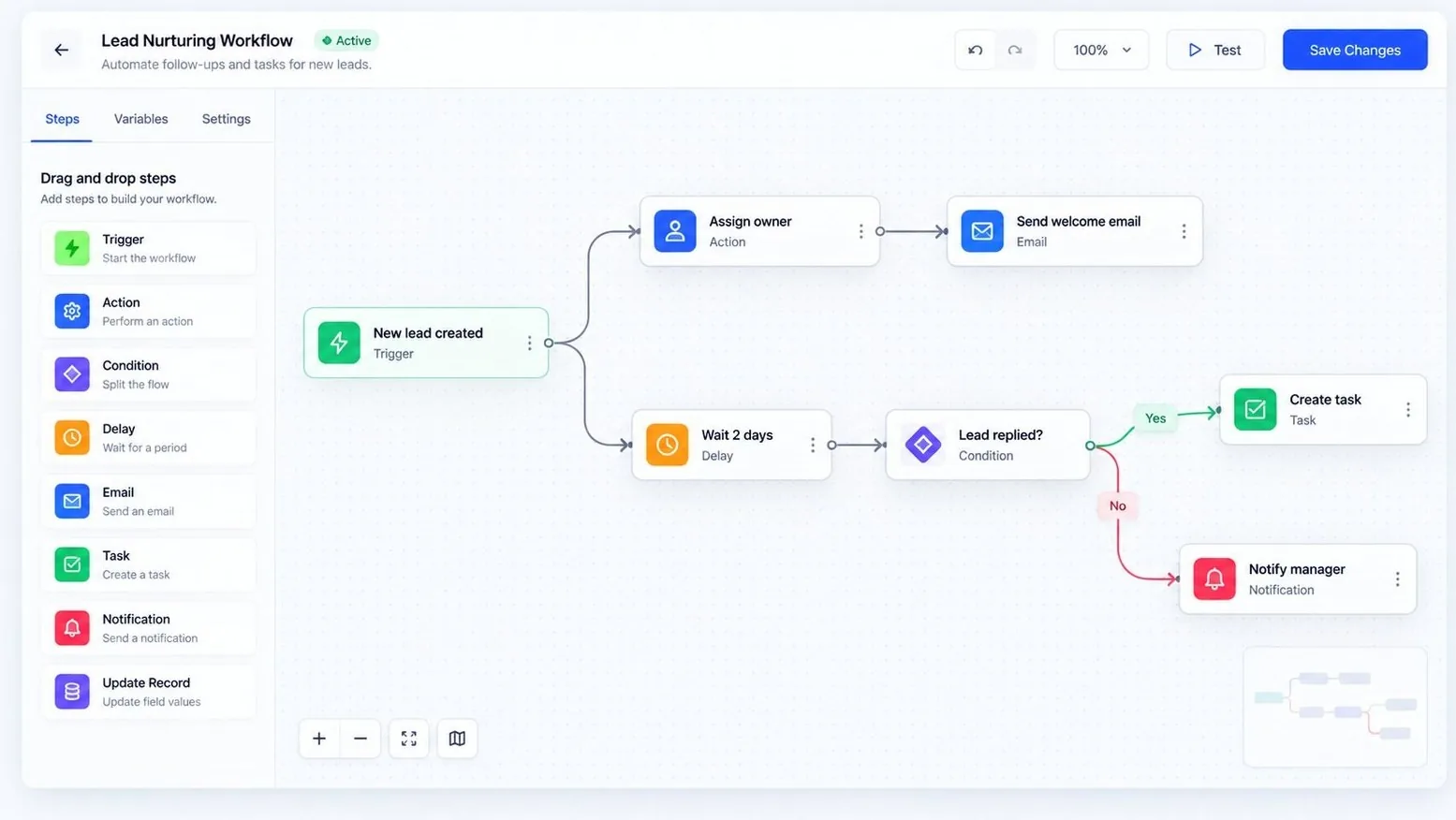
It should stop, and in many accounts we open it does not. A working sequence removes a lead the moment they reply, book, or opt out, using either HighLevel's workflow-level Stop on Response setting, a Goal Event step, or an explicit condition on booking status.
This is the single most damaging mistake, because it turns a positive signal into a bad experience. The lead did what you wanted and your automation ignored it.
HighLevel gives you more than one way to handle it. The workflow settings include Stop on Response, alongside re-entry and time window controls. The Goal Event action can move a contact past the remaining steps when they meet a condition, such as submitting a form or clicking a link. HighLevel's documentation says Goal Events can also end a workflow, for example with the User Replied goal type, so automated messages stop once a team member has responded. When a contact reaches a Goal Event without meeting the condition, you choose whether to end the workflow, continue anyway, or wait until the goal is met.
The settings names and menu positions change as HighLevel updates the product, so confirm in your own account which controls you have. What matters is the logic, which you can test:
- Reply stops the sequence. Enroll a test contact, reply from that number, and confirm no further automated message goes out.
- Booking stops the sales sequence. Book a test appointment and confirm the nurture messages end and the reminder sequence begins instead.
- Opt-out stops everything. Send STOP from a test number and confirm the contact is marked do-not-contact across the account, not just in that workflow.
- A human reply also counts. If a team member texts the lead manually, the automation should not keep firing over the top of that conversation.
- Re-entry is deliberate. If the same person fills out the form twice, decide whether they restart the sequence, and set the re-entry option to match that decision.
This overlaps with workflow design more broadly. Two workflows that trigger on the same event will both message the lead, and neither knows about the other. Our guide to GoHighLevel workflows, triggers, and campaigns explains how to keep the trigger logic clean, and our messy account cleanup checklist covers finding the overlapping workflows in an account that has grown over time.
How many follow-up touches should a sequence have, and over how long?
There is no universal right number. Design the sequence around how long your buying decision actually takes: a same-day service request needs a tight cluster of touches in the first day, while a considered purchase needs a longer, slower tail. Five to eight touches is a reasonable starting range, but that is a design starting point, not a proven benchmark.
The mistake we see most is one sequence for every kind of lead. A person asking for an emergency plumber and a person requesting a quote for a kitchen remodel are not the same, and giving them identical timing fails both. Split sequences by the lead's likely urgency, then adjust.
| Lead type | Shape of the sequence | Why |
|---|---|---|
| High urgency (missed call, emergency request) | Dense first hour, a few touches in the first day, then stop or drop to a slow tail | The need is immediate; a lead who has not answered in a day has probably solved it elsewhere |
| Considered purchase (quote request, consultation) | Fast first touch, then spaced touches over roughly two to three weeks | The decision takes time and the lead compares options |
| Cold or reactivation list | Few touches, low frequency, clear opt-out | Consent is weaker and complaint risk is higher |
| No-show or missed appointment | Quick reschedule prompt, one follow-up, then a soft close | The lead already showed intent; the friction is scheduling |
Length also interacts with the deliverability numbers above. A long sequence sent to a list with weak consent produces complaints, and complaints damage the sending reputation your good sequences depend on. More touches is not automatically more conversions.
A useful test is to look at where in the sequence people actually booked. If almost every booking happens in the first three touches, touches nine through twelve are adding annoyance without adding results, and you can cut them. We do not have a universal figure for this. Your own booking data by step is the only number that matters, and you should read it before adding anything.
Which channel should each follow-up use?
Mix channels by purpose instead of repeating the same message everywhere: text for speed and short prompts, a phone attempt for high-intent leads, and email for detail and proof. Sending the identical message over all three at once tells the lead you are running a script.
Each channel has a different job and a different failure mode:
- SMS. Best for the first touch and short nudges. It depends entirely on your A2P registration, and it needs a clear opt-out. Keep messages short and identify the business by name, which HighLevel's approval guidance also expects in sample messages.
- Phone call. Best for leads that look ready: a demo request, a quote form with a budget field. A missed call can trigger an automatic text so the lead has something to reply to. If you use automated calling, our guide on AI calling versus chat agents covers the trade-offs, and the AI calling agent service page describes what we build.
- Email. Best for longer explanation, links, and proof. It is also the channel most sensitive to the authentication and complaint rules above.
- Chat or web widget. Best for catching a lead who is still on your site. An AI chat agent can answer the first question instantly and hand off a warm lead.
One first-hand detail: when a sequence underperforms and email is the only channel, we usually find it was built that way because the person setting it up had not finished the SMS registration. The channel mix was a side effect of an unfinished compliance step, not a strategy. Fix the registration and the sequence gains its strongest first touch.
Is the offer or the copy the real problem?
Only after delivery, timing, and stop conditions check out. If messages arrive quickly, stop correctly, and still get ignored, look at what you are asking: a vague "let us know if you're interested" gives the lead nothing to do, while a specific next step with a low commitment gives them something to answer.
Copy problems in follow-up sequences are usually structural, not stylistic. Look for these:
- Every message says the same thing. "Just following up" five times is one message, repeated.
- No specific next step. Ask one question or offer one booking link per message, not three options.
- No reference to what the lead asked for. Use the service, the form answer, or the property they inquired about. GoHighLevel custom values and merge fields make this cheap.
- The message is about you. Lead with what is in it for the recipient and what happens next.
- The booking link is buried or broken. Click it yourself, on a phone, from the message as a lead would see it.
Different messages can also do different jobs. The first confirms and sets expectations. A later one answers the most common objection. Another offers a lower-commitment alternative, such as a short call instead of a full consultation. The last one is a polite close that tells the lead you will stop unless they respond, which often draws a reply from people who were interested and busy.
Finally, ask whether the leads themselves are the problem. A sequence cannot fix a lead source that sends people who never wanted your service. If every channel fails equally, look upstream at the form, the ad, or the qualifying questions.
What is a diagnostic table for a non-converting sequence?
Work through the table below from top to bottom and stop at the first failing row: each row names a symptom, what it usually means, and where to check in HighLevel. Fixing a lower row while an upper row is broken wastes the effort.
| Check | Symptom you see | Likely cause | Where to look |
|---|---|---|---|
| 1. SMS registration | Texts show as failed, or leads say they never got them | A2P 10DLC brand or campaign not approved, or messages do not match the registered use case | Settings, Phone System, Trust Center |
| 2. Email authentication | Low opens, emails landing in spam for your own test inbox | Missing or misaligned SPF, DKIM, or DMARC; shared sending domain | Settings, Email Services, Dedicated Domain and IP |
| 3. Spam complaints | Sudden drop in inbox placement | Complaint rate near Google's 0.10% guidance, or emailing people who asked to stop | Google Postmaster Tools, unsubscribe handling |
| 4. First-touch speed | Leads reply "who is this?" or have gone cold by the time you write | Human in the trigger, Time Window delaying the first message, wrong time zone | Workflow trigger and workflow settings |
| 5. Stop conditions | Leads who replied or booked keep getting messages | No Stop on Response, no Goal Event, no booking check, overlapping workflows | Workflow settings, enrollment history |
| 6. Sequence shape | All bookings happen in the first few touches; late touches only produce unsubscribes | One sequence for every lead type, too many touches | Bookings grouped by sequence step |
| 7. Channel mix | Only one channel in use, or the same text on every channel | Unfinished SMS registration, no call attempt for high-intent leads | Workflow actions |
| 8. Offer and copy | Delivered, read, ignored | Vague ask, repeated message, no personalization, broken booking link | Message text, booking link on a real phone |
Log what you find in a simple list as you go. If two or three rows fail, fix them in order and re-test with a real contact before changing anything else. If it is most of the table, the account probably needs more than a tune-up, which is covered near the end of this page.
What does a good example follow-up sequence look like?
A sound starting sequence sends a useful text and email within minutes, follows with a call attempt for leads that look ready, spaces later touches across days, and exits the lead the moment they reply or book. The table below is design guidance we would build from, not a benchmark or a client result.
Design guidance, not a benchmark. This is an illustrative sequence for a lead who requested a consultation through a web form. The timings are a starting point to adjust with your own booking data, and it assumes SMS registration and email authentication are already passing.
| Step | Timing | Channel | Purpose |
|---|---|---|---|
| 1 | Immediately | SMS | Confirm the request, name the business, say who will follow up, include one booking link |
| 2 | Immediately | Confirmation with more detail: what happens next and a booking link | |
| 3 | A few minutes later, inside the time window | Call attempt | Reach the lead while the request is fresh; a missed call triggers a short text |
| 4 | Next morning | SMS | One short question tied to what the lead asked for |
| 5 | Day 2 or 3 | Answer the most common objection or question | |
| 6 | Day 4 or 5 | Call attempt plus text | Second attempt to reach a person |
| 7 | Around day 7 | Lower-commitment option, such as a short call | |
| 8 | Around day 10 to 14 | SMS | Polite close: say you will stop unless they respond |
Exit rules apply at every step. A reply ends the sequence, a booking ends it and starts the reminder flow, and an opt-out ends everything. If a team member is already in the conversation, the automation stays out of it.
Why this shape? The first three steps go out fast because the lead is most likely to respond right after asking. The middle steps vary the channel and the content so the lead is not receiving a duplicate. The last step gives the lead a clean end. If your data shows bookings drop to nothing after step five, shorten it.
Once a lead books, the job changes from persuading to preventing no-shows. That is a separate workflow, and we cover it in our appointment booking automation guide.
When is fixing the sequence the wrong move?
Fixing the sequence is the wrong move when the problem is upstream or underneath it: a lead source that sends the wrong people, a sales process that cannot handle the leads it gets, or an account whose structure is so tangled that no sequence can be trusted to run as designed. In those cases, changing messages only hides the real problem.
- The lead source is the problem. If leads never wanted your service, no follow-up will convert them. Look at the ad, the form, and the qualifying questions.
- Nobody answers the phone or replies to bookings. A perfect sequence that books calls into a calendar nobody honors just moves the failure downstream.
- The account is a mess. If workflows overlap, tags contradict each other, and nobody knows what triggers what, start with the cleanup checklist before building a better sequence on top.
- Your lead volume is tiny. With a handful of leads a month, a person following up personally will usually outperform an automated sequence, and building one is more effort than it repays.
- You cannot register or authenticate yet. If A2P registration is stuck or your domain is new and unwarmed, the honest move is to fix that and wait, not to blast a new list.
Automation also has a ceiling. It gets the right message to the right person at the right time. It does not make an unconvincing offer convincing. If the diagnostic table comes back clean and results are still poor, look at the offer and the sales conversation itself.
Can you fix this yourself, or should you hire someone?
You can run the diagnostic table yourself in an afternoon if you have admin access and a few test contacts. Bring in help when the sequence touches revenue you cannot afford to disrupt, when registration keeps getting rejected, or when the account has grown past what one person can trace.
Typical Autoesta pricing, at the time of writing, is a free audit, cleanup from $200, and a small automation build of two or three automations from about $1,000. A full GoHighLevel setup runs about $3,000 to $5,000, and monthly support starts from $200, with six months of maintenance included on builds. These are typical ranges, not a quote, and the scope of your account decides the real number. Our GoHighLevel pricing guide puts these next to the platform's own subscription costs.
We are a 16-person team, roughly eight of us in San Francisco and the rest in India and Nepal, and we have completed more than 320 projects across over 15 countries. Alpit Patel, our founder, is a HighLevel Certified Admin. For a look at what a clean, working follow-up flow produces in practice, see the dental case study and the real estate case study, both reported by Autoesta.
If the fix turns out to be a rebuild, our GoHighLevel setup service describes what that involves, and the GoHighLevel expert page covers audits.
If the problem is the first reply, not the follow-up, read how to speed up lead response.
More questions about GoHighLevel follow-up sequences
Why are my GoHighLevel text messages not delivering?
The most common cause for US numbers is registration. HighLevel says A2P 10DLC registration is required for business SMS from standard 10-digit numbers, and campaigns get rejected when sample messages, consent flow, or business details do not match. Check the Trust Center status first.
Do I need SPF, DKIM, and DMARC if I send fewer than 5,000 emails a day?
Google's strict requirements target bulk senders at 5,000 or more messages a day. We still set all three up for every sender, because a message with no authentication looks less trustworthy to any mailbox provider, whatever your volume.
How do I stop a GoHighLevel workflow when someone replies?
Use the workflow's Stop on Response setting, or add a Goal Event step with the User Replied goal type, then test it with your own number. HighLevel's menu names can change, so confirm what your account offers.
How many follow-ups is too many?
It depends on urgency and consent. A cold reactivation list needs far fewer touches than a warm quote request. Check where your bookings happen by step and cut the touches that produce only unsubscribes.
Is texting leads without asking allowed?
That depends on the consent rules that apply to you, and this page is not legal advice. HighLevel's registration process asks you to document how recipients agree to receive messages, so consent has to be real and provable before you send.
Should the first message be an SMS or an email?
Send both at once when both are registered and authenticated, and let each do a different job: SMS for a fast, short prompt, email for detail. If only one is reliable, use that one and fix the other.
Can automation outside GoHighLevel help?
Yes, for the parts the platform handles poorly, such as checking a lead against another system before enrolling it. See our n8n automation service, and use the contact page or book a free 30-minute strategy call to talk through your sequence.
Which sources back the deliverability rules on this page?
The email and texting rules quoted here come from Google's and Yahoo's own sender guidelines and HighLevel's support documentation, all checked on September 24, 2026. Rules change, so confirm against the current versions before you act. For a full email checklist, see why GoHighLevel emails go to spam, and for texts, what happens when a contact replies STOP.
- Google email sender guidelines for bulk senders
- Yahoo sender best practices
- HighLevel: A2P 10DLC brand and campaign registration
- HighLevel: A2P 10DLC campaign approval best practices
- HighLevel: dedicated email sending domains
- HighLevel: Goal Event workflow action
- Harvard Business Review: The Short Life of Online Sales Leads (2011)
For the complete sequence design, with timing and stop rules, see lead follow-up that converts.
