Does Autoesta build mobile apps, or just web software?
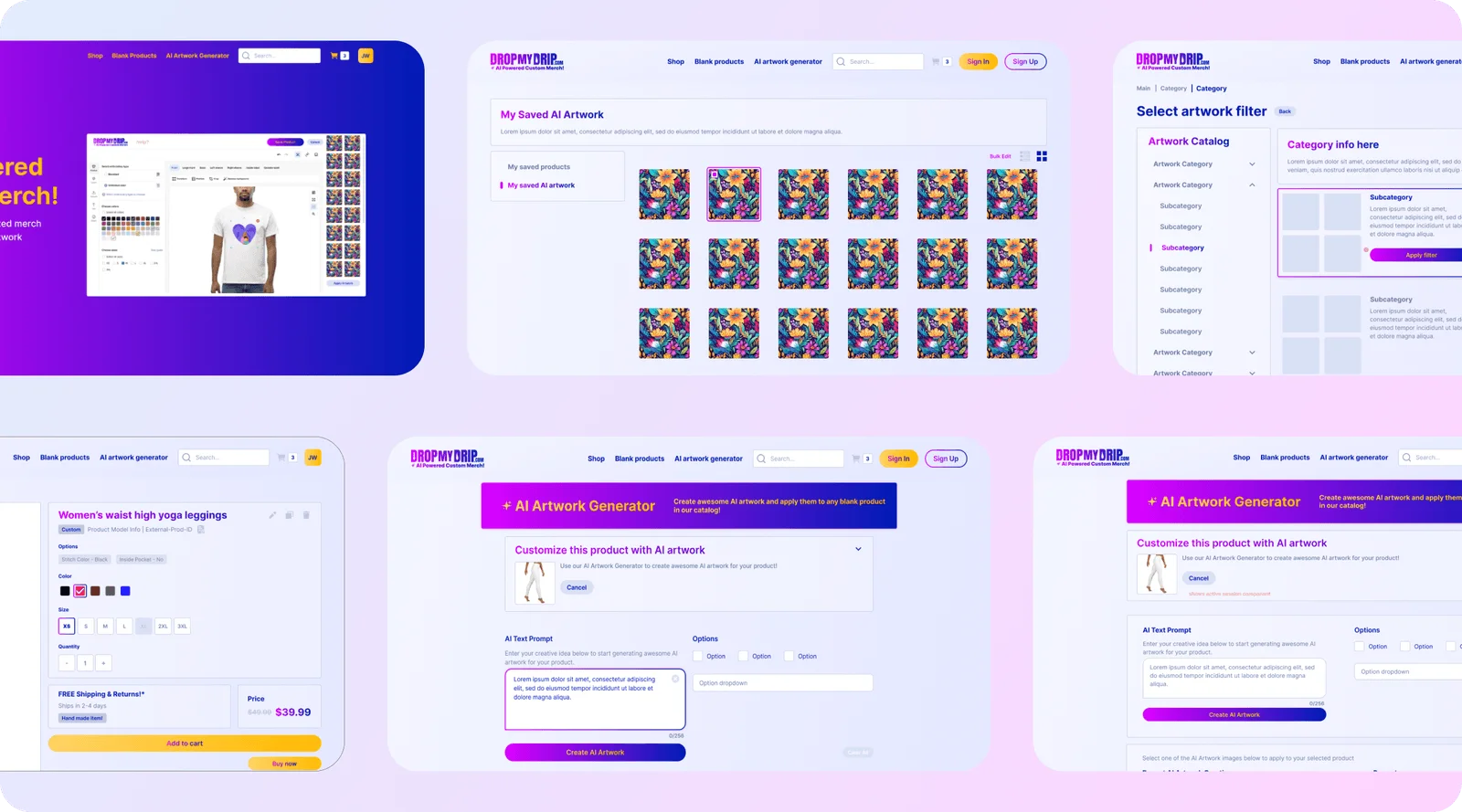
Yes. Autoesta builds native and cross-platform mobile apps as part of the same product strategy, design and development process behind its custom software work. Two of its three published builds, Coo and Drop My Drip, are mobile products.
Our custom software page covers that capability broadly: web and mobile products, marketplaces, community platforms, AI-powered features. This page narrows to what's specific to mobile: native versus cross-platform, what app store submission and review involve, whether push notifications and offline support make sense, and who owns the app afterward. If you already know you want a custom product and haven't decided mobile versus web yet, start on the custom software page instead and come back here once mobile is the answer.
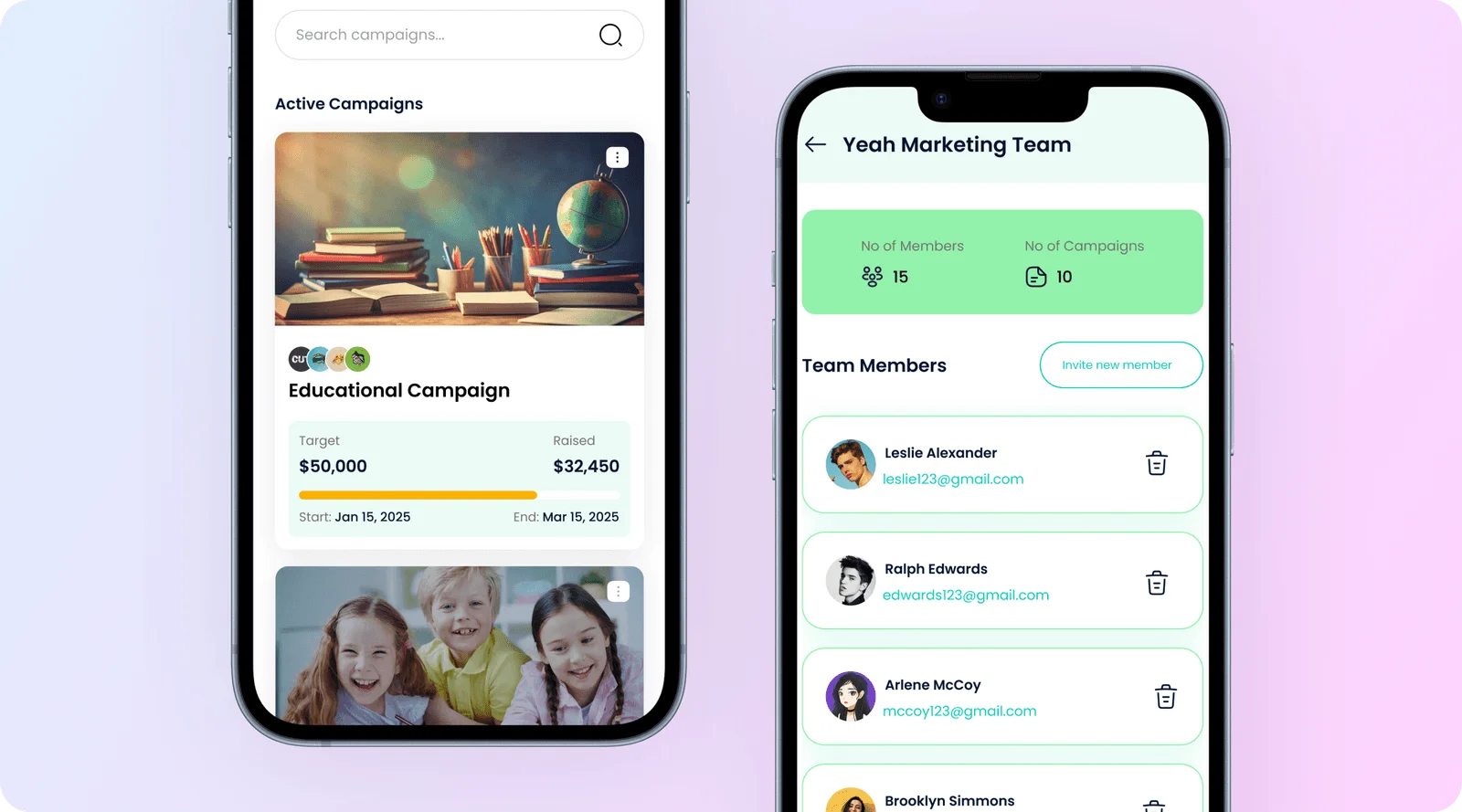
Coo's team designed a redemption flow that skips point-of-sale integration entirely: a code shown on the customer's phone screen and confirmed by a staff member. The target merchant, a four-person hairdresser or hardware shop, doesn't have point-of-sale hardware to integrate with. It's a mobile-specific design decision driven by who uses the app on a shop floor, not a generic "we build apps" claim.
What mobile apps has Autoesta actually built?
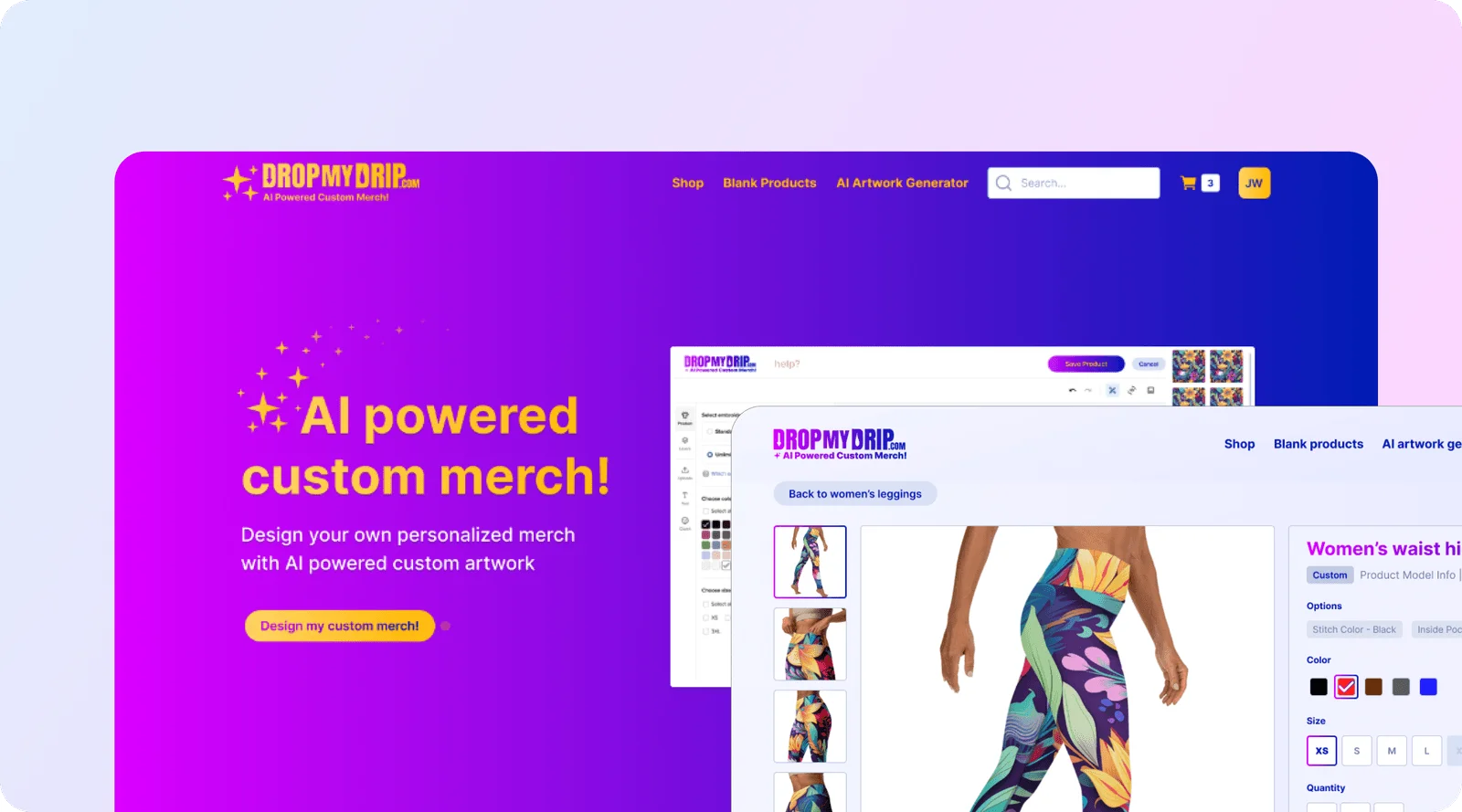
Two real, published mobile apps: Coo, a local deals marketplace used by 2,100 businesses across four cities with 310,000 deals redeemed in its first year, and Drop My Drip, an AI-powered custom apparel app with 19,000 garments ordered and a 4% return rate against a 23% category norm.
| Product | What it is | Built in | Reported result |
|---|---|---|---|
| Coo | Local deals marketplace app for small businesses | 6 weeks | 2,100 businesses listed, four cities, first year |
| Drop My Drip | AI-powered custom apparel app | 8 weeks | 4% return rate, versus a 23% category norm, first year |
Figures above are reported by each client for their first year. Read the Coo case study and the Drop My Drip case study for the full detail behind each number, or see all our case studies, including Our Fusion, the third published custom software build, a web-based community platform rather than a mobile app.
Should my app be native or cross-platform?
It depends on what the app needs to do. Native development in Swift for iOS or Kotlin for Android gets the best performance and the deepest access to device features for a graphics or camera-heavy app. Cross-platform frameworks like React Native or Flutter ship to iOS and Android from one codebase, usually faster and cheaper, when the app's needs are more standard.
Native or cross-platform?
This is a general decision framework Autoesta applies project by project. It doesn't say which approach Coo or Drop My Drip used specifically. The right call depends on the app itself: how much it depends on camera, GPS, Bluetooth or high-end graphics, how tight the budget and timeline are, and whether the team plans to maintain one codebase or two going forward.
| Native (Swift / Kotlin) | Cross-platform (React Native / Flutter) | |
|---|---|---|
| Performance | Best available on each platform | Good for most apps, can lag on graphics-heavy work |
| Device access | Full, immediate access to new OS features | Usually available, sometimes a step behind on brand-new APIs |
| Codebase | Separate iOS and Android codebases | One codebase for both platforms |
| Speed and cost | Slower and more expensive for two platforms | Faster and cheaper to reach both platforms |
| Best fit | Camera, AR, gaming, or hardware-heavy apps | Marketplaces, booking, content and most standard business apps |
This tradeoff pattern is well documented across the industry; see Uptech's native versus cross-platform breakdown and Mobisoft's CTO guide for the general industry framing behind the table above. Autoesta decides the specific answer for your app during the strategy phase, against what the product actually needs to do.
How much does it cost to build a mobile app?
Autoesta quotes mobile app development per project, not from a fixed price list. Platform count, feature complexity and design work move the number too much for one figure to mean anything, the same approach the custom software page takes.
Autoesta doesn't publish a mobile app price range, and this page won't invent one. As a general industry reference point, not an Autoesta quote, published cost guides put a basic app around $40,000 to $100,000 and a more complex, multi-platform product well beyond that. See Appinventiv's mobile app cost guide for that industry data, labeled clearly as industry figures, not Autoesta's own pricing. Book a strategy call for a number specific to your build. Autoesta's other project-quoted services, n8n automation and API and webhook integration, get quoted per project for the same reason.
How long does it take to build a mobile app?
Autoesta's two published mobile builds, Coo and Drop My Drip, took 6 and 8 weeks respectively for product strategy through development; a smaller MVP takes less, and more platforms or features take longer.
| Product | Scope | Timeframe |
|---|---|---|
| Coo | Merchant dashboard, discovery, redemption, reporting | 6 weeks |
| Drop My Drip | Design canvas, AI artwork generator, realistic visualization, order routing | 8 weeks |
These build timeframes cover product strategy through development. App store review is a separate stage that runs after the build is done, not included in the weeks above; the next section covers how long to budget for that.
What does Autoesta's mobile app development process look like?
Product strategy, design, development, device testing, app store submission, then launch and handover. One team runs the whole sequence from first call to launch, the same order documented on both Coo and Drop My Drip.
From discovery to the app stores
- Discovery and strategy. What the app needs to do, for whom, and what version one actually needs to include.
- Design. Screens, flows and a brand system built for this product, not a template. Both Coo and Drop My Drip shipped with a real brand style guide from this step.
- Development. The app gets built against the agreed scope, feature by feature.
- Device testing. Real devices, not just a simulator, since touch targets, camera behavior and performance vary by hardware in ways a simulator won't show.
- App store submission. The build goes to Apple's App Store and Google Play for review, the one step here that a general custom software build doesn't have.
- Launch and handover. The app goes live, and the client gets documentation and, per the contract, the code.
App store submission is the one mobile-specific addition to Autoesta's usual strategy-design-development-launch sequence. See our custom software process for how that same core sequence runs on a web product with no app store step at all.
How does the app store review process work, and how long does approval take?
Apple typically reviews a new app submission within 24 to 48 hours and Google Play within a few hours to about a week. Each rejection and resubmission adds days to weeks on top of that, so budget app store review time separately from build time.
| Store | Typical first review | After a rejection |
|---|---|---|
| Apple App Store | Around 24 to 48 hours | Add days to weeks per resubmission cycle |
| Google Play | A few hours to about a week | Add days per resubmission cycle |
These are typical windows reported by developer resources tracking Apple and Google's stated review times, not a guarantee for any specific app; check Apple's and Google's own current developer documentation before committing to a launch date. See this app store review time breakdown and this Google Play review time reference for the sources behind the ranges above.
The most common rejection reasons are mundane rather than dramatic: incomplete or inaccurate app metadata, a crash on the specific device or OS version the reviewer tests on, and missing privacy disclosures for data the app actually collects. Each of those is avoidable with careful testing and an accurate privacy declaration before submission, which is why device testing and app store prep are separate steps in Autoesta's process above rather than an afterthought tacked onto development.
Do you handle app store submission and manage the listing after launch?
Yes. Autoesta handles Apple Developer and Google Play Console submission as part of launch. Whether ongoing listing management afterward, screenshots, description updates, new-version submissions, is included or a separate quoted engagement depends on the project. Ask on your strategy call rather than assume either way.
Submission itself, getting the finished build through Apple's and Google's review process at launch, is part of the launch and handover step in Autoesta's process. What happens after that, updating screenshots, refreshing the description, submitting future app versions, varies enough by project that it's worth confirming explicitly on the call rather than reading in from this page.
Does my app need push notifications?
It depends on the app. Push notifications work well for anything with a real time-sensitive reason to bring someone back, a saved deal about to expire, an order status update, and add little value for an app people open on their own schedule anyway.
Coo's saved-deals wallet with expiry reminders is the shape of feature push notifications exist for: a customer saves a deal, and something needs to nudge them before it expires. That's the kind of moment worth designing a notification strategy around during strategy. It isn't a claim that Coo's published app currently sends push notifications, which isn't confirmed on its case study page.
The "wrong choice" angle matters here too: over-notifying is one of the fastest ways to get an app uninstalled. If there's no real time-sensitive reason to interrupt someone, skip push notifications rather than reaching for them by default.
What if the app needs to work with a slow connection or offline?
Offline and low-connectivity support is a design decision made during strategy, not something bolted on afterward, because it changes how data syncs and what a user sees when a network call fails.
Coo's in-store redemption flow, a code shown on the phone screen and confirmed by staff, with no point-of-sale integration required, is designed around a real-world moment that can have spotty connectivity: a shop floor at a busy time. That's the kind of design constraint offline and slow-connection planning has to account for. It isn't a claim that Coo runs a specific offline mode, which isn't stated anywhere in its published case study. Deciding what a screen shows when a network call is slow or fails, and what data needs to be available without a live connection at all, is a strategy-phase question for any app used somewhere connectivity isn't guaranteed.
What's the difference between a mobile app and a mobile-friendly website?
A mobile-friendly website or progressive web app runs in a browser and needs no install; a native or cross-platform app installs from an app store, can access device features like camera, location, push notifications and offline storage more deeply, and appears on the home screen.
If the goal is readable content on a phone, a responsive website is faster and cheaper to build and update. See our mobile-friendly website option if that's what fits. A real app earns its extra cost when the product needs device features a browser can't reach as well, camera, location, notifications, offline data, or when habitual, home-screen use matters more than being easy to find in a browser tab.
Who owns the app and the app store account after launch?
You own the code and design, the same standard stated on Coo's and Drop My Drip's case studies, confirmed in the contract for each project. Which Apple Developer or Google Play Console account the app publishes under is a separate question the case studies don't address, covered next.
Which Apple Developer and Google Play Console account an app publishes under, the client's own or Autoesta's, is a real, material detail worth confirming for your specific build rather than assuming; ask this directly on your strategy call so it's settled before development starts, not after launch.
When is a mobile app the wrong choice?
A mobile app is the wrong choice when a responsive website already does the job, when the idea hasn't been validated with real users yet, or when there's no plan or budget for the ongoing app store maintenance a published app requires.
- A responsive website already covers the need. If people need to read content or fill out a form on their phone, a mobile-friendly website is faster and cheaper than an installed app, and doesn't ask anyone to download anything first.
- The idea hasn't been validated yet. A landing page or a simpler prototype is cheaper and faster to test with real users before committing to a multi-week app build and an app store launch.
- There's no plan for ongoing maintenance. A published app needs updates when Apple or Google release a new OS version; an app left unmaintained for a year or two can break, get flagged, or fall out of compliance with current store requirements. Building the app is not the last cost.
Telling a prospective client not to build a mobile app is part of the service here, the same as it is on the custom software page. A cheaper, faster website is sometimes the right answer.
How do I get started?
Book a free 30-minute strategy call, or use the contact page, and bring what platform or platforms you're thinking about and who the app is for.
A strategy call is where platform choice, timeline and cost for your specific app get worked out. They're not published in advance on this page because they vary too much by app for a general number to mean anything. Use the contact page if a call isn't the right first step. If what you need turns out to be broader than mobile, a web product, a marketplace, an AI-powered feature, start from the custom software page instead.
More questions about mobile app development
Is Autoesta's mobile app work different from its GoHighLevel work?
Yes. GoHighLevel, n8n and Zapier are the CRM and automation backend Autoesta uses for AI agents and GoHighLevel setup projects. Coo and Drop My Drip involved none of that: each is a standalone mobile app built from scratch. This matters because a "mobile app development" search result can quietly mean a white-label app, published under an agency's own name in the App Store but built on top of a platform like GoHighLevel. That's not the same as a custom product built for one client from the ground up. Those are different deliverables, and Autoesta's two named apps are the custom-built kind, not a white-label listing.
Can you take over an app someone else started building?
Tell us what exists and where it's stuck on a strategy call. Whether taking over an unfinished app makes sense depends on its current state, its codebase and how much of it is usable, which is specific enough to each project that it needs that conversation rather than a general yes here.
Building for the browser too? See custom web applications and SaaS product development.
