What is an AI customer service agent?
An AI customer service agent answers your existing customers' support questions by chat, email, text, WhatsApp or phone. It looks up their order, booking or account, resolves routine requests itself, and passes everything else to a person in your helpdesk.
The difference from an FAQ chatbot is access. A chatbot can only repeat what is written on your website. A customer service agent is connected to the systems your support team uses every day: the order system, the booking calendar, the CRM record and the helpdesk. That lets it answer "where is my order?" with the actual tracking status, move an appointment, or start a return within the rules you set.
This page covers support for people who are already customers. If you want an agent that answers new website visitors, qualifies them and books sales calls, that is our AI chat agent for new leads. If the main job is picking up every inbound call, see the AI receptionist. Both sit in the same family of AI agents we build, and one build can include more than one of them.
What can an AI customer service agent do for existing customers?
It answers policy and how-to questions from your approved knowledge base, looks up live order, booking and account data, completes simple actions such as rescheduling or starting a return, and opens or updates the ticket with a summary when a person needs to step in.
Answer questions from your own knowledge base
Shipping times, return windows, opening hours, what is covered by a warranty, how to use a feature. The agent answers only from the help articles and policies you approve, and says so when it does not know.
Look things up
Order status and tracking from Shopify, WooCommerce or your own store; appointments from your calendar or GoHighLevel; plan, invoice or account details from your billing system or CRM. Each lookup is a tool call to an API with read access limited to what the agent needs.
Take simple actions
Reschedule or cancel a booking, resend an invoice or a login link, update a delivery address before dispatch, or open a return that fits your policy. Actions that move money or change contracts are set up as "AI drafts, person approves".
Work the ticket inside your helpdesk
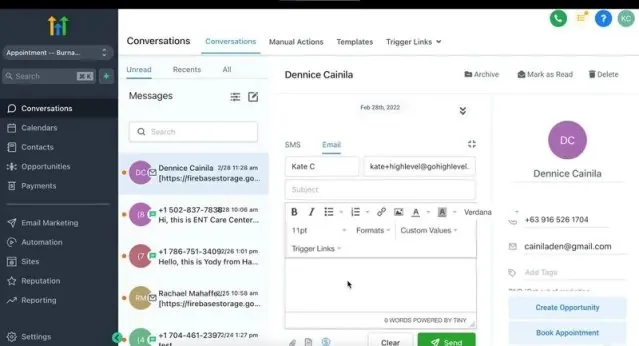
The agent tags the ticket, sets the topic and priority, writes a short summary, and either closes it as resolved or assigns it to the right group. Your team keeps working in Zendesk, Freshdesk, Gorgias, Intercom, HubSpot or GoHighLevel Conversations as they do today.
Which channels and helpdesks can it work with?
The same agent can answer website chat, email, SMS, WhatsApp and phone, and hand off inside Zendesk, Freshdesk, Gorgias, Intercom, HubSpot or GoHighLevel. We connect it through each tool's own API or native AI feature, depending on which one fits your volume and rules.
| Channel | How the agent connects | What to watch |
|---|---|---|
| Website chat and in-app chat | Your helpdesk's messenger widget, or GoHighLevel chat | Customers should be identified (logged in or verified) before account lookups |
| Helpdesk email channel; the agent replies or drafts | Longer messages with several questions in one | |
| SMS | GoHighLevel or Twilio numbers | US texting needs A2P 10DLC registration and consent rules |
| WhatsApp Business Platform through your helpdesk or GoHighLevel | Template rules and per-message fees; see our WhatsApp automation service | |
| Phone | Voice AI on GoHighLevel or a voice platform, with call transfer | Per-minute voice costs and a clear transfer path |
For phone support, voice adds its own costs. HighLevel's AI pricing article, last modified October 29, 2026, lists its Voice AI engine at $0.045 a minute from May 20, 2026, with text-to-speech or speech-to-speech models charged on top, and phone system charges on every call. Our AI voice agent pricing research compares voice platforms in more detail.
How much does an AI customer service agent cost?
Helpdesk AI agents charge per resolution or session: $0.99 per Intercom Fin outcome, $2.00 per pay-as-you-go Zendesk resolution, $0.90 to $1.50 per Gorgias interaction, $49 per 100 Freddy sessions. Our small builds are about $1,000 at the time of writing.
These are the list prices on each vendor's own pricing page, checked October 30, 2026. Seats for your human agents are charged separately on every platform.
| Platform | AI agent price | What is counted | Included |
|---|---|---|---|
| Intercom Fin | $0.99 per Fin outcome | Customer confirms it is resolved, stops asking for help after Fin answers, or Fin completes a workflow (handoffs included); charged once per conversation | With another helpdesk, Fin's help center describes a $49 monthly base plan that includes 50 outcomes; unused outcomes do not roll over |
| Zendesk AI agents | US$2.00 per pay-as-you-go automated resolution; committed resolutions cost less | Resolved without escalation to a person, then verified by a language model | 5 per agent a month on Team plans, 10 on Professional; 10,000 a year cap on allocated resolutions |
| Gorgias AI Agent | $0.90 per interaction on annual plans, $1.00 on monthly, $1.50 overage | A request fully resolved without a person; if an agent replies within 72 hours, it is billed only as a ticket | 30 to 530 AI interactions a month depending on plan |
| Freshdesk Freddy AI Agent | $49 per 100 extra sessions | Each session, resolved or not; one email session is a 72-hour window | First 500 sessions, once per account |
| GoHighLevel Conversation AI | Billed on tokens, or AI Employee Unlimited at $97 a month per sub-account (fair use) | Input and output tokens per conversation | AI Employee Growth ($50 a month) includes 1,000 agent responses |
Our side is simple. The strategy call and audit are free. A small build of two or three automations, such as an FAQ and order-status agent on one channel with a helpdesk handoff, is about $1,000. A larger system with several channels, account lookups and actions is quoted at a fixed price after the free audit. Anything we build is fixed free for 6 months, and monthly support from $200 is optional after that. All of this is at the time of writing. The model, helpdesk and channel fees are billed to your own accounts.
What does 1,000 resolved tickets cost on helpdesk AI versus a custom agent?
At list prices, 1,000 resolved tickets cost $900 to $2,000 on helpdesk-native AI agents. A custom agent's model tokens cost about $150 on Claude Sonnet 5.5 or under $10 on Claude Haiku 5.5, before the build is paid back.
AI cost per 1,000 resolved tickets
This is our own calculation from the pricing pages read on October 30, 2026. It compares only the AI line. Your human agents still need helpdesk seats in both cases, and channel costs (SMS, WhatsApp, phone minutes) are the same either way, so they are left out.
Assumptions for the custom agent (labelled, change them for your case)
- Each AI-handled conversation makes 6 model calls (replies plus lookups).
- Each call sends 6,000 input tokens (instructions, knowledge-base passages, history) and returns 300 output tokens. That is 36,000 input and 1,800 output tokens per conversation.
- The agent resolves 60% of the conversations it handles, so 1,000 resolved tickets means about 1,667 conversations.
- No prompt caching, which would lower the input cost further. Hosting the agent (for example on a self-hosted n8n server) is not included.
The arithmetic
- Claude Sonnet 5.5 ($2 per million input tokens, $10 per million output): 36,000 x $2 / 1,000,000 = $0.072, plus 1,800 x $10 / 1,000,000 = $0.018, so $0.090 per conversation. 1,667 x $0.090 = about $150 per 1,000 resolved.
- Claude Haiku 5.5 ($0.10 input, $0.50 output for prompts up to 100,000 tokens): $0.0036 + $0.0009 = $0.0045 per conversation. 1,667 x $0.0045 = about $7.50 per 1,000 resolved.
- Zendesk pay as you go: 1,000 x $2.00 = $2,000, less any plan allowance (10 agents on a Professional plan include 100 a month, so 900 x $2.00 = $1,800).
- Gorgias: 1,000 x $0.90 = $900 on annual plans, $1,000 on monthly, $1,500 at the overage rate.
- Intercom Fin: 1,000 x $0.99 = $990.
- Freshdesk Freddy: sessions are charged whether or not they resolve, so at the same 60% rate, 1,667 sessions x $0.49 = $817 (after the one-time 500 free sessions).
| Option | Cost per 1,000 resolved tickets | Unresolved conversations charged? |
|---|---|---|
| Zendesk, pay as you go | $2,000 | No |
| Gorgias, overage rate | $1,500 | No |
| Intercom Fin | $990 | No |
| Gorgias, annual plan rate | $900 | No |
| Freshdesk Freddy (60% resolved) | $817 | Yes, per session |
| Custom agent, Sonnet 5.5 tokens | $150 | Yes, tokens are used either way |
| Custom agent, Haiku 5.5 tokens | $7.50 | Yes, tokens are used either way |
Adding the build price back in
A custom agent has a build price that helpdesk AI does not. Spread over 12 months at 1,000 resolved tickets a month, every $1,000 of build price adds $1,000 / 12 = about $83 per 1,000 resolved. Optional support from $200 a month adds $200 per 1,000 at that volume.
The payback test is: build price / ((helpdesk price per resolution minus custom cost per resolution) x resolutions a month). Against Zendesk pay as you go, the saving is $2.00 minus $0.15 = $1.85 per resolution, so at 1,000 a month each $1,000 of build price is paid back in about 16 days ($1,000 / $1,850 a month). Against Intercom Fin the saving is $0.84, so the same $1,000 takes about 5 weeks. At 200 resolutions a month against Fin, it takes about 6 months, and staying on the helpdesk's own agent is usually the better call.
Read this before you switch. Token cost is the small part. The real cost of any AI support agent, native or custom, is connecting it to your systems and keeping its knowledge current. Helpdesk-native agents include reporting, resolution checks and vendor maintenance in their price. If you have a few hundred AI-resolved tickets a month, those extras are worth more than the per-ticket saving.
Which support tickets should you automate first?
Start with frequent, low-risk tickets that need one lookup and one answer: order status, booking changes, policy questions and resend requests. Keep refunds above a limit, complaints, legal, medical and safety issues with people, with the AI only gathering details.
Where each ticket type should start
Pull the last 90 days of tickets from your helpdesk, group them by topic, and score each topic on three things: how often it comes in, what data the answer needs, and what happens if the answer is wrong. This matrix is how we sort them in an audit.
| Ticket type | Data the agent needs | Risk if wrong | Recommended mode |
|---|---|---|---|
| Where is my order? | Order and tracking lookup | Low | Fully automated |
| Hours, shipping, returns policy, how-to | Knowledge base only | Low | Fully automated |
| Reschedule or cancel an appointment | Calendar read and write | Low | Fully automated, with your cancellation rules |
| Resend invoice, receipt or login link | Billing or account lookup, verified identity | Low to medium | Automated after identity check |
| Start a return or exchange | Order data plus policy rules | Medium | Automated inside policy; exceptions to a person |
| Change address, plan or account details | Account write access, verified identity | Medium | Automated with limits, logged |
| Technical troubleshooting | Knowledge base, device or account details | Medium | AI walks through steps, then hands off with notes |
| Refunds, billing disputes, credits | Payment system | High | AI gathers facts and drafts; person approves |
| Complaints, legal threats, medical or safety issues | Full history | High | Straight to a person, with a summary |
Gartner predicted in March 2025 that agentic AI will resolve 80% of common customer service issues without human help by 2029. The word that matters is "common". The rows at the bottom of this table are where your team's judgment earns its keep, and our page on whether an AI agent will replace staff covers what the research says about that.
How do you build an AI customer service agent?
We start with a free audit of your ticket history and tools, pick the ticket types to automate, write the knowledge base and rules, connect the lookups and the helpdesk handoff, test against real past tickets, then launch on one channel and widen it.
- Audit (free). We read a sample of recent tickets, list the top topics, and check which systems have APIs the agent can use.
- Scope and fixed price. You get a written list of ticket types, channels, actions and escalation rules, with one price.
- Knowledge base. We turn your policies and macros into short, single-topic articles the agent can quote. Gaps are listed for you to fill.
- Connections. Order, booking and account lookups through each system's API, built on your helpdesk's AI tools, GoHighLevel, or n8n workflows with an AI model of your choice. Our API integration service covers systems without a ready connector.
- Escalation and tagging. Handoff rules, routing to the right group, and summaries on every ticket.
- Testing. We replay a set of real past questions, including the awkward ones, and check every answer and action before any customer sees it.
- Launch small, then widen. One channel and the safest ticket types first, then more as the numbers hold.
Timelines follow our general ranges: a small build takes days, and a larger build with AI agents takes three to four weeks, as set out on our build timeline page. Waiting for API access and knowledge-base sign-off is usually the slowest part.
How should an AI customer service agent hand a ticket to a person?
It should hand off the moment a customer asks for a person, after two failed attempts, on high-risk topics, or when the customer is upset. The ticket goes to the right team with a summary, and the customer is told what happens next and when.
What happens when the AI hands off
Bad handoffs are the most common complaint about AI support: a loop that never reaches a person, or a person who asks the customer to repeat everything. We design the handoff before the answers.
- Triggers: customer asks for a human; two answers that did not help; topics on the high-risk list; signs of anger or distress; high-value or flagged accounts; anything the agent is unsure of.
- Routing: the ticket is assigned to the right group (billing, technical, returns) with priority set, using your helpdesk's own rules.
- Context: a three-line summary, what the agent already checked, and the full transcript on the ticket.
- Expectation: the customer is told a person will reply and roughly when, based on your business hours. Outside hours, the agent says so plainly.
- No dead ends: every conversation has a path to a person, including on phone, where the agent transfers or books a callback.
How do you keep an AI support agent's answers accurate?
Give it one approved knowledge base, make one person responsible for each topic, update an article the same day a policy changes, and review a sample of AI conversations every week. Unanswered questions become new articles.
Most wrong answers come from out-of-date content. A price changes, a shipping partner changes, a holiday schedule is added, and the agent keeps quoting the old version. What works:
- One source of truth: the help center or knowledge base the agent reads, never a separate document.
- Short articles, one topic each, with the date they were last checked.
- A weekly list of questions the agent could not answer or handed off, reviewed and turned into articles.
- A sample of 20 to 50 AI conversations read each week by someone who knows the product.
- Instructions that tell the agent to say "I don't know" and hand off, instead of guessing.
Keeping AI agents current is part of what support after a build covers, because an agent's answers go out of date when your prices, hours or services change.
How do you measure containment, resolution and CSAT?
Track four numbers from your helpdesk: the share of conversations closed without a person, the share of those that stay closed for seven days, CSAT on AI-closed tickets compared with human-closed ones, and handoff rate by topic.
Vendor "resolution" counts are billing units, and each vendor defines them differently. Intercom counts an outcome when a customer stops asking for help after Fin answers or when Fin completes a workflow, handoffs included. Zendesk counts conversations that were not escalated and that pass a language-model check, with a window of 72 hours on email, 2 hours by default on messaging and the end of the call on voice. Gorgias bills an interaction as a plain ticket if a person replies within 72 hours. None of these tells you whether the customer's problem went away.
| Metric | How to calculate it | Why it matters |
|---|---|---|
| Containment rate | Conversations closed with no human reply / all AI-handled conversations | How much work the agent takes |
| True resolution rate | Contained conversations with no new contact on any channel within 7 days / contained conversations | Catches customers who gave up and came back |
| CSAT gap | CSAT on AI-closed tickets minus CSAT on human-closed tickets, same topics | Shows whether automation is hurting experience |
| Handoff rate by topic | Handoffs / conversations, per ticket type | Shows which topics need better content or rules |
| Wrong-answer rate | Errors found in the weekly sample / conversations sampled | The number that protects your brand |
Should you use your helpdesk's AI agent or a custom one?
Use your helpdesk's own AI agent when volume is modest, answers live in the help center and lookups are supported natively. Choose a custom agent when volume is high, data sits in several systems, or you need control of the model and costs.
| Your situation | Better fit |
|---|---|
| A few hundred AI-resolved tickets a month, answers mostly in the help center | Helpdesk-native agent (Fin, Zendesk AI agents, Gorgias, Freddy) |
| Shopify store already on Gorgias with order actions you need | Gorgias AI Agent, set up and tuned |
| Thousands of resolutions a month and per-resolution fees growing | Custom agent; run the payback test above |
| Data in a CRM, a booking tool and a custom database that the helpdesk cannot reach | Custom agent with API lookups |
| Support runs in GoHighLevel Conversations alongside sales | GoHighLevel Conversation AI, extended with workflows; see our GoHighLevel Voice AI setup for phone |
| Strict rules on where customer data is processed | Custom agent with the model provider and region you choose |
We set up both. Often the right answer is a helpdesk-native agent now and a custom one later, when the numbers justify it. If you are weighing a broader build, our AI agent development service covers agents beyond support.
What are the risks of AI customer service, and how do you reduce them?
The main risks are wrong answers, actions the customer did not ask for, exposure of another customer's data, and claims about the AI that are not true. Each is reduced with identity checks, limited permissions, approved content, handoff rules and honest wording.
US regulators treat AI claims like any other business claim. In August 2025 the FTC sued Air AI, alleging among other things that it claimed its product could replace human customer service representatives. In February 2025 the FTC finalized an order against DoNotPay, which had marketed a "robot lawyer" without testing whether its AI performed like one. In January 2024 the FTC warned AI companies that quietly using customer data for new purposes, such as training models, can break the law. For your support agent, that means: tell customers they are talking to an AI, do not promise what it cannot do, and do not use their conversations for anything your privacy policy does not say.
Texting and calling customers add their own rules on consent and timing, covered in our guide on whether AI calling is legal. Healthcare support needs a HIPAA-ready setup before any patient data reaches the agent.
| Symptom | Likely cause | Fix |
|---|---|---|
| Agent quotes an old price or policy | Knowledge base not updated | Owner per article; update on the day of change; weekly sample |
| Agent invents an answer | No instruction to hand off when unsure; weak retrieval | "Don't know, hand off" rule; shorter articles; test set of tricky questions |
| Customer sees someone else's order | Lookup by email or order number with no identity check | Verify the customer first (logged-in session or one-time code) |
| Customers stuck in a loop | No handoff trigger after failed attempts | Hand off after two failed answers or on request |
| Lookups fail silently | API key expired or rate limit hit | Error alerts, a fallback reply and a handoff |
| AI-resolved tickets reopen | Agent closes too early | Measure 7-day reopen rate; ask "did that solve it?" before closing |
| Monthly AI bill jumps | Per-resolution fees growing with volume, or long prompts | Re-run the cost per 1,000 calculation; trim context; consider custom |
Who owns the AI customer service agent, the data and the accounts?
You do. We build on accounts in your name: your helpdesk, your AI model account and API keys, your automation tool and your CRM. Conversation data stays in your systems, and custom work is handed over as set out in the contract.
That means you can change providers, including leaving us, without rebuilding. Check four things with any agency: whose name the accounts are in, whether you have admin access, whether you can export the data, and whether the contract transfers custom work to you. Our page on who owns automations and data covers each one.
Ready to see which of your tickets an agent could take? Book a free strategy call, or send us the details on the contact page.
Read next:
- resolution vs containment vs deflection rate
- Zendesk AI vs Intercom Fin vs Gorgias pricing compared
- chatbot disclosure laws by market
- Does Autoesta build AI customer service agents?
More questions about AI customer service agents
Is an AI customer service agent worth it for a small business?
It can be, if the same questions arrive every day and someone is answering them by hand. At low volume, your helpdesk's built-in AI agent is usually the cheapest start, because you pay only for resolutions. A small build from us, about $1,000 at the time of writing, suits one channel and a few ticket types. Larger companies follow the same steps with more channels and systems.
Can an AI customer service agent answer the phone?
Yes. The same knowledge base and lookups can run on a voice agent that answers support calls, checks an order or booking, and transfers to a person when needed. Voice adds per-minute costs on top of the model. If the main need is answering every inbound call and routing it, our AI receptionist service is the better starting point.
Why is AI customer service so bad sometimes?
Usually because it was built mainly to deflect tickets. Common causes are no access to real order or account data, out-of-date help articles, no way to reach a person, and closing conversations before the problem is solved. Each of these is a design choice, and each has a fix: lookups, content owners, handoff rules and a seven-day reopen check.
Is AI replacing customer service jobs?
The evidence points to the work changing more than the jobs going. Gartner reported in December 2025 that only 20% of customer service leaders saw AI-driven headcount reduction. In our builds, the agent takes the repeat questions and your team handles exceptions, complaints and anything that needs judgment, with a summary waiting on every ticket it passes on.
Can you build an AI customer service agent with n8n?
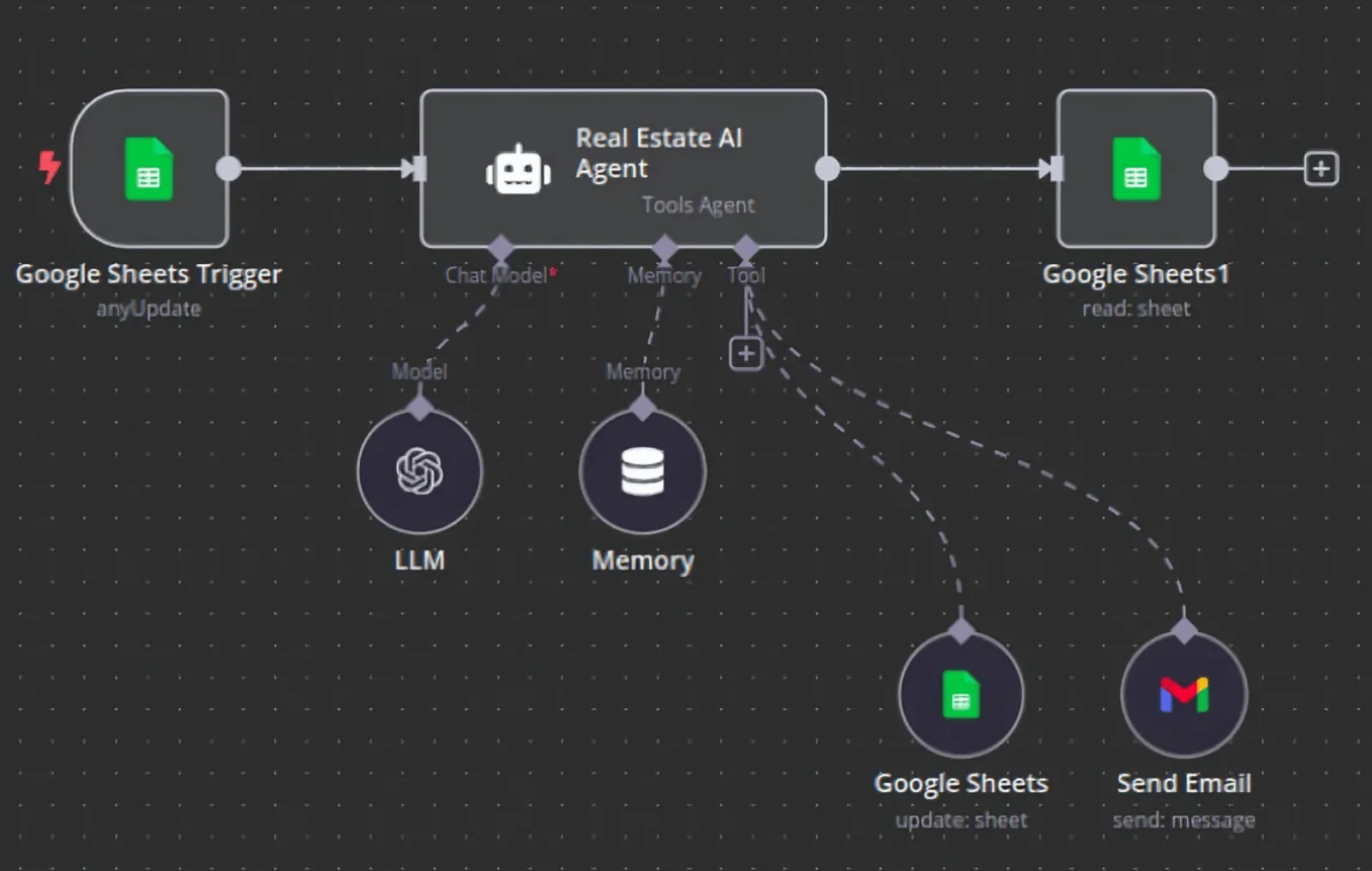
Yes. n8n has an AI agent node that can call tools, such as an order lookup or a helpdesk API, and it can be self-hosted so executions are not billed per task. It suits teams with several systems to connect or high volume. You still need a knowledge base, handoff rules and monitoring, which take more time than the workflow itself.
Does it work on WhatsApp?
Yes, through the WhatsApp Business Platform, connected via your helpdesk or GoHighLevel. Meta's message fees vary by country and message type, so check current rates for your countries before you plan volume. The agent uses the same knowledge base and handoff rules as your other channels.
Do customers have to be told they are talking to AI?
We build every agent to say it is an AI at the start and never to claim to be a person. The FTC treats misleading claims about what AI can do as deceptive, and some laws require bot disclosure in certain situations. Telling people up front also sets the right expectation and makes asking for a human feel normal. Check the rules in your markets with your own counsel.
Can the AI agent issue refunds?
It can, but we rarely recommend it without limits. A common setup lets the agent approve refunds that fall clearly inside policy and below an amount you set, and sends anything larger or unusual to a person with the facts already gathered. Every refund action is logged on the ticket so your team can audit it.
What happens when the AI gives a wrong answer?
The weekly sample and the reopen check catch most of them. We trace each one to its cause, usually a missing or outdated article, fix the content or rule, and add the question to the test set so it is checked before every future change. Fixes to anything we built are free for six months.
What do we need to prepare before a build?
Admin access to your helpdesk and the systems the agent will read, such as your store, calendar or CRM; an export of recent tickets; your current policies and macros; and a person who can approve answers. Having those ready on day one removes most of the waiting that slows these projects down.
Sources and further reading
- Intercom pricing: Fin AI Agent per outcome and seat prices, checked October 30, 2026
- Zendesk pricing: plans and automated resolutions, checked October 30, 2026
- Zendesk help: about automated resolutions, checked October 30, 2026
- Gorgias pricing: AI Agent interactions, checked October 30, 2026
- Freshdesk pricing: Freddy AI Agent sessions, checked October 30, 2026
- HighLevel: AI product pricing, modified October 29, 2026, checked October 30, 2026
- Claude API pricing, checked October 30, 2026
- Gartner, agentic AI will resolve 80% of common customer service issues by 2029, March 5, 2025
- Gartner, AI spending by customer service leaders up 38%, August 26, 2026
- Gartner, only 20% of customer service leaders report AI-driven headcount reduction, December 2, 2025
- FTC, FTC sues to stop Air AI from using deceptive claims, August 25, 2025
- FTC, FTC finalizes order with DoNotPay, February 11, 2025
- FTC, AI companies: uphold your privacy and confidentiality commitments, January 9, 2024
