What is WhatsApp automation for business, and what do we build?
WhatsApp automation for business means your CRM and an AI agent send reminders, answer questions and book appointments on WhatsApp without someone typing each reply. We build it on Meta's official WhatsApp Business Platform, connected to your CRM and n8n, on your own accounts.
WhatsApp work is one part of our AI automation services. A typical build has four parts that work together:
- Templates for messages you start. Appointment reminders, order and job updates, payment links and re-engagement offers, each written as a Meta template in the right category so it is approved and priced correctly.
- An AI agent for messages customers start. It answers questions about your services, prices and hours from your own information, collects details, books into your calendar and hands the chat to a person when it should.
- The CRM connection. Every WhatsApp chat lands on the contact record next to calls, texts and emails, with tags and pipeline stages updated automatically. Most of our clients run this on GoHighLevel; see our CRM automation work for other CRMs.
- The workflow layer. n8n or GoHighLevel workflows decide what happens next: who gets alerted, which follow-up runs, what is written back to your booking or job system.
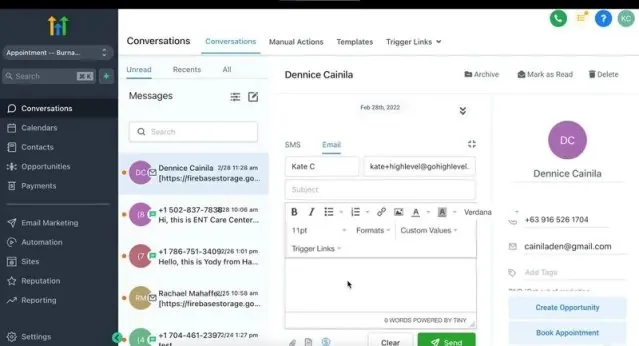
We have built WhatsApp into client systems before: the Realeshome real estate lead system includes a WhatsApp chatbot and auto-responder, and the Smile Bright dental CRM sends WhatsApp confirmations alongside SMS reminders. This page covers the WhatsApp side on its own: what Meta charges, what its rules allow, and how we put it together.
Is the WhatsApp Business API free, and how does Meta charge?
No. Meta charges per delivered message on the WhatsApp Business Platform, priced by category and by the customer's country code. Customer messages are free, and each phone number gets 1,000 free service replies a month. Templates you send are always billable.
Meta's pricing documentation (checked October 30, 2026) sets out how the bill works:
| Message type | What it is (Meta's definition) | How it is charged |
|---|---|---|
| Marketing | Template messages "for promotional objectives" | Per delivered message, highest rate |
| Utility | Template messages "for transactional or informational objectives" | Per delivered message; volume discounts only at high volume |
| Authentication | Template messages "for identity verification objectives" | Per delivered message; some markets have a higher international rate |
| Service | Any non-template reply, written by a person or by a third-party AI | First 1,000 per number per month free, then charged from October 1, 2026 |
| Meta Business Agent | Replies written by Meta's own AI agent | $2.00 per 1 million tokens, one global rate |
Four rules decide most bills:
- The 24-hour customer service window. When a customer messages you, a 24-hour window opens and resets each time they message or call. Inside it you can send free-form replies. Outside it you can only send approved templates.
- Utility inside the window is billed again. Meta made utility templates sent inside an open window free from July 1, 2025, and charges for them again from October 1, 2026.
- The free entry point window. If a customer messages you from a Click to WhatsApp ad and you reply within the service window, a window of up to 7 days opens in which marketing, utility, authentication and service messages are free. Meta Business Agent messages are still charged.
- Volume tiers start late. In the USD tier sheet, utility stays at the list rate up to 80,000 messages a month in North America and 100,000 in the UK and the UAE, and up to 25,000,000 in India. Most businesses never reach a discount.
Meta can only change prices on January 1, April 1, July 1 or October 1, with at least a month's notice for rate changes. Our WhatsApp message rates by country research page tracks the full rate card and its dated changes.
What does WhatsApp automation cost per month in the US, UK, UAE and India?
For 2,000 reminders, 500 promotions and about 400 inbound chats a month, Meta's charge is about $21 in the US, $70 in the UAE, $89 in the UK and $10 in India, on rates effective October 1, 2026. Your customers' country changes the bill most.
Meta charge for one illustrative month
This is our own calculation from Meta's USD list-rate sheet, "effective October 1, 2026", downloaded from the pricing page on October 30, 2026. The business is illustrative, not a client. Assumptions:
- 2,000 utility templates a month (appointment reminders and confirmations).
- 500 marketing templates a month (one small campaign).
- 400 inbound chats with an average of 4 business replies each, so 1,600 service messages. The first 1,000 are free, so 600 are charged.
- One phone number, all customers in the same country, no ad-started chats, no volume discounts (none apply at these volumes).
| Market | Utility rate | Marketing rate | 2,000 utility | 500 marketing | 600 paid service | Meta total a month |
|---|---|---|---|---|---|---|
| US and Canada (North America) | $0.0034 | $0.0250 | $6.80 | $12.50 | $2.04 | $21.34 |
| United Kingdom | $0.0220 | $0.0635 | $44.00 | $31.75 | $13.20 | $88.95 |
| United Arab Emirates | $0.0157 | $0.0576 | $31.40 | $28.80 | $9.42 | $69.62 |
| India | $0.0014 | $0.0118 | $2.80 | $5.90 | $0.84 | $9.54 |
Arithmetic, US row: 2,000 x $0.0034 = $6.80; 500 x $0.025 = $12.50; 600 x $0.0034 = $2.04; total $21.34. Service messages use the same rate as utility in all four markets on this sheet. The UK costs about four times the US for the same month, almost all of it from the utility line, so a UK clinic pays more for reminders than for promotions. Indian businesses should note that, for eligible solution providers and direct businesses in India, Meta will stop delivering messages from non-INR messaging accounts from January 1, 2027, so those accounts move to the INR rate card.
If Meta's own AI agent writes the replies
The 1,600 replies above are priced as service messages because they come from a person or a third-party AI. If the same replies came from Meta Business Agent, they would be charged by token. Meta's pricing page says one message "typically consumes 20,000 to 25,000 tokens", about 4 to 5 cents each. That puts 1,600 replies at roughly $64 to $80 a month (1,600 x $0.04 and 1,600 x $0.05), against $2.04 of service charges in the US. The model fees of a third-party AI are paid to that AI provider and sit on top of the service line; we estimate them for your volume on the free call.
What GoHighLevel adds on top
HighLevel's WhatsApp pricing, billing and rebilling guide (modified September 22, 2026, checked October 30, 2026) charges the agency $10 a month per WhatsApp-enabled sub-account and applies a default usage multiplier of 1.05x to cover payment processing. On the US example that is about $21.34 x 1.05 + $10, or roughly $32 a month. The guide's own US rate table is labelled as running through September 30, 2026, so check the sub-account billing screen before quoting a client.
How much does a WhatsApp AI agent or chatbot cost: a tool or a done-for-you build?
Software tools charge a monthly subscription on top of Meta's message fees; done-for-you means someone builds the agent into your CRM for a one-off price. At the time of writing, we charge about $1,000 for a small build of two or three workflows.
Here is what three common tools publish on their own pricing pages, checked October 30, 2026. None of them includes Meta's message fees.
| Tool | Published price | What it includes | Meta fees |
|---|---|---|---|
| respond.io | $99, $199 or $349 a month on monthly billing ($79, $159 or $279 billed annually) | 5 or 10 users, 1,000 monthly active contacts to start; AI Agents from the Growth plan | "WhatsApp fees are not included in any respond.io subscription" |
| WATI | Rs 2,699, Rs 5,799 or Rs 16,799 a month, billed quarterly (shown in INR to us from India) | 3 to 5 users, 1 to unlimited Astra AI agents, 2,000 to 20,000 AI credits | Charged per template message on top |
| Twilio | $0.005 per message, inbound or outbound; $0.001 per failed message | The API only; you build the agent and the inbox yourself | Passed through on top |
| HighLevel | $10 a month per WhatsApp sub-account, plus usage at a default 1.05x | WhatsApp inside the CRM inbox, workflows and Conversation AI | Rebilled through HighLevel |
On the US example above, Twilio's fee would be about $28.50 a month (2,000 + 500 + 1,600 outbound plus an assumed 1,600 inbound customer messages, 5,700 x $0.005), before Meta's $21.34. A tool is the cheaper route if someone on your team has the time to set up templates, write the agent's instructions, connect the CRM and maintain it. Our service is for businesses that want the system built and running without that work.
What we charge, at the time of writing
- Strategy call and audit: free.
- Small build: about $1,000 for two or three workflows or automations, for example a reminder flow, an inbound AI agent and a hand-off to your team.
- Larger systems: a fixed price quoted after the free call or audit, for example several countries, an agent connected to booking and payments, or a CRM migration.
- Fixes: anything we built is fixed free for 6 months. Monthly support from $200 is optional after that.
Meta's message fees, HighLevel or tool subscriptions and AI model usage are paid by you directly to those vendors. Our software costs on top of a build page lists the usual ones.
Can a business still use an AI agent on WhatsApp after Meta's 2026 AI policy?
Yes, for your own business. Meta's terms bar providers whose main product is a general-purpose AI assistant. An AI agent that answers your customers about your services remains allowed, and Meta says a third-party AI can write service replies.
The rule sits in section 4.7, "AI Providers", of the Meta Terms for WhatsApp Business Platform (last modified September 23, 2026, checked October 30, 2026). It says providers and developers of AI technologies "are strictly prohibited from accessing or using the WhatsApp Business Platform, whether directly or indirectly, for the purposes of providing, delivering, offering, selling, or otherwise making available such technologies when such technologies are the primary (rather than incidental or ancillary) functionality being made available for use, as determined by Meta in its sole discretion". HighLevel's changelog dates this update to January 15, 2026.
Meta has since reopened access for general-purpose AI providers in some markets, at a separate AI-provider rate: Italy from February 16, 2026, the rest of the EEA and Brazil from March 11, and Türkiye from October 15, according to its AI providers pricing page (checked October 30, 2026). The full rule, the regulator actions and the rates are in our FAQ on whether WhatsApp is banning AI chatbots.
What this means in practice:
| Use | Allowed? | Why |
|---|---|---|
| An agent that answers your customers, books appointments and qualifies leads for your business | Yes | The AI is incidental to your business; Meta's pricing page says service replies "can be powered by a 3rd-party AI solution or people" |
| A public "ask me anything" assistant offered on WhatsApp as the product itself | No | The AI is the primary functionality being made available |
| Using WhatsApp chat data to train or improve a general AI model | No | Section 4.7 bars it, with one exception: fine-tuning a model for your exclusive use |
HighLevel says in its WhatsApp policy update note that Conversation AI "remains fully compliant with these new terms", runs within HighLevel's infrastructure and "does not share or train on your WhatsApp data." For builds on n8n, we keep the agent scoped to your business, use model providers whose terms exclude training on your data, and do not export chat history for training. Meta decides what counts as "primary" in its sole discretion, so we keep every agent clearly business-specific.
Should you use the WhatsApp Business app, the API, or both?
Use the free Business app if one or two people reply by hand. Use the API through a CRM once you need templates, an AI agent or a team inbox. Coexistence lets you keep the app on the same number while the API handles automation.
App, API, or both on one number
Meta's coexistence documentation (checked October 30, 2026) explains how an existing Business app number connects to the Cloud API. Messages are mirrored between the app and the API, and up to 180 days of one-to-one chat history can be synced. It needs Business app version 2.24.17 or later. The trade-offs are real:
- Throughput on a coexistence number is fixed at 20 messages per second.
- Group chats are not synced, broadcast lists are disabled and become read-only, and features such as disappearing and view-once messages, live location and catalogs are not supported on the API side.
- Linked companion devices are removed at onboarding and must be re-linked.
In GoHighLevel, the coexistence changelog says you connect under Settings, then WhatsApp, then Sign up with Facebook, pair the app by QR code and import up to six months of chat history. It lists Nigeria and South Africa as excluded, allows one phone number per Business app account, and keeps template sending in the CRM and business profile edits in the app.
How do we build a WhatsApp AI agent with n8n and GoHighLevel?
We map your conversations, set up the Meta business portfolio and number, write and submit templates, build the agent with your own information, connect it to the CRM and calendar, then test with real scenarios before going live. Small builds take days.
How a WhatsApp AI agent build runs
- Free call and audit. We list the messages you send today, the questions customers ask most, and the countries they are in, then price it.
- Accounts. Your Meta business portfolio, WhatsApp Business account and phone number, created or verified in your name. Business verification also raises your messaging limit (see the next section).
- Templates. We write reminder, update and offer templates in the right categories and submit them to Meta. A reminder sent as marketing costs more in every market above. In GoHighLevel we use the rebuilt WhatsApp template builder with per-contact media, and for time-boxed promotions the limited time offer template.
- The agent. In GoHighLevel we use Conversation AI, which HighLevel has enabled on the WhatsApp channel. For agents that need to call other systems, we build them in n8n with its WhatsApp Trigger and WhatsApp Business Cloud nodes, a language model, and tools for your calendar, CRM and knowledge base.
- Hand-off. Rules for when the agent stops and a person takes over, and an alert so that person sees it.
- Testing and go-live. Real scenarios, wrong answers, opt-outs and out-of-window replies, then a watched launch.
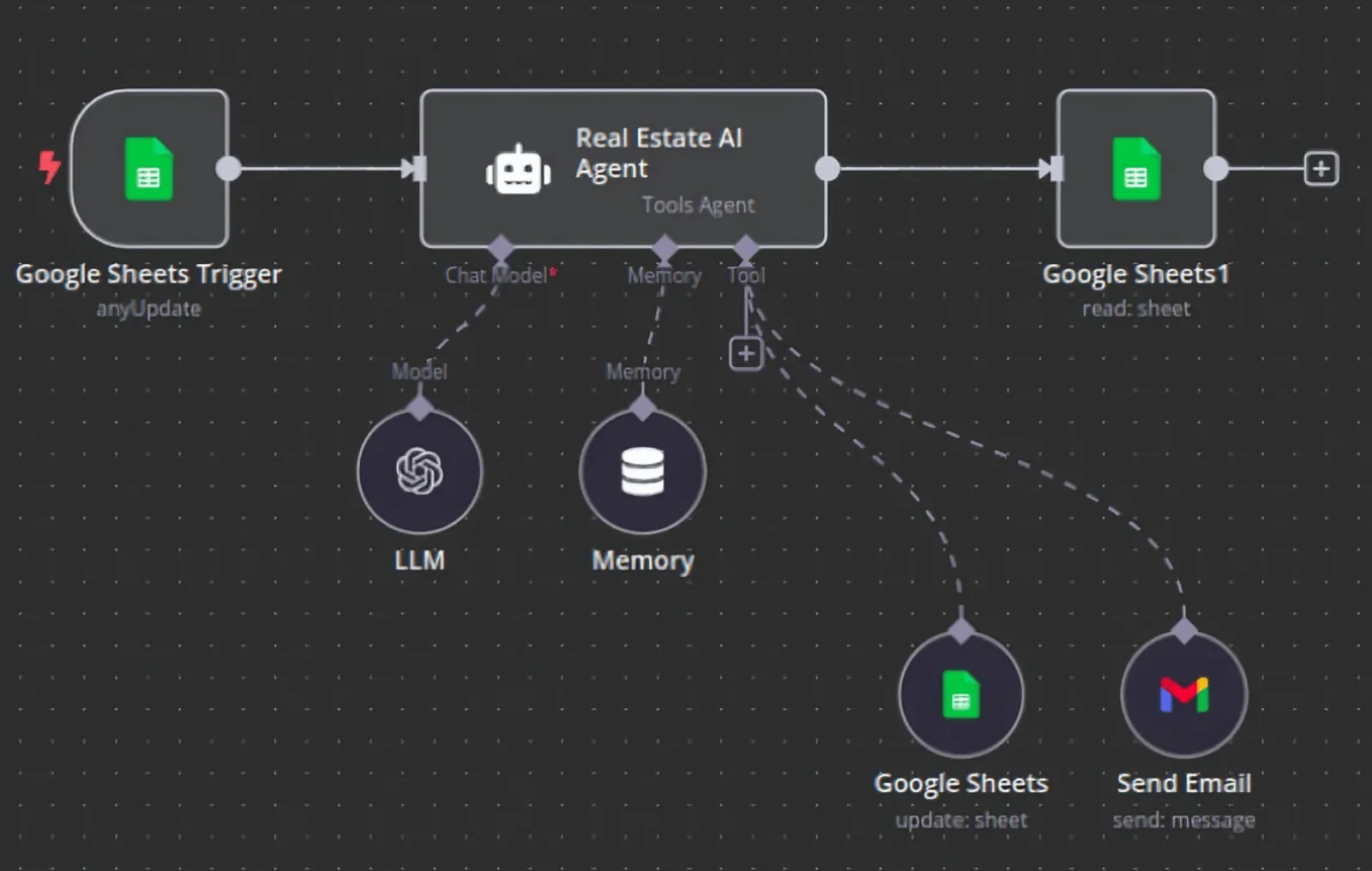
Two details from the n8n WhatsApp Trigger documentation catch most first-time builds: WhatsApp allows only one webhook per app, so the test URL overwrites the production URL, and Meta only sends webhooks to apps subscribed to your WhatsApp Business account. If the agent should also answer website chat, Instagram and Facebook, our AI chat agent service runs the same agent across channels.
How many WhatsApp messages can you send, and what are the opt-in rules?
New business portfolios can message 250 unique customers outside the service window in a rolling 24 hours, rising to 2,000 after business verification and then automatically to 10,000, 100,000 and unlimited. Every customer must first opt in to messages from your business by name.
Messaging limits per business portfolio
Meta's messaging limits page (checked October 30, 2026) sets the limit per business portfolio, shared by all its phone numbers. To move past 2,000 you need high-quality messages and to have used at least half your current limit in the last 7 days; the next level then arrives within 6 hours. Replies inside an open service window do not count toward the limit.
Meta's opt-in rules require that the person gave you their number and agreed to receive messages, that the opt-in "clearly state the business's name", and that you follow applicable law. The opt-in can be collected on a website form, by SMS, by phone or on paper, and it does not have to mention WhatsApp. Meta recommends clear opt-out instructions per message type, and customers can also block marketing from a business inside WhatsApp. We record consent on the contact in your CRM and stop sends on opt-out; what happens when a contact replies STOP explains the GoHighLevel side.
When is WhatsApp the right channel, and when is it not?
WhatsApp fits when your customers already use it, when chats need photos, documents or buttons, and when you sell across countries. SMS or email can be cheaper for one-way reminders in markets with high utility rates, such as the UK, so compare before you switch.
| Situation | Better fit | Reason |
|---|---|---|
| Customers in the UAE, India or other markets where they already message businesses on WhatsApp | Replies and bookings happen where the customer already is | |
| Two-way chat with photos, PDFs, quotes or payment links | Rich media and buttons in one thread on the contact record | |
| US reminders at volume | WhatsApp or SMS | US utility is $0.0034; SMS needs A2P 10DLC registration, see our A2P 10DLC guide |
| One-way UK reminders | Compare first | UK utility is $0.022 per message, the highest of the four markets above |
| A public general-purpose chatbot | Not WhatsApp | Barred by section 4.7 of Meta's terms |
| Marketing to people who never opted in | No channel | Meta's opt-in rules and local law both apply |
In the Realeshome and Smile Bright builds, WhatsApp runs beside SMS, email and AI calling on the same CRM contact. See reducing no-shows for how the reminder side is built.
What goes wrong with WhatsApp automation, and how do we fix it?
Most failures are silent: templates rejected or recategorised, free-form replies blocked outside the 24-hour window, a messaging limit reached, or webhooks that stopped arriving. Each has a clear cause and a fix we build in from the start.
| Symptom | Likely cause | Fix |
|---|---|---|
| A reminder never arrives | A free-form message was sent outside the 24-hour window | Send an approved utility template outside the window; free-form text only inside it |
| Reminders cost more than expected | Template approved as marketing | Rewrite as purely transactional and resubmit as utility |
| Campaign stops partway through | Messaging limit reached for the portfolio | Verify the business, spread sends across days, keep quality high |
| Service replies stop after the 1,000th | No payment method on file once the free tier is used | Add a payment method in Meta or the CRM billing |
| n8n agent receives nothing | Test webhook overwrote production, or the app is not subscribed to the WhatsApp Business account | Publish one URL, subscribe the app, test with a real message |
| Agent invents prices or policies | Instructions too loose, no source data | Answer only from your knowledge base and hand off when unsure |
| Customer complaints or blocks rise | Too many promotions or weak opt-in | Cut marketing frequency, honour opt-outs, check consent records |
For a related HighLevel change, see HighLevel's notice on moving WhatsApp marketing to MM Lite; we check it on every GoHighLevel WhatsApp account we take on.
Who owns the WhatsApp account, number and data?
You do. The Meta business portfolio, WhatsApp Business account, phone number, templates, CRM, n8n workflows, API keys and chat history are all created in or moved to your name. We work with access you grant and can remove.
That matters on WhatsApp more than most channels, because the phone number's quality rating and messaging limit belong to the business portfolio that holds it. If an agency holds the portfolio, leaving the agency can mean losing the number's history. We hand over every login, document how the system works, and you can switch providers without rebuilding. Our general policy is on who owns the automations and data. To see what your own setup would need, book a free strategy call.
Read next:
- is WhatsApp banning AI chatbots?
- step-by-step n8n WhatsApp agent guide
- why WhatsApp templates get rejected
- Does Autoesta build WhatsApp AI agents?
More questions about WhatsApp automation
How much does a WhatsApp chatbot for business cost?
There are three parts: Meta's per-message fees (about $21 a month in the US for our example volume), a software or CRM subscription (from $10 a month per HighLevel sub-account to $99 to $349 a month on respond.io), and the build. At the time of writing we charge about $1,000 for a small build of two or three workflows, with the audit free.
Is the WhatsApp Business app free?
Yes, the WhatsApp Business app is free to download and use for replying by hand. The WhatsApp Business Platform, which CRMs and AI agents use, is the paid part: Meta charges per delivered template message, and service replies above 1,000 a month per number are charged from October 1, 2026.
Can I connect ChatGPT or another AI model to WhatsApp Business?
Yes, if the model powers an assistant for your own business, such as answering your customers and booking appointments. What Meta's terms bar is offering a general-purpose AI assistant as the product itself. WhatsApp chat data also may not be used to train general AI models, except to fine-tune a model for your exclusive use.
Can I build a WhatsApp AI agent in n8n?
Yes. n8n has a WhatsApp Trigger node for incoming messages and a WhatsApp Business Cloud node that sends messages and templates and handles media. An AI Agent node with a language model and tools sits between them. Watch two traps: one webhook per Meta app, and the app must be subscribed to your WhatsApp Business account.
Does GoHighLevel work with WhatsApp?
Yes. HighLevel offers WhatsApp inside the sub-account for $10 a month plus usage, with templates, workflows, the Conversations inbox and Conversation AI on the WhatsApp channel. It also supports coexistence, so you can keep using the WhatsApp Business app on the same number. HighLevel rebills Meta's fees with a default 1.05x multiplier.
What is the 24-hour rule on WhatsApp?
When a customer messages your business, a 24-hour customer service window opens and resets each time they message or call. Inside it you can reply with free-form messages. Once it closes, you can only send pre-approved template messages, which are charged by category. Your automation has to know which side of the window each message is on.
What is Meta Business Agent?
It is Meta's own AI agent for WhatsApp, set up from the WhatsApp Business app, that answers customers, collects details and hands chats to people. Meta charges its replies by token at $2 per million tokens, which Meta estimates at about 4 to 5 cents per message. Replies from a third-party AI are charged as service messages instead.
Can I automate WhatsApp without the API?
The WhatsApp Business app has basic built-in tools for one person replying on a phone. Anything that sends at volume, connects to a CRM or runs an AI agent needs Meta's WhatsApp Business Platform, directly or through a provider. We do not build on tools that drive WhatsApp Web from a script, because they sit outside Meta's platform.
How many messages can I send per day on the WhatsApp API?
New business portfolios start at 250 unique customers in a rolling 24 hours for messages outside the service window. Verifying your business, or sending 2,000 good-quality messages in 30 days, raises it to 2,000. After that it scales automatically to 10,000, 100,000 and unlimited when quality stays high and you use at least half your limit.
Do customers have to opt in before I message them on WhatsApp?
Yes. Meta requires that the person gave you their number and agreed to receive messages from your business, with the business named in the opt-in. It can be collected on a web form, by SMS, by phone or on paper, and must meet local law. We store consent on the CRM contact and stop sending when someone opts out.
How long does it take to set up WhatsApp automation?
A small build of two or three workflows takes days once we have access. The waiting is usually outside our control: Meta business verification, template approvals and getting logins to your existing tools. Larger systems with several countries or a booking-connected agent are planned on the free call, and we give the timeline with the fixed price.
Sources and further reading
- Meta for Developers, Pricing on the WhatsApp Business Platform, with the linked USD list-rate and volume-tier sheets "effective October 1, 2026", checked October 30, 2026.
- Meta for Developers, Messaging limits, checked October 30, 2026.
- Meta for Developers, Get opt-in for WhatsApp, checked October 30, 2026.
- Meta for Developers, Onboarding WhatsApp Business app users (coexistence), checked October 30, 2026.
- Meta, Meta Terms for WhatsApp Business Platform, section 4.7, last modified September 23, 2026, checked October 30, 2026.
- WhatsApp Business, Meta Business Agent, checked October 30, 2026.
- HighLevel help, WhatsApp pricing, billing and rebilling guide, modified September 22, 2026, checked October 30, 2026.
- HighLevel changelog, WhatsApp policy update: Business Solution Terms and AI use and WhatsApp coexistence expanded global rollout, checked October 30, 2026.
- n8n docs, WhatsApp Trigger node and WhatsApp Business Cloud node, checked October 30, 2026.
- Pricing pages: respond.io, WATI, Twilio WhatsApp, checked October 30, 2026.
