Can GoHighLevel work as dental appointment reminder software?
Yes, GoHighLevel can send appointment confirmations, reminders and no-show follow-ups by SMS and email, and it handles patient replies in one inbox. What it does not do out of the box is read your practice management schedule, so a dental practice needs a plan for keeping the two in sync.
That last point decides most of the outcome. Dedicated dental reminder tools are built around the schedule in Dentrix, Open Dental, Eaglesoft or similar software. GoHighLevel is a general CRM and automation platform, so it starts from its own calendar. If patients book through a GoHighLevel calendar, the reminders are simple. If the front desk books in the practice management system and GoHighLevel never hears about it, the reminders have nothing to fire on.
What GoHighLevel does well for a practice is everything around the appointment. A booking triggers a confirmation. A workflow waits until a set time before the visit and sends a reminder. A patient's reply lands in the same conversation thread as earlier messages. A missed appointment starts a rebooking sequence. Those pieces are documented in HighLevel's own support portal, and we build them together rather than one at a time. We cover the wider system in our GoHighLevel for dentists guide.
Three questions decide whether this route suits a practice:
- Where do appointments get created today: a website calendar, the phone, or the practice management system?
- Who at the front desk will own the replies and the no-show list every day?
- Does the practice have a written process for text consent and privacy, or will one need to be created?
The sections below answer each of these, then compare the approach with dedicated dental reminder tools so you can decide with the trade-offs in view.
What reminder cadence works for a dental practice?
A sensible starting cadence is an instant confirmation, a confirm-or-reschedule text two to three days out, a short text the day before, and an optional message a couple of hours before the visit. Treat it as a starting point and adjust it against your own show rates.
The dental reminder cadence
We do not have a universal figure for the "best" number of touches, and we would not trust one that claims to. The right cadence depends on how far ahead your patients book (a hygiene recall booked six months ago behaves differently from a same-week crown seat), how easily a slot can be refilled, and how many messages your patients will tolerate. This table is the layout we start from, then tune.
| Touch | When | Channel | Job it does |
|---|---|---|---|
| Booking confirmation | Immediately after booking | SMS and email | Date, time, address and a reschedule link, so the patient has it in writing |
| Confirm request | 2 to 3 days before | SMS first, email as backup | Ask for a reply or a tap, early enough that the slot can be refilled if the answer is no |
| Day-before reminder | About 24 hours before | SMS | Time, address, arrival note, and how to cancel or move it |
| Same-day nudge | A couple of hours before | SMS | Optional. Useful for early appointments and for new patients who are still finding the office |
| Missed-visit message | Same day, after the appointment time passes | SMS | Offer a new time. Covered in the no-show section below |
Two design choices matter more than the exact hours. First, schedule every reminder relative to the appointment ("24 hours before"), never at a fixed clock time. A patient who booked three weeks ago and one who booked this morning then both get correctly timed messages. Second, decide what happens when a booking is made inside a reminder window. A visit booked the evening before should not receive a "3 days before" message that has already passed. HighLevel's wait step lets you choose what happens when that time has already gone by, including skipping outbound messages until the next wait step.
Keep the message count in mind for consent reasons too. We come back to that in the compliance section, because a five-touch sequence in one week has legal implications a two-touch sequence does not.
For the general reminder principles that apply to any appointment business, see our appointment booking automation guide. This page is the dental-specific version.
How do you build the reminder workflow in GoHighLevel?
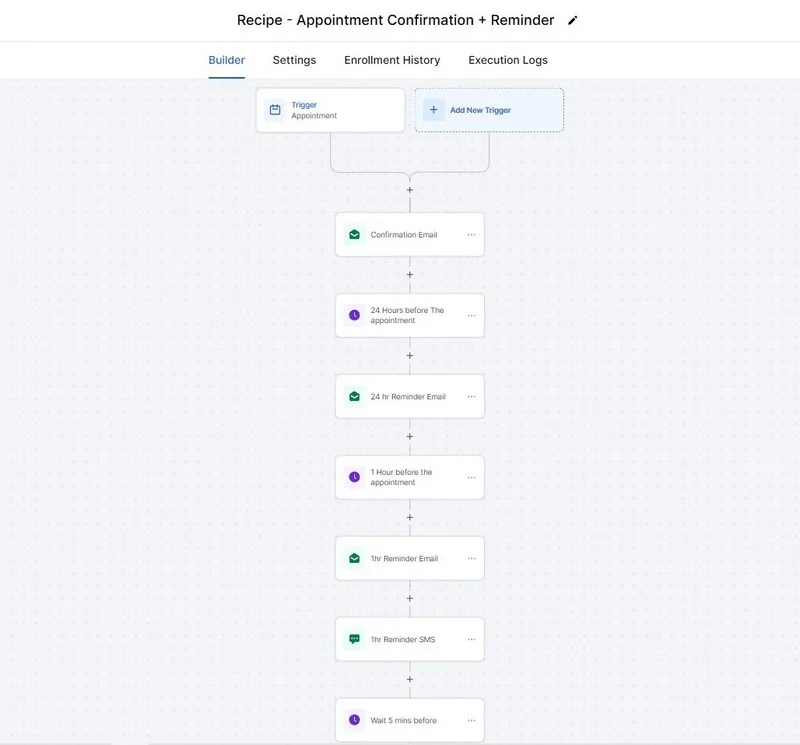
Use the appointment as the trigger, set the event start date, then chain wait steps that pause until a set time before the visit and send a message after each wait. HighLevel also has built-in calendar notifications for simple confirmation and reminder texts.
How the reminder workflow branches
There are two ways to do this inside HighLevel, and the choice matters. The calendar's own notification settings can send a booking confirmation, a reminder, a reschedule notice and a follow-up by email, SMS, WhatsApp or in-app message, with timing you set for reminders and follow-ups. That is enough for a single-dentist practice with one reminder. Workflows are the better fit once you need conditions: different messages for new and existing patients, different timing for long appointments, or a stop when the patient replies.
A workflow-based build looks like this:
- Trigger on the appointment. Use the Appointment Status trigger filtered to the specific calendar (for example the hygiene calendar) so a recall booking and a new-patient exam do not share one sequence by accident.
- Send the confirmation. Text and email, with the practice name, date, time, address and a reschedule link.
- Set the event start date if the appointment time is not already available to the workflow, then use the Event/Appointment Time wait type to pause until the moment each reminder is due.
- Send the confirm request. Ask for a reply, and add a tag such as "awaiting-confirmation" so the front desk can see who has not answered.
- Branch on the reply. A confirmation updates the appointment status. A request to move or cancel goes to a person. No reply moves to the next reminder.
- Handle the past-date case. Choose what the wait step does when the reminder time has already passed, so late bookings do not receive stale messages.
- Stop on cancel, reschedule or STOP. Cancelled and rescheduled contacts should exit the sequence, and a patient who texts STOP must be muted on SMS.
The failure we design against most is overlap. Practices that add a second automation over time, such as a review request or a recall message, often end up with two workflows texting the same patient about the same visit. If you want the trigger mechanics explained in more detail, our article on workflows, triggers and campaigns in GoHighLevel covers where each one fits.
How do confirmations work, and what happens when a patient does not reply?
A confirmation is a text asking the patient to reply or tap to confirm, and a workflow that listens for that reply and updates the appointment status. When there is no reply, the sequence should escalate to a second text and then to a call from the front desk, not keep waiting.
HighLevel's Customer Replied trigger can filter on the text of the reply. Its Exact Match Phrase filter fires only when the reply matches what you specify, and Contains Phrase fires when the reply includes certain words. A common pattern is to ask patients to reply "C" to confirm. The workflow then updates the appointment to Confirmed, removes the "awaiting-confirmation" tag and stops further reminder pressure.
The trigger also has an Intent Type filter that categorizes replies, for example as a positive response, a complaint or a question. We use that only to route, never to act. A reply the software labels as positive can still be "yes, but can we move it," and a label wrongly applied to a patient who is upset about a bill is worse than no label. Anything that is not an exact confirmation goes to a person.
What to do with silence is a practice decision rather than a software one:
- Most visits: two text attempts, then a task for the front desk to call the morning before.
- High-value or long appointments: add a call earlier, since a missed hour of chair time is expensive to replace.
- New patients: confirm by both text and email, and include how to find the office and what paperwork to bring.
Some practices release unconfirmed slots to a waitlist. That is a policy choice with patient-experience costs, so decide it deliberately and word the confirm request so a patient knows what a non-reply means. Outbound calling to confirm is possible with an AI calling agent, which carries its own consent rules, so we keep human calls for high-stakes cases.
How do two-way text replies work for patients?
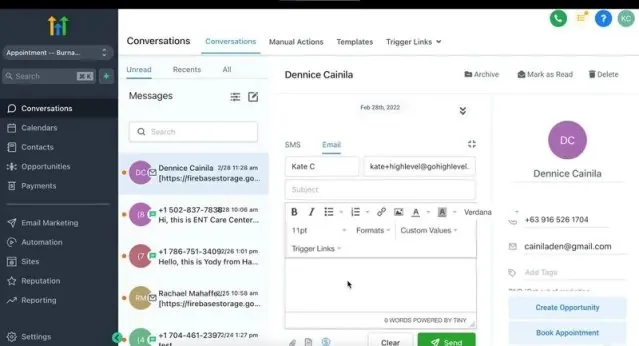
Patient replies arrive in HighLevel's Conversations inbox on the same contact record as the reminders that prompted them, so the front desk sees the whole thread. Replies can also trigger workflows, but anything beyond a simple confirmation should reach a person.
Two-way texting sounds like a feature and behaves like a workload. Patients reply "running 10 minutes late," "can I bring my daughter," "I need to cancel," and photographs of insurance cards. A reminder system that cannot receive those replies produces angry calls. One that receives them and nobody reads them is worse, because the patient believes they have told the office.
When we set this up, the rules we agree with the practice before anything is switched on are:
- Who reads the inbox during open hours, and who covers lunch and the last hour of the day.
- What the reminder number does after hours: an automatic "we will reply at 8am" message, or a route to an AI chat agent limited to logistics questions.
- Which words always go to a human, such as pain, swelling, bleeding, emergency, or any complaint.
- Whether replies from a shared family phone are matched to the right patient.
The last item is a genuine limitation. A parent who books for three children often uses one mobile number, so "C" from that phone may refer to any of them. Design the confirm request so each appointment gets its own message and its own reply, and tell the front desk not to assume a single "yes" covers every visit.
How should you handle dental no-shows in GoHighLevel?
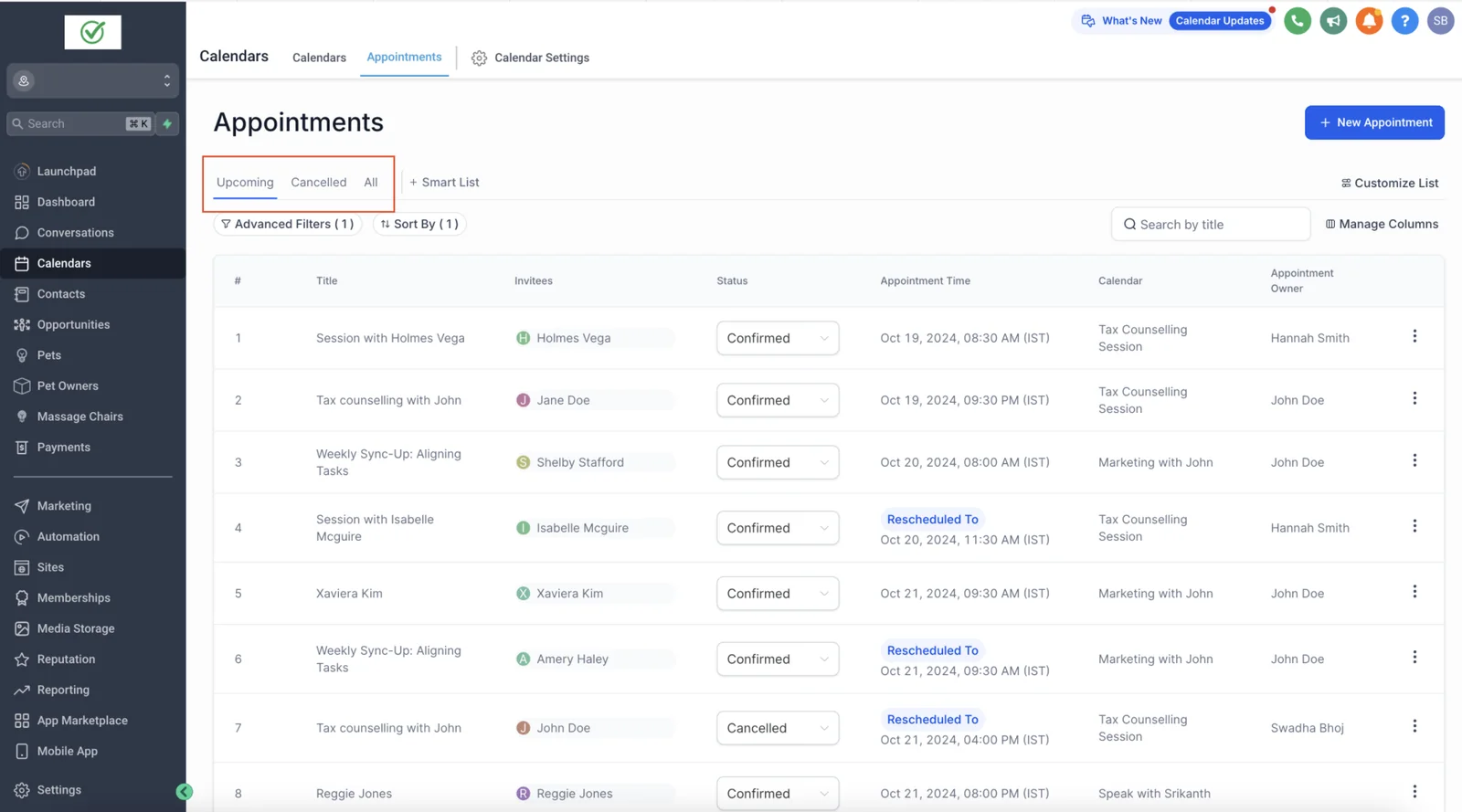
Mark the appointment as a no-show, send a short same-day message offering a new time, and follow up once more within a few days. The no-show status is a step the front desk or a sync has to set, so plan who does it before you build the sequence.
HighLevel's Appointment Status trigger can fire on New, Confirmed, Cancelled, Showed, No-show and Invalid statuses. Its documentation describes the trigger, but it does not say that a no-show is detected automatically, so we plan for the status to be set by a person or by data coming in from your practice management system. If nobody marks the status, the no-show workflow never runs, which is why this is the first thing to test.
A workable no-show sequence has three parts:
- Same-day message. Brief and neutral: "We missed you today. Would you like to pick a new time? Reply with a day that works or use this link."
- A follow-up a few days later if there is no answer, with the booking link.
- A front-desk task for patients with a history of missed visits or with treatment in progress, so a person makes the call.
Tone matters more than cleverness. A message that implies blame makes a rebooking less likely. Keep the fee policy out of the text unless it is already in the patient's signed paperwork, and never threaten. If your office charges for missed appointments, say so in the booking confirmation where it is expected, and let the front desk handle the conversation when it applies.
Patients who keep missing visits are often the same ones who lapse from hygiene recall. That link is why we treat this as part of one system, and why the follow-on step lives in our dental recall and patient reactivation guide. For measuring the effect, see the section further down: we do not put a no-show reduction figure on any of this because we do not have a sourced one.
What do consent, TCPA, HIPAA and A2P registration require?
Sending appointment texts in the US involves three separate layers: patient consent under the TCPA, privacy handling under HIPAA if you are a covered entity, and carrier registration for business texting. This is general information, not legal advice, and your counsel or compliance lead should approve the final setup.
Consent and the TCPA
The FCC's rules treat a healthcare message from a HIPAA covered entity or its business associate as needing prior express consent rather than prior express written consent. The FCC also has a narrow exemption for healthcare provider messages to wireless numbers, set out in 47 CFR 64.1200(a)(9)(iv). It requires that messages go only to the number the patient provided, name the provider, stay non-promotional, offer a STOP reply that is honored immediately, and stay within one message a day and three a week. A cadence with four or five touches in a single week goes beyond that exemption, so it has to rest on the patient's consent instead. Get that consent in a form you can prove, such as an intake checkbox with the wording saved.
Opt-outs deserve equal attention. Under the FCC's revocation rules, a consumer can withdraw consent by any reasonable means, and words such as stop, quit, cancel and unsubscribe must be honored. HighLevel automatically turns on Do Not Disturb for a contact who replies with an opt-out keyword, and workflows can also set DND. Test it: text STOP from your own phone and confirm the reminders actually stop. A wider opt-out rule that would treat a revocation as covering unrelated future messages is under a waiver until January 31, 2027, according to a law firm summary of the FCC's order, so check the current status before relying on that date.
HIPAA
Appointment reminders are generally treated as part of treatment or operations, and HHS states they can be sent without a separate authorization. The practical work is in what the message says and where the data lives. Keep the text to date, time, practice name and a way to change it. Leave out procedures, diagnoses and balances. Many practices also want a Business Associate Agreement with any vendor that handles patient information.
HighLevel sells a HIPAA Compliance add-on, priced at US$297 per month at the time of writing, which includes a Business Associate Agreement and covers objects that can store PHI such as contacts, notes, custom fields, SMS, voice recordings and email. Its own article says the add-on cannot be canceled or removed once activated, and that it must be enabled for each sub-account after the BAA is signed. Buying the add-on does not make a practice compliant on its own. Your policies, access controls and staff habits still count.
A2P 10DLC registration
Business texts to US numbers from standard 10-digit local numbers require carrier registration. In HighLevel this is done in the Trust Center under Phone System, with a brand registration followed by a campaign registration. HighLevel advises matching the campaign details to your real consent flow, so start registration before the build rather than after. Our GoHighLevel setup service includes that groundwork.
Sources for these points are linked at the end of this page. If any of this is new to your team, ask a lawyer who handles healthcare communications to review the consent wording and the opt-out handling before the first patient text goes out.
How does GoHighLevel compare with dedicated dental reminder tools?
Dedicated dental tools win on practice management integration and on being built for dental workflows from day one. GoHighLevel wins on flexibility, one inbox for marketing and patient messages, and owning the workflow logic, but it needs a sync solution and more setup.
The vendors below all describe reminders and two-way texting for dental or healthcare practices on their own sites. We have listed what each says publicly, and we have not tested any of them against a live practice ourselves. None of the pages we checked published a price, so we do not quote any. Ask each vendor for a written quote.
| Option | What its own site says | Practice management integration | Pricing |
|---|---|---|---|
| Weave | All-in-one communication platform with automated reminders, texting, payments and scheduling | Mentions qualified PMS integrations for its AI receptionist booking feature | Not shown on the page we checked. Demo and pricing page |
| NexHealth | Appointment reminders, online scheduling, recalls, waitlist, forms, payments and messaging | Lists 60+ systems including Dentrix, Open Dental and Eaglesoft | Not shown. States flexible monthly plans and no long-term contracts |
| Solutionreach | Reminders and confirmations, two-way texting, online scheduling, recall and reputation tools | States compatibility with 400+ PM and EHR systems | Not shown. Quote request |
| RevenueWell | Automated calls, texts and emails for reminders and confirmations, plus HIPAA-compliant texting | Lists Dentrix, Eaglesoft, Open Dental, Denticon and WinOMS | Not shown. Tiered plans and a demo |
| Demandforce | Reminders and confirmations, two-way texting and online booking, with the dental page routed through Henry Schein One | Mentions 150+ integrations without naming dental systems on the page we checked | Not shown. Form or demo |
| GoHighLevel, built by us | Configurable confirmations, reminders, replies and no-show sequences on top of a full CRM | No first-party Dentrix or Open Dental connector that we are aware of. Third-party sync products, such as SmartSync and GHL Dental, advertise one | HighLevel's subscription plus build cost, see the cost section |
Read the integration column first. A tool that writes confirmations back into Dentrix or Open Dental saves the front desk a manual step on every appointment, which is the strongest argument for buying a dental-specific product. The sync tools built for HighLevel say they do similar work, but they are separate products with their own terms, and we have not verified their behavior in a live practice. Test any of them with real appointments, including cancellations and reschedules, before committing.
Where GoHighLevel pulls ahead is when the practice also wants the marketing side under one roof: new-patient lead follow-up, review requests, recall and reminders in a single system. That is the pattern in our dental CRM automation case study, where reminders and confirmations were one layer of a larger intake system. The reported result there, reported by Autoesta for one practice, was first response falling from 45 to 90 minutes to under 5 minutes. That figure describes response speed. We are not offering it as proof of a no-show reduction, and we have no no-show number to give you.
What does it cost to run reminders in GoHighLevel?
The costs are HighLevel's subscription and usage charges, a HIPAA add-on if you need one, any third-party sync tool, and the one-time build. For the build, Autoesta's reminder work typically falls in the small automation range, from about $1,000 at the time of writing.
Third-party numbers, kept to what HighLevel publishes: at the time of writing, its pricing guide lists email usage at $0.675 per 1,000 emails on all plans, the HIPAA Compliance add-on at $297 per month, and points to its phone pricing and Twilio for SMS rates, which vary by region and product. It does not give a single SMS price, so we do not either. Our GoHighLevel pricing breakdown covers the subscription tiers in detail.
Our own typical pricing, at the time of writing, is a small automation build of two or three automations from about $1,000, a free audit, cleanup from $200, a full GoHighLevel setup at about $3,000 to $5,000, and monthly support from $200. Six months of maintenance is included on builds. A reminder, confirmation and no-show sequence would normally sit in the small-build range if the practice already has a working GoHighLevel account, and moves toward a full setup if the account, calendars and phone registration also need to be built. The practice management sync is a separate quote item because it depends on the software involved.
The cost people forget is staff time. Two-way replies and the no-show list need daily attention. If nobody has that time, the cheapest reminder tool in the world will not help, and a dedicated vendor's support team may be worth more than the flexibility you give up.
How do you know whether the reminders are working?
Measure the show rate and the no-show rate before you change anything, then compare the same appointment types afterward. Cut the numbers by source, service and how far ahead the visit was booked, because the average hides where the problem sits.
Pull three months of appointments from the practice management system before switching anything on. You need the count of scheduled appointments, how many were kept, how many were cancelled with notice, and how many were missed with none. Cancellations with notice are a win when the slot gets refilled, so count them separately from no-shows. Then track after launch:
- Show rate and no-show rate by appointment type: hygiene, exam, restorative, new patient.
- Confirmation rate, meaning the share of patients who reply before the visit.
- Same-day and next-day slot refills from cancellations.
- Opt-out rate, which rises if the cadence is too heavy.
- Reply volume and front-desk response time.
Judge the change over a long enough window that seasonal swings and one unusual month do not mislead you. If a figure improves, be honest about the other things that changed at the same time, such as a new front-desk hire or a fee policy. Reminders are one lever among several.
When is GoHighLevel the wrong choice for dental reminders?
GoHighLevel is the wrong choice when the practice wants reminders that write back into Dentrix or Open Dental with no custom sync, has no one to own replies and setup, or only needs a basic reminder and nothing else.
Pick a dedicated dental tool if any of these describe you:
- The schedule lives in the practice management system and stays there. A vendor with a supported, maintained integration removes the hardest part of this project.
- You want one vendor to call. With a dedicated tool the reminders, texting and support come from the same team. With a custom build, the practice depends on the builder and on HighLevel.
- Nobody wants to administer a workflow platform. Workflows need an owner who checks enrollment, delivery errors and opt-outs.
- Your practice already pays for a suite that includes reminders. Adding a second messaging system can mean two tools texting the same patient.
- Compliance sign-off is a hurdle. If your counsel is uncomfortable approving a configurable platform, the vendor's dental-specific documentation may be easier to get approved.
We would rather tell you that on a call than build something you will resent. If you are undecided, our GoHighLevel expert page explains how our audits work, and the free strategy call is a fast way to check fit before spending anything. For comparable clinic builds outside dentistry, see our guide to GoHighLevel for aesthetic clinics.
For the wider problem beyond dentistry, read our guide to reducing appointment no-shows.
More questions about dental appointment reminders in GoHighLevel
Does GoHighLevel integrate with Dentrix, Open Dental or Eaglesoft?
Not as a first-party connector that we are aware of. Third-party products advertise syncs, and n8n or the API can be used for custom work. Whichever route you choose, verify it with real appointments before the practice depends on it. See our n8n automation service for the custom route.
Is GoHighLevel HIPAA compliant?
HighLevel offers a paid HIPAA add-on with a Business Associate Agreement, and its own article describes what it covers and requires. Compliance also depends on how the practice uses the system, so it is not a label you can buy. Ask your compliance lead to approve the setup.
Can we text patients without asking permission?
Do not assume so. Healthcare messages generally require prior express consent, and the FCC's healthcare exemption has strict conditions, including a cap of one message a day and three a week. Collect consent at intake and store the wording. This is not legal advice.
What should a dental reminder text say?
Practice name, date, time, address and a way to confirm or reschedule. Leave out the procedure, diagnosis and any balance. A sample: "Hi Sam, this is Lakeside Dental. You are booked on Tuesday at 2:30pm. Reply C to confirm, or use this link to change it. Reply STOP to opt out." The practice name in that example is invented for illustration.
Do automated reminders reduce no-shows?
Reminders are a standard tool for reducing missed visits, and a confirmation step lets you refill slots. We do not have a sourced figure for how much they help a given practice, so we do not quote one. Measure your own baseline first, as described above.
Can the same system handle recall and reactivation?
Yes, and that is one reason to consider a CRM approach. Reminders cover booked visits, and recall and reactivation covers the patients who have not booked. Keep the two sequences from overlapping.
How do we get started?
Book a free 30-minute call or use the contact page. Tell us where appointments are created today and which practice software you use. You can also browse our case studies for how we document builds.
What is the difference between a dental reminder system and a PMS reminder?
Most PMS tools send a basic reminder. A dental appointment reminder system in GoHighLevel adds two-way texting, confirmations, reschedule links, no-show follow-up and review requests after the visit, all in one workflow.
Related: CRM automation by industry, the FCC opt-out rule changes, appointment no-show statistics, what time businesses can text customers and what happens when a contact replies STOP.
Sources for the outside facts on this page: HHS FAQ on appointment reminders, 47 CFR 64.1200, Wiley summary of the FCC revocation waiver, HighLevel HIPAA article, HighLevel pricing guide, Appointment Status trigger, Customer Replied trigger, Wait action, calendar notifications, and A2P registration. Vendor details reflect each vendor's own website at the time of writing.
See the complete practice setup in dental practice automation, and how missed calls are handled in recover missed calls.
