What is the difference between dental recall and patient reactivation?
Recall is the routine outreach that brings an active patient back when a hygiene or exam visit comes due. Reactivation is the separate, slower effort to win back patients who have lapsed well past that date and have stopped responding to normal recall.
Most practices run both from one mental bucket, but they behave differently in a CRM. Recall is predictable: the due date is known, the patient has a relationship with the office, and the message is a reminder that a visit is due. Reactivation is a judgment call. The patient may have moved, changed insurance, chosen another dentist, or simply avoided the chair for two years. The tone, the timing, the number of touches, and the consent picture are all different.
We build them as two separate workflows in GoHighLevel for that reason. Recall runs on a due date and stays short. Reactivation runs on a segment, has a hard stop after a set number of attempts, and hands anyone who replies straight to a human. Mixing the two into one long drip is the most common design mistake we see, because a patient who is three weeks overdue and a patient who has been gone for three years should not get the same message. This guide sits inside our wider work on GoHighLevel for dentists, and it pairs with the confirmation flow in our dental appointment reminder guide, which covers patients who are already booked.
How often should dental patients be recalled?
The interval is a clinical decision made by the dentist for each patient, not a CRM setting. A Cochrane review found little to no difference between risk-based recall and a fixed 6-month recall for adults, so the right automation follows whatever interval the chart already says.
The review, by Fee and colleagues (Cochrane Database of Systematic Reviews, 2020), pooled two studies with 1,736 participants. It reported little to no difference in tooth surfaces with caries, gingival bleeding, or oral-health-related quality of life between a risk-based interval and a 6-month interval for adults. The authors described the evidence for children and adolescents as uncertain. You can read it at PubMed Central.
What that means for a build: do not hard-code "every 6 months" into a workflow. Practices set intervals per patient and per recall type, for example a prophylaxis cycle for one patient and a periodontal maintenance cycle for another. The PMS holds those dates. GoHighLevel should read the due date, not invent one. If a practice tells us "everyone is six months," we still store the due date as a per-patient field so the workflow keeps working the day the hygienist changes one patient to three months.
Who counts as an inactive patient, and how do you segment them?
There is no industry-standard cutoff. The practice decides what "inactive" means, usually as time since the last completed visit, and then splits lapsed patients into bands so each gets a different message and a different number of attempts.
Recall and reactivation segments
We have not found a single authoritative definition, and we will not pretend one exists. Some offices call anyone without a visit in 18 months inactive; others use 24 months, and some track "unscheduled treatment" as its own group. Pick a definition with the office manager and write it down, because every report you build later depends on it. The table shows the bands we typically start from. The cutoffs are illustrative starting points to adjust, not benchmarks.
| Segment | Illustrative definition | Goal | Sequence length |
|---|---|---|---|
| Recall due soon | Recall due date within the next 30 days, no future appointment | Get the visit booked | 2 to 3 touches |
| Overdue | Recall due date passed, up to about 12 months | Rebook before the gap widens | 3 to 4 touches over several weeks |
| Lapsed | No completed visit for 12 to 24 months | Reopen the relationship | 3 touches, then stop |
| Long-inactive | No completed visit for over 24 months | One clean invitation, then archive | 1 to 2 touches, then stop |
| Unscheduled treatment | Diagnosed treatment not yet booked | Front desk follows up personally | Task for staff, not an automated blast |
In GoHighLevel these become Smart Lists and tags fed by two custom date fields: last completed visit and recall due date. The dental practice in our dental CRM automation case study was set up with a Follow-Up/Recall pipeline next to its new-patient pipelines, so recall patients never sit in the same stage list as fresh enquiries. Keeping them apart matters because your reporting has to tell a returning patient from a new one.
What should a recall sequence look like in GoHighLevel?
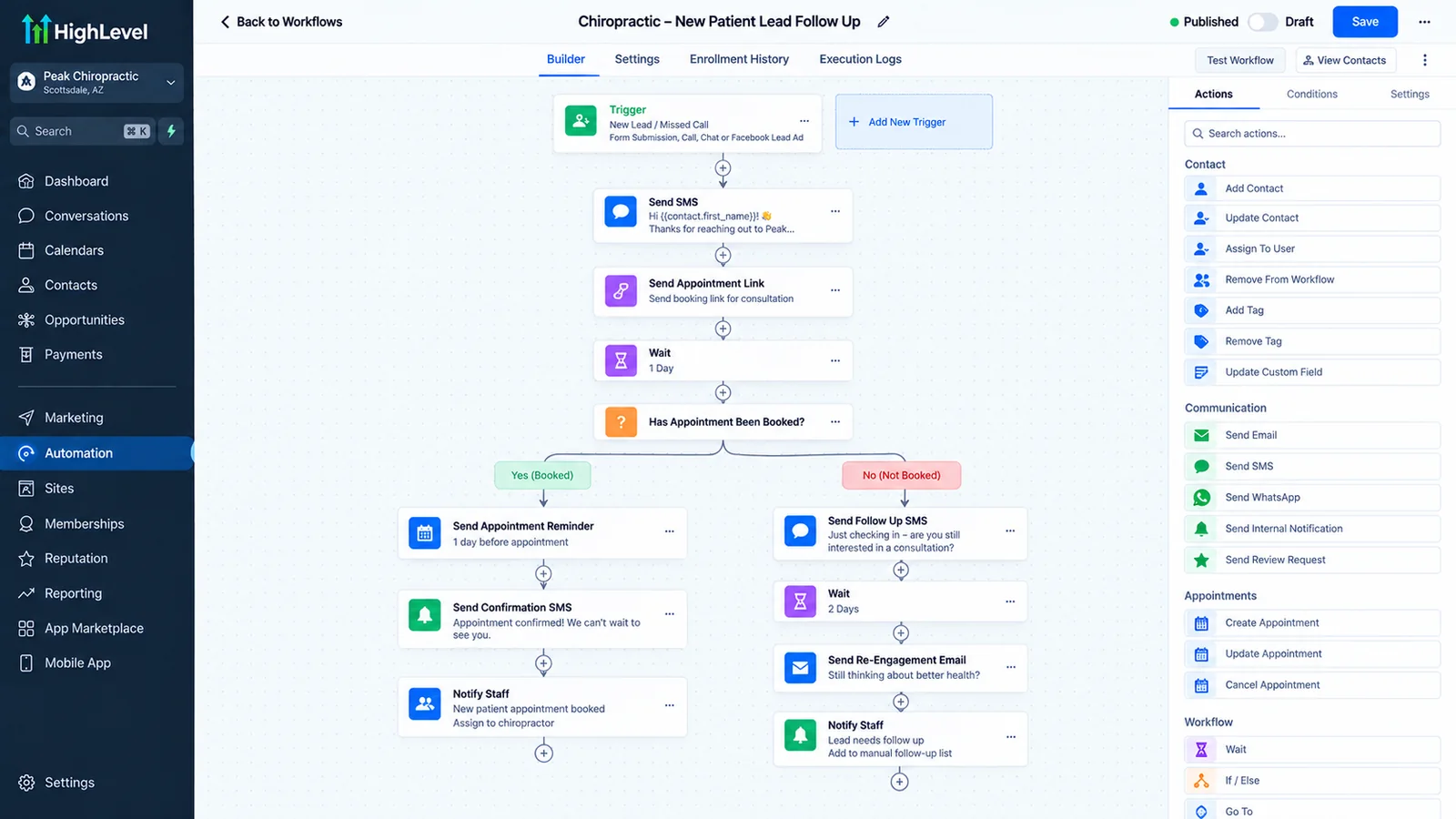
A recall sequence starts from the patient's due date, sends a short run of messages spaced over a few weeks, and exits the moment the patient books, replies, or opts out. GoHighLevel's Custom Date Reminder trigger, Wait steps, and Stop on Response setting cover all three.
The recall sequence in GoHighLevel
The Custom Date Reminder trigger fires before, on, or after a date field you choose, with filters for the number of days. HighLevel's documentation notes it will not fire when the date field is empty for a contact, which is a useful safety net: a patient with no recall date never enters the flow. The Wait step has an advanced window that limits which days and hours contacts can resume, so messages go out during office hours instead of at 2 a.m. A Wait for Reply option pauses the contact until they respond or a timeout passes. Details are in HighLevel's help pages for the Custom Date Reminder trigger and the Wait action.
Here is the shape we start from. The day offsets are an illustrative schedule to adjust with the practice, not a tested benchmark:
- Trigger: recall due date minus 30 days, no future appointment. The workflow checks the synced next-appointment date first. If the patient already has a visit, the contact exits.
- Touch 1, text, inside the office-hours window. Short, friendly, one link to a booking calendar or a reply option.
- Wait 5 to 7 days, or until a reply. Use Wait for Reply so a response ends the wait right away.
- Touch 2, email. A little more detail: the office, the hygiene visit, how to book. Email is the better place for anything longer than a couple of lines.
- Wait, then check again for a booked visit. Re-check the appointment field before every send, not just at entry.
- Touch 3, text or a call task for the front desk. For patients who have ignored two messages, a person calling can work better than a third automated text.
- Exit and tag. Anyone who never responds gets a tag such as recall-sequence-complete and moves to the overdue segment. They do not keep receiving recall messages.
Two workflow settings decide whether this behaves. Stop on Response removes a contact from the workflow when they reply to a message from that workflow, so nobody keeps getting nudges after saying "call me tomorrow." Allow Re-entry controls whether a patient can enter the workflow again after finishing it; for recall you want it on, so the same patient re-enters next cycle, with the appointment check protecting against overlap. Both are described in HighLevel's workflow settings overview. If you are new to the differences between triggers, workflows, and campaigns, our guide to GoHighLevel workflows, triggers, and campaigns explains which one to reach for.
What should a reactivation sequence say?
A reactivation message should be short, personal, and free of clinical detail, with one clear action and an easy way to say no. Keep procedure names, diagnoses, and balances out of texts entirely and let the patient reply or book to get specifics.
Patients who have been away for a year or two are not looking for a sales pitch. They want to know the office remembers them and that returning is easy. We write these as if the front-desk coordinator typed them, because that is who the patient expects to hear from. Here are three sample messages to adapt. Replace the bracketed parts with your own details:
- Touch 1, text: "Hi [First name], it's [Coordinator] at [Practice]. It's been a while since we saw you and we'd love to get you back on the schedule. Reply here or book at [link]. Reply STOP to opt out."
- Touch 2, email: A plain-text email from a named person, two or three short paragraphs: we have not seen you in a while, here is how to book, here is the phone number, and a note that you can tell us if you have moved or switched dentists so we can update your record.
- Touch 3, text: "Hi [First name], last note from us. If now isn't the time, no problem. If you've moved or found another dentist, just reply and we'll update your file. Reply STOP to opt out."
The last message does real work. It gives the patient a graceful exit and it surfaces bad data. Replies like "I moved to Texas" are worth something, because those patients should leave the recall list instead of skewing every report you run. Route every reply into the inbox where the front desk sees it, and consider an AI chat agent to handle after-hours replies only if the practice has approved exactly what it may say. A missed reply from a lapsed patient who is ready to book is the costliest failure in the whole flow.
A word on tone: avoid guilt ("you're overdue!") and avoid discount language unless the practice truly runs an offer. Promotional messages can change the compliance picture, which the consent section below covers.
What do you do when the PMS holds the recall list?
Treat the practice management system as the source of truth for recall dates and appointments, and get that data into GoHighLevel on a schedule through a file export, an automated report, or an API. Then suppress anyone who has already booked, because GoHighLevel cannot see what the front desk enters in the PMS on its own.
This is the part most guides skip, and it is where dental builds succeed or fail. GoHighLevel is a good place to run outreach, conversations, and reporting. It is not where hygiene recall lives. Recall dates, recall types, and appointment books sit in the PMS, and staff keep editing them all day. If GoHighLevel holds a stale copy, it will text a patient who booked by phone at 10 a.m. That patient's opinion of the practice drops quickly.
These are the integration options we weigh, from least to most automated:
| Approach | How it works | Strength | Weakness |
|---|---|---|---|
| Scheduled CSV export and import | Front desk or a script exports the recall and appointment report on a set cadence, and it is imported into GoHighLevel | Works with almost any PMS; no vendor approval | Data is only as fresh as the last export; manual steps get skipped |
| Automated report pickup | The PMS or a helper tool drops a report on a schedule, and an n8n or Zapier flow reads it and updates contacts | Regular refresh without staff effort | Depends on what the PMS can schedule and export; needs monitoring |
| PMS API | A workflow reads recalls and appointments directly through the vendor's API | Freshest data; can check for a booked visit right before a send | Depends on the vendor's API, access terms, and any fees |
| PMS handles recall, GoHighLevel handles the rest | The PMS's own recall module sends recall messages; GoHighLevel runs reactivation, reviews, and new-patient flows | No sync to break for the core recall | Two systems messaging patients; reporting is split |
For the API route, the example we can point to is Open Dental, which publishes a REST API with a Recalls resource. According to Open Dental's documentation, the recall record includes fields such as DateDue, RecallInterval, RecallStatus, and RecallTypeNum, and it can be filtered by patient, date range, provider, clinic, or recall type. The same documentation says API developers should have a Business Associate Agreement in place with their clients, and it lists pricing tiers for developers. See Open Dental's Recalls API page and API specification. For other systems such as Dentrix or Eaglesoft, we do not assume anything. Ask the vendor in writing whether a supported export or API exists, what it costs, and who at the practice must approve access. Their answer decides the architecture.
Whatever the route, we design around one rule: check for a booked visit immediately before every send. In practice that means a synced next-appointment date field, an If/Else at the top of each touch, and Stop on Response. If the sync only runs nightly, a patient can still book and receive a message the same day, so we tell the practice that plainly and add a line to the front-desk routine: when a recall patient books by phone, tag or note them in GoHighLevel too, or accept the small risk of one extra text. It is a trade-off, and it belongs in the plan before launch. If your account data is already unreliable, sort that first; our guide to fixing a messy GoHighLevel account covers duplicate contacts and dead fields that would poison a recall import.
What consent and opt-out rules apply to recall and reactivation texts?
Two sets of rules matter: the TCPA (through FCC rules) for calls and texts, and HIPAA for how patient information is used. Honor any reasonable opt-out within 10 business days at most, keep consent records, and have a healthcare attorney confirm your setup. This section is general information, not legal advice.
What does the TCPA say about opt-outs?
Under the FCC's rule at 47 CFR 64.1200(a)(10), a called party can revoke consent using any reasonable method. A reply text using the words "stop," "quit," "end," "revoke," "opt out," "cancel," or "unsubscribe" counts as a reasonable means on its own. Other wording must be treated as a valid revocation if a reasonable person would understand it that way. Requests must be honored within a reasonable time not to exceed ten business days, and the sender may not designate an exclusive method for opting out. Paragraph (a)(12) permits one confirming text after a revocation, sent within five minutes to fall within presumed consent, as long as it contains no marketing content. The full text is at Cornell's Legal Information Institute.
At the time of writing, a further piece of the rule, often called "revoke all," has been pushed back to January 31, 2027, and a law-firm summary reports that the FCC has circulated a draft for its September 30, 2026 open meeting that would replace it with a category-specific approach. That draft is not final, so ask your attorney what applies on the day you launch. The CommLaw Group summary tracks the status.
What does HIPAA say about recall and marketing?
HIPAA's definition of marketing, at 45 CFR 164.501, is a communication about a product or service that encourages people to buy or use it. The same definition carves out communications made for treatment purposes, including directing or recommending alternative treatments, as long as the covered entity does not receive financial remuneration from a third party for making the communication. HHS's FAQ on the topic treats appointment reminders as part of treatment. The regulation is on Cornell's Legal Information Institute and HHS's answer is in its appointment reminder FAQ.
The practical takeaway is that a plain "your visit is due" message and a promotional offer are treated differently. Where a reactivation message crosses into promotion, the analysis can change, so we keep the copy informational and let counsel decide on offers. Separately, HHS's guidance on leaving messages says to limit the information disclosed, which is why we keep clinical detail out of texts and voicemails.
How does GoHighLevel handle STOP and opt-in?
HighLevel turns on Do Not Disturb for a contact when they reply with opt-out keywords such as STOP or UNSUBSCRIBE, and per HighLevel's documentation DND can be set per channel: SMS, email, calls, WhatsApp, and others. Workflows also offer a Contact DND trigger and an Enable/Disable DND action. For US texting on standard 10-digit numbers, A2P 10DLC brand and campaign registration is required, and HighLevel's opt-in guidance calls for consent checkboxes that are not pre-selected. See HighLevel's DND documentation and A2P opt-in guidance.
Two details we add. First, write opt-outs back to the PMS as a do-not-text flag so a later import does not quietly undo them. Second, keep a consent record per patient: where the number came from, when, and what they agreed to. A patient who gave a number on intake paperwork is in a different position from a number scraped from an old list. Finally, HighLevel says its accounts are not HIPAA compliant by default. Its help center states the HIPAA add-on costs US$297 per month at the time of writing and requires a signed BAA. A practice sending anything tied to patient records should sort that out first; our page on GoHighLevel for healthcare clinics covers the wider setup. HighLevel's own summary is at its HIPAA help article.
How do you measure reactivation without inflating the numbers?
Count a patient as reactivated only when the PMS shows a completed visit after your outreach, for someone who had no visit in the lapsed window before it. Bookings and replies are leading signals, and a small holdout group shows how many would have returned anyway.
Vendors love to quote a reactivation percentage. We do not publish one here because we have no defensible industry figure, and what the number means depends entirely on how the practice defines inactive and how long it waits before counting. Instead, measure your own funnel with definitions fixed in advance:
| Stage | What to count | Where the data comes from |
|---|---|---|
| Eligible | Patients in the segment on the day the sequence starts, after removing opt-outs and bad numbers | GoHighLevel Smart List snapshot |
| Contacted | Patients who were sent at least one message | GoHighLevel workflow history |
| Replied | Patients who answered, including "moved away" | GoHighLevel Conversations |
| Booked | Patients with a new appointment after the first touch | PMS appointment book, synced back |
| Completed | Patients who attended that visit | PMS completed visits |
| Still active later | Patients with a further visit or a scheduled one at a set date afterward | PMS, checked at a fixed interval |
Two habits keep the numbers honest. First, take the completed-visit count from the PMS, not from GoHighLevel, because a booked appointment that is cancelled or missed is not a returned patient. Second, hold out a small random slice of each segment that gets no outreach, then compare. Some lapsed patients call on their own, and without a holdout you would credit the workflow for returns that were already going to happen. The holdout costs you a handful of messages and gives you a comparison you can defend when the owner asks whether this is worth the money.
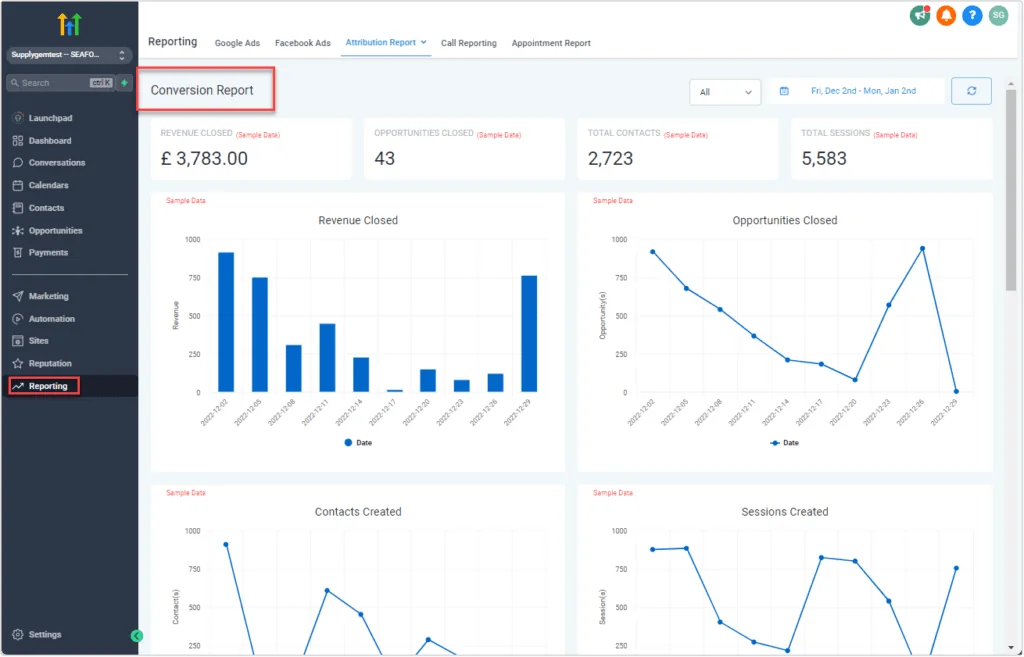
In GoHighLevel, we tag each contact with the sequence and touch they received and store a "reactivation campaign date" field, so reports can group by campaign cohort. The finished report is a plain table per cohort with the counts above. Revenue per returned patient should come from the practice's own billing data; do not estimate it from anything in GoHighLevel. Dashboards like the conversion report below are useful for a visual, but the PMS is where the completed-visit truth lives.
How much does it cost to build dental recall and reactivation in GoHighLevel?
At the time of writing, a small automation build of 2 to 3 workflows from Autoesta starts at about $1,000, and a full GoHighLevel setup runs about $3,000 to $5,000. Recall plus reactivation with a PMS sync usually sits between those, depending on how the recall list reaches GoHighLevel.
What moves the price is the data path, not the message copy. A CSV-based flow is the cheapest to build. An API or scheduled-report integration takes more design and testing, and any vendor fees for API access come on top and are set by the PMS vendor. Our audits are free, cleanup starts from $200, monthly support starts from $200, and builds include six months of maintenance. A practice with several locations that share one recall process falls into our multi-location range, which is higher. Platform costs, texting fees, and the HIPAA add-on mentioned above are separate from our fees; see our GoHighLevel pricing breakdown for the platform side. For the broader build, read about our GoHighLevel setup service or talk to a GoHighLevel expert.
When is this the wrong choice?
Skip a custom GoHighLevel recall build if your PMS already sends recall well, your recall data is unreliable, no one on staff can answer replies, or you cannot document consent. Fix those first, or a well-built workflow will amplify the problem.
- Your PMS recall module already works. If patients get reminders, book, and your hygiene schedule is full, adding a second messaging system can create duplicate texts. Use GoHighLevel for reactivation only, or not at all.
- The recall dates are wrong. Automation multiplies whatever it is given. If due dates are stale or intervals were never maintained, clean the list before you send anything. Nothing damages a lapsed relationship faster than a wrong message.
- No one owns the replies. Reactivation works when a person answers a reply within a business day. If the front desk is already underwater, adding replies makes it worse. Solve the staffing question first, or start with a small segment.
- Consent is unclear. If you cannot show where phone numbers came from, do not text them. Email or a direct call may be the safer first step, and your attorney should confirm.
- You expect automation to replace the front desk. The workflow schedules and reminds. Unscheduled treatment, anxious patients, and financial questions still need a person.
- The practice is small and stable. A single-dentist office with a short overdue list may be better served by a monthly call session than a build.
We would rather tell you that on a free call than sell you a system you do not need. If you want a second opinion on your situation, contact us or read the wider case studies.
More questions about dental recall and reactivation in GoHighLevel
Can GoHighLevel replace my practice management system's recall tool?
Not by itself. GoHighLevel can run outreach and conversations well, but the recall dates and appointment book live in the PMS. Most practices are better off keeping the PMS as the source of truth and using GoHighLevel to send, track, and report.
How many messages should I send to an inactive patient?
Fewer than most people expect. We usually cap reactivation at three touches for lapsed patients and one or two for the long-inactive, then stop and tag them. The right number is a practice decision, and the opt-out rules above apply to every one of them.
Should recall messages go by text, email, or phone call?
Use a mix. Texts get read quickly, email suits longer detail, and a staff call is best for patients who ignored automated touches. Whatever the channel, honor opt-outs across all of them in practice, even where the rule only requires it for one.
Do I need a HIPAA agreement with HighLevel?
HighLevel states its accounts are not HIPAA compliant by default and that the HIPAA package and a signed BAA are needed. Ask your compliance advisor whether your use requires it. This is not legal advice.
What if a patient books by phone after entering the sequence?
That is the most common failure. Sync the next-appointment date from the PMS, check it before each send, and ask the front desk to note phone bookings. Stop on Response also ends the sequence when the patient replies to a message.
Can I use AI calling to reactivate patients?
You can, but outbound automated and AI-voiced calls are regulated, so get consent and legal review first. Our AI calling agent service page explains how we approach it, and it is usually better to start with text and email.
How do I get started?
Book a free 30-minute strategy call with the details of your PMS, your recall process, and your patient count. We will tell you which integration route fits and whether a build is worth it, before you spend anything. See also appointment booking automation for the booking side of the flow.
What should a dental recall text say?
A dental recall text template: "Hi [first name], it has been about six months since your last cleaning at [practice]. Would you like to book? Reply YES or pick a time here: [link]". Keep health details out of texts unless the account is set up for HIPAA.
Is dental patient reactivation different from recall?
Yes. Recall reminds patients who are due; dental patient reactivation targets patients who have not been in for a long time. A dental reactivation system uses a separate, shorter sequence with a clear reason to come back.
Related: GoHighLevel follow up sequence, CRM automation by industry and the FCC opt-out rule changes.
Recall is one part of the wider system described in dental practice automation.
