How do you set up Instagram comment-to-DM automation in GoHighLevel?
Build one workflow: the Instagram Comment(s) On A Post trigger with your keyword, a Reply In Comments action for the public reply, then an Instagram Interactive Messenger action set to Reply to Comment via DM, with buttons and a branch for each answer.
The comment-to-DM workflow in GoHighLevel
This guide is the step-by-step build in HighLevel, setting by setting, taken from HighLevel's own help articles and Meta's Instagram docs read October 30, 2026. If you want the wider picture first (which triggers Meta allows, what the tools cost, and when ManyChat or n8n fits better), start with our Instagram DM automation service page. If you would rather have the workflow built and tested for you, that page also covers how we do it.
The finished workflow has six parts, in this order:
- Trigger: Instagram Comment(s) On A Post, filtered to one post and one keyword.
- Public reply: Reply In Comments, telling the person to check their DMs and message requests.
- Private reply: Instagram Interactive Messenger, Reply Type "Reply to Comment via DM", with up to three buttons.
- Button branches: one per button, each sending the next message with Reply to DM, tagging the contact and moving them in a pipeline.
- Default Timeout branch: for people who do not tap anything.
- CRM logging: tags, a pipeline stage and, where it fits, a booking link.
What do you need before you build the workflow?
An Instagram professional account linked to a Facebook Page, that Page connected in HighLevel through the Facebook integration, Instagram messaging switched on in that integration's settings, and "Allow access to messages" turned on in the Instagram app.
We check every item before writing a single message, because a gap here makes the workflow fire with nothing delivered. The table pulls the requirements from each source into one list.
| Check | Where to look | Source |
|---|---|---|
| The Instagram account is a professional (business or creator) account | Instagram app, account type | Meta Instagram Platform overview: "your app users must have an Instagram professional account" |
| The Instagram account is connected to your Facebook Page | Meta Business settings, the Page's connected assets | HighLevel comment automation recipe and messaging setup article |
| The Facebook Page is connected to the sub-account | HighLevel: Settings > Integrations > Facebook card > Connect | HighLevel Unified Facebook Connect (updated October 27, 2026): linked Instagram professional accounts become available automatically |
| The person who connects has full Page access with message access | Meta Business settings, Page and Instagram account permissions | HighLevel messaging setup and troubleshoot article |
| Instagram messaging is switched on in HighLevel | Settings > Integration > Facebook card > Settings | HighLevel messaging setup and troubleshoot article |
| Third-party access to messages is allowed | Instagram app: Menu > Messages and story replies > Message requests > Connected tools > Allow access to messages | Instagram Help Center |
The last row is the one people miss. Instagram's help center says that if you turn this setting off, "you'll only be able to view and send messages from your Instagram account", which means HighLevel cannot send the DM even though the trigger fires. If you are setting up the sub-account itself from scratch, our guide to setting up GoHighLevel properly covers the rest of the account.
How do you set up the Instagram comment trigger?
In Automation > Workflows, add the trigger Instagram Comment(s) On A Post. Set Page Is first, then Post Type and Post Is, then a Contains Phrase or Exact Match keyword filter, and decide whether to track first-level comments only.
HighLevel files this trigger under Facebook/Instagram Events in the trigger list. The settings, from HighLevel's trigger article:
- Page Is. Pick the connected page. HighLevel's recipe article warns that this filter must be set first, and deleting it deletes the other filters too.
- Post Type. "Published Post" to pick from a list, or "Custom Post" to paste a post URL.
- Post Is. The specific post.
- Contains Phrase or Exact Match. The keyword filter (examples below).
- Track First Level Comments Only. On ignores replies under other comments. Off fires on nested replies too.
Comments posted by workflow actions are ignored, so your own public reply cannot set the workflow off again.
Which keyword filter should you use?
HighLevel's examples show that Contains Phrase looks for the phrase as one piece inside the comment, and Exact Match needs the whole comment to equal the phrase. We applied those two rules to the comments people actually leave under a "Comment PRICE" reel:
| Comment left | Contains Phrase "price" | Exact Match "price" |
|---|---|---|
| price | Fires | Fires |
| price please | Fires | Does not fire |
| whats the price? | Fires | Does not fire |
| prices | Fires ("price" is inside "prices") | Does not fire |
| pricing | Does not fire ("pricing" does not contain "price") | Does not fire |
| PRICE | Test it: the article does not say whether matching ignores letter case | Test it |
| prcie (typo) | Does not fire | Does not fire |
What we do with this. Contains Phrase with a short keyword catches the most real comments. We add the common variants (for example "pricing" and "cost") and test capitals on a live post before launch. Exact Match suits giveaways where you want one precise word and nothing else. The rows marked "Test it" are our assumption from the article's wording, not a documented rule.
How do you reply publicly to the comment?
Add the Reply In Comments action after the trigger. Write up to ten reply variations, which HighLevel picks from at random, and switch on Like Comments if you want each comment liked. Tell people to check their DMs and message requests.
HighLevel's article says the action "chooses randomly from the provided replies", so every variation must make sense for every comment. If you want a reply that answers what the person actually wrote, put an AI action before it and use its output in Reply In Comments; HighLevel's "Facebook Comments + Workflow AI" recipe shows that pattern, and the screenshot below is a real HighLevel workflow built the same way on Facebook.
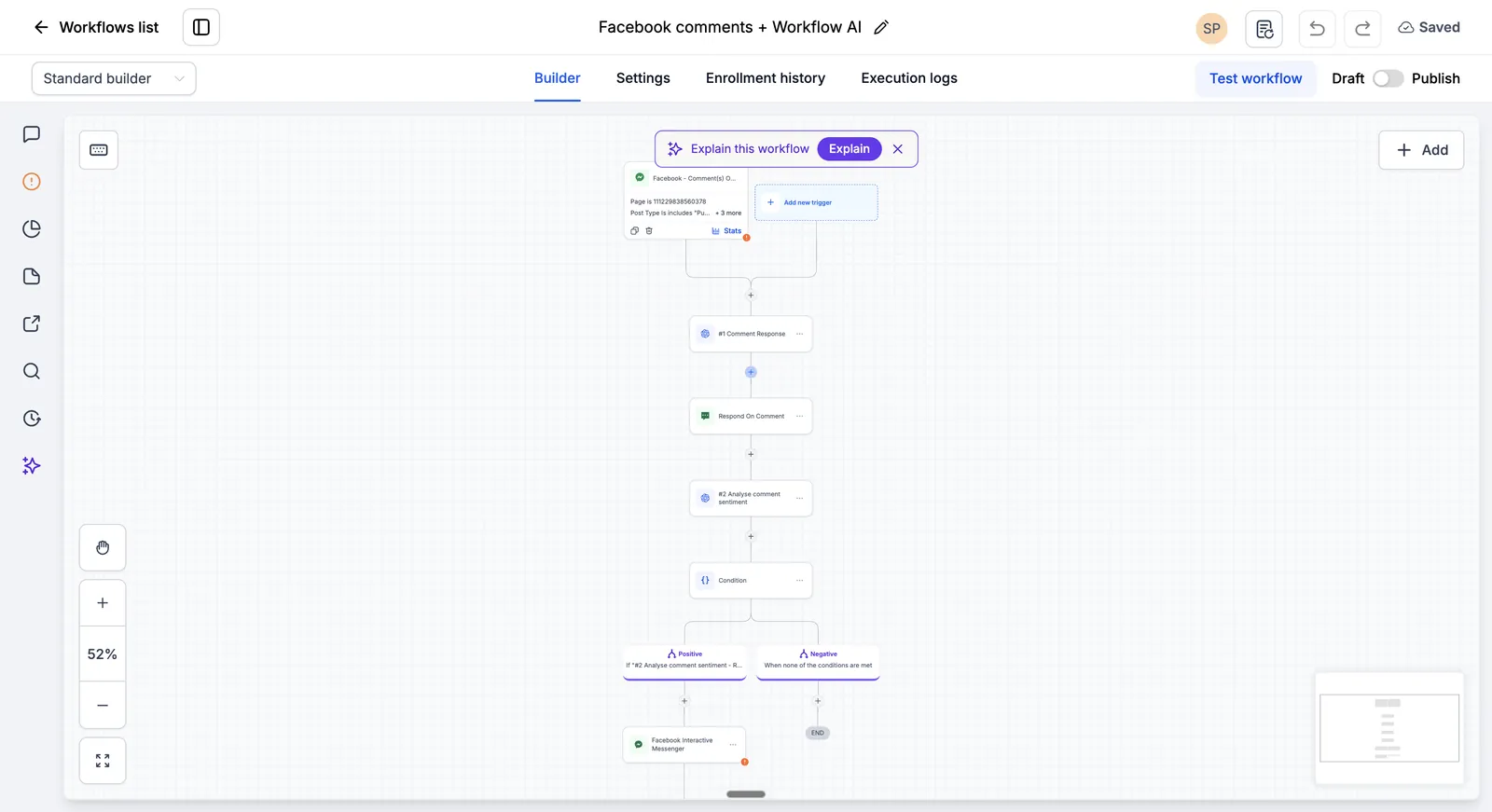
Mention message requests in the public reply. Meta's Private Replies documentation says the DM goes to the person's Inbox if they follow you and to the Requests folder if they do not, so non-followers often think nothing arrived. Two examples we use: "Sent you a DM. Not there? Check your message requests." and "Done, it's in your DMs (look in requests if you don't follow us yet)."
How do you send the DM with Instagram Interactive Messenger?
Add Instagram Interactive Messenger, set Reply Type to Reply to Comment via DM, write a short message with one next step, and add up to three buttons. Each button creates a branch; a Default Timeout branch catches people who do not respond.
How long each step is allowed to take
Use this action, not the plain Instagram DM action. HighLevel's Instagram DM article says "a contact commenting on an Instagram post does not automatically establish the 24-hour direct messaging window", while Interactive Messenger sends a private reply to the comment, which Meta allows once per comment within 7 days of it. The settings, from HighLevel's Interactive Messenger and recipe articles:
| Setting | What it does | What we set |
|---|---|---|
| Reply Type | "Reply to Comment via DM" after a comment trigger; "Reply to DM" when answering a DM | Reply to Comment via DM on the first message only |
| Message body | The DM text, with custom values and trigger links | Two or three short lines, ending in a question |
| Buttons or Quick Replies | Buttons stay visible after a tap; quick replies disappear. Up to 3 buttons per action | Two buttons, for example "Send the price list" and "Book a call" |
| Attachment | A file or a hosted file URL | Sent in the next message, because quick replies cannot be added when an attachment is in the same message |
| Wait step | Required; defaults to 1 minute, editable | Raised so people have time to open the DM (we test the value per account) |
| Default Timeout branch | Where contacts go if they do not tap a button in the wait time | Tag "No response" and stop; no further automated DM |
The first message has one job: get a tap or a reply. Meta's private reply rules allow only one message per comment, and a follow-up only after the person responds, within 24 hours of that response. A tap on a button counts as a response, which is why the buttons matter more than the wording. An example we would start from:
"Hi {{contact.first_name}}, here is the price list you asked for. Want it as a PDF, or would a 15-minute call be easier?" [Send the PDF] [Book a call]
Two rules from the recipe article to remember: no further actions can be added after a "Call" button, and if the contact never replied to the first Interactive Messenger message, a second Interactive Messenger action in the Default Timeout branch will not run.
What happens after the person taps a button or replies?
Their tap opens a 24-hour messaging window. Inside each button branch, send the next message with Interactive Messenger set to Reply to DM, then tag the contact, move them to a pipeline stage and, if they want a call, send your booking link.
Every later message in the chain uses Reply to DM, which HighLevel's recipe says only sends if there was a conversation in the last 24 hours. A typical "Send the PDF" branch sends the file, adds a tag such as "IG lead: price list", and creates an opportunity. A "Book a call" branch sends your calendar link; our appointment booking automation page covers the calendar side and reminders.
When the 24-hour window closes, automation stops. Meta's messaging docs describe a separate 7-day Human Agent window for a person on your team to reply by hand, so set an internal notification for any lead who asked a question the workflow cannot answer. If you want the DM conversation itself handled by AI, that is a different build: HighLevel's Conversation AI or a custom agent, covered in our GoHighLevel AI agents guide.
How should you test the workflow before going live?
Comment from two test accounts, one that follows you and one that does not, on the exact post in the trigger. Try every keyword variant, a nested reply, a button tap and no tap, then check the contact, tags and conversation in HighLevel.
We run this test sheet on every comment-to-DM build. The expected results come from the HighLevel and Meta articles listed in the sources.
| Test | Expected result | If it fails, check |
|---|---|---|
| Follower comments the keyword | Public reply, then the DM in their main inbox | Connected tools toggle, Facebook card messaging setting, Post Is filter |
| Non-follower comments the keyword | DM arrives in their Requests folder | Normal behaviour per Meta; confirm the public reply mentions requests |
| Comment with a keyword variant ("prices", "PRICE") | Fires if your filter covers it | Contains Phrase versus Exact Match, letter case |
| Keyword as a reply under someone else's comment | Fires only if Track First Level Comments Only is off | The toggle |
| Same person comments twice | Decide in advance: one DM or two | Workflow re-entry settings |
| Tap each button | The right branch runs, tag and stage applied | Branch actions, Reply to DM type on later messages |
| No tap within the wait time | Default Timeout branch runs, no further DM | Wait step value |
| Comment on a different post | Nothing happens | Post Is filter |
If the same person gets the DM twice, our page on GoHighLevel workflows sending duplicate messages walks through the usual causes.
Why is my GoHighLevel Instagram comment automation not working?
The usual causes are a setup gap (Instagram messaging off in the Facebook integration, or Allow access to messages off in the app), the wrong action after the comment, a keyword filter that does not match, or a follow-up placed in the Default Timeout branch.
| Symptom | Cause | Fix |
|---|---|---|
| Instagram Interactive Messenger is greyed out | The workflow does not use an Instagram trigger | Use Instagram Comment(s) On A Post or Customer Reply (Instagram) as the trigger |
| Trigger fires but no DM arrives | Plain Instagram DM action used after a comment, or third-party message access turned off | Switch to Interactive Messenger, Reply to Comment via DM; turn on Allow access to messages |
| Instagram DMs never show in Conversations | Instagram messaging not enabled on the Facebook integration, or the account is not in the Page's connected assets | Settings > Integration > Facebook card > Settings; check connected assets in Meta Business settings |
| Quick replies option unavailable | An attachment is in the same message | Move the attachment to the next message |
| Your filters vanished | The Page Is filter was deleted, which removes the others | Set Page Is first, then rebuild the filters |
| Follow-up in the timeout branch never sends | The contact did not reply to the first message, so no window opened | Leave the timeout branch for tags and internal tasks only |
| Public replies do not match the comment | Reply In Comments picks a variation at random | Write variations that fit any comment, or use an AI action first |
These are the HighLevel-side causes. For causes on Meta's side, such as the 750-per-hour private reply limit on busy reels, see the troubleshooting table on our Instagram DM automation page. If messaging on the account has been limited, read can Instagram ban you for automated DMs.
More questions about GoHighLevel Instagram comment automation
Can GoHighLevel replace ManyChat for Instagram comment-to-DM?
For a keyword comment, a public reply, one DM with buttons and a few branches, yes: HighLevel has the trigger, the Reply In Comments action and Instagram Interactive Messenger, and the contact lands straight in your CRM. ManyChat is built only for messaging flows, so long creator-style sequences take less setup there. Our service page compares the two, with prices.
Does the comment trigger work on reels and ads?
Meta's Private Replies documentation supports comments on posts, reels, stories, Live broadcasts and ad posts. HighLevel's trigger article talks about posts and lets you pick a published post or paste a post URL with Custom Post. Because the article does not list reels or ad posts by name, we test each reel or ad post with a real comment before launch.
Do I need my Instagram account connected to a Facebook Page?
Yes, for this setup. HighLevel's comment automation recipe says the Instagram account must be connected to your Facebook Business Page before the automation will work, and HighLevel's Facebook integration brings in the Instagram professional accounts linked to the Pages you connect. A personal Instagram account must switch to a professional account first.
Can AI write the public comment replies?
Yes. HighLevel's recipe list includes "Facebook Comments + Workflow AI", which uses an AI action to write a reply to each comment and to judge whether a comment is positive before sending a DM. On Instagram the same layout works with the Instagram trigger and Instagram Interactive Messenger. Keep the AI prompt short and give it your offer, tone and words to avoid.
How long does the private reply window last?
Meta allows one private reply per comment, sent within 7 days of the comment; for Live comments, only during the broadcast. HighLevel's recipe also says a 7-day window applies to Reply to Comment via DM. Once the person responds, you can send more messages for 24 hours from that response, and each new response restarts the 24 hours.
How long does this take to build?
One comment-to-DM workflow with two branches can be built and tested in a day once the accounts are connected; most of the time goes on access, the message copy and testing. A small build of two or three flows from us is about $1,000 at the time of writing, after a free call. See how long an automation build takes.
Sources and further reading
- HighLevel: Workflow Trigger, Instagram Comment(s) On A Post (filters, first-level toggle, loop protection), read October 30, 2026.
- HighLevel: Workflow Action, Instagram Interactive Messenger (reply types, buttons, quick replies, wait step), read October 30, 2026.
- HighLevel: Facebook and Instagram Comment Automation (recipes, 3 buttons, 7-day and 24-hour rules), read October 30, 2026.
- HighLevel: Workflow Action, Reply In Comments, read October 30, 2026.
- HighLevel: Instagram DM workflow action (comments do not open the 24-hour window), read October 30, 2026.
- HighLevel: Messaging setup and troubleshoot, read October 30, 2026.
- HighLevel: Connect your Facebook Page with Unified Facebook Connect, read October 30, 2026.
- Meta: Instagram Platform, Private Replies, read October 30, 2026.
- Meta: Instagram Messaging API (24-hour and Human Agent windows, Requests folder), read October 30, 2026.
- Instagram Help Center: control access to your messages (Connected tools), read October 30, 2026.
HighLevel changes menus often. If a setting has moved in your account, the current HighLevel help article wins.
