What is Instagram DM automation, and what do we build?
Instagram DM automation sends replies in Instagram Direct automatically when someone comments a keyword, replies to a story, clicks an ad or messages you. We build it for businesses, connect it to your CRM, and keep it inside Meta's messaging rules.
Most pages that rank for this phrase sell a tool and leave the setup to you. We do the setup, because a DM answered in minutes is worth more than one answered tomorrow (see our speed to lead research). A typical system we build on your accounts has five parts:
- Comment-to-DM keyword replies. Someone comments "PRICE" on a reel and gets one private message with the price sheet or a booking link.
- Story reply and story mention flows. A reply to your story arrives as a message, so it can start a conversation with an answer, a question or a link.
- Ad (Click-to-Direct) flows. People who tap your ad's message button get a scripted or AI-led first conversation.
- An AI agent that answers DMs from content you approve (services, prices, hours, policies), asks qualifying questions and hands over to a person when it should.
- Booking and CRM logging. Qualified people book a time, and every contact, tag and message lands in your CRM so your team sees the whole thread.
We build this on one of three stacks: GoHighLevel's own Instagram integration, ManyChat with a sync into your CRM, or n8n on Meta's Instagram API. It is one part of our wider AI automation services, and the AI part works the same way as our AI chat agent on websites and other channels.
Is Instagram DM automation allowed by Meta?
Yes, when it replies to people who contacted you first. Meta's API lets a business account message someone only after that person messages it, comments, replies to a story or clicks a message ad. Cold DMs to strangers are not allowed.
Meta's Instagram messaging documentation says an app can message a person "only after an Instagram user has sent your app user's Instagram professional account a message", and Meta's developer policy (section 5.2) says not to contact people in Instagram Messaging unless they opted in. That is why every legitimate tool, ours included, works from triggers the person starts. Tools that log in as you and mass-message strangers do not use the official API and put the account at risk.
You need an Instagram professional account (Meta's docs say a professional account "can represent a business or creator"). The messaging API is built for professional accounts, so a personal account has to switch first.
Which Instagram actions let you send an automated DM?
A direct message, a story reply, a story mention, a comment and a message started from a Click-to-Direct ad all allow a reply. A new follow alone, or a list of people who never contacted you, does not.
What the person did, and what you may send back
We built this table from Meta's own pages, read October 30, 2026. It is the first thing we check before designing any flow, because a flow built on the wrong trigger simply fails to deliver.
| What the person did | Automated DM allowed? | How long and how many | Meta source |
|---|---|---|---|
| Sent you a DM | Yes | Inside the standard messaging window, which lasts 24 hours for most actions | Instagram Messaging API |
| Replied to your story | Yes (it arrives as a message) | Standard 24-hour window | Instagram Messaging API |
| Mentioned you in their story | Yes | Meta lists story mentions among the ways a conversation starts; standard window | Instagram Messaging API |
| Commented on your post, reel, story, Live or ad post | One private reply | One message per comment, within 7 days of the comment (during the broadcast for Live). More messages only if they reply, within 24 hours of that reply | Private Replies |
| Sent a first message after clicking a Click-to-Direct ad | Yes | Window may last up to 7 days from that message | Instagram Messaging API; Platform policy 5.6.1 |
| Window closed, a staff member needs more time | Human replies only | Separate 7-day Human Agent window for manual replies | Instagram Messaging API; Messenger and IG policy |
| Followed you, never messaged | No | No window opens until they message | Instagram Messaging API |
| Never interacted (cold outreach list) | No | Not allowed | Platform policy 5.2.a |
Two numbers that shape every comment campaign. Meta allows 750 private-reply calls per hour per Instagram professional account for comments on posts and reels. If a reel collects 3,000 keyword comments in one hour, the last private reply goes out about 4 hours later (3,000 / 750 = 4), still well inside the 7-day limit. Plan the public "check your DMs" reply with that delay in mind.
How does comment-to-DM automation work on Instagram?
A person comments a keyword, the system matches it, replies publicly, then sends one private message to the commenter. If they answer that message, a normal 24-hour conversation opens and the flow can qualify them, share links and book a time.
One comment, one private reply, then a conversation
Meta's private reply rules are strict: one message per comment, sent within 7 days of the comment. Follow-ups are allowed only after the person responds. So the first private message has one job: get a reply. We usually end it with a question and two or three quick-reply buttons ("Send me the price list", "Book a call"), because a tap counts as a response and opens the conversation.
Private replies reach the person's main inbox if they follow you, and the Requests folder if they do not. Our public comment reply says "Sent you a DM, check your requests if you do not see it" for that reason.
How it looks in GoHighLevel
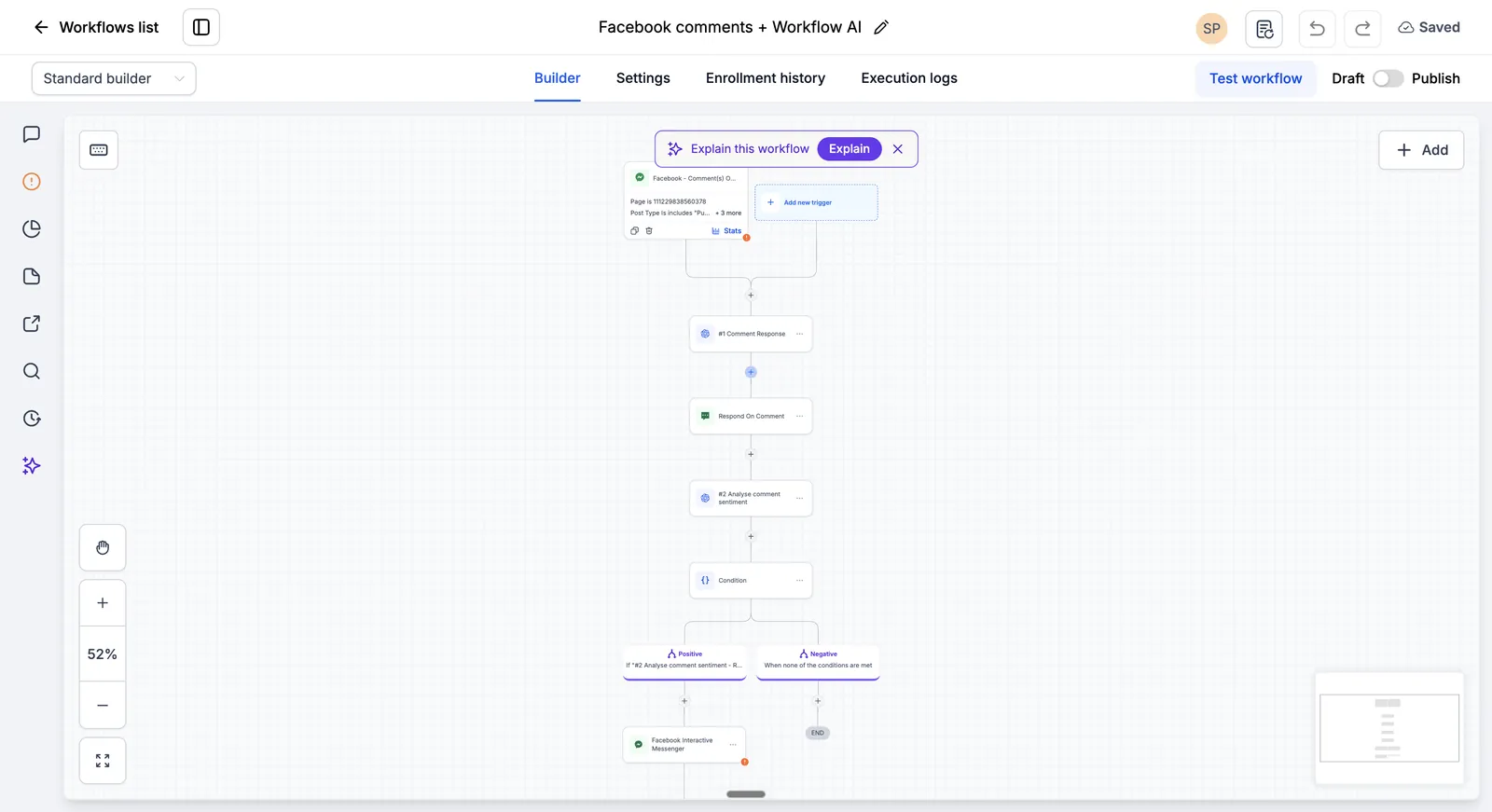
HighLevel has an "Instagram Comment(s) On A Post" workflow trigger with Contains Phrase and Exact Match filters, a toggle to track first-level comments only, and it ignores comments posted by workflow actions so the automation cannot loop on itself. The DM is sent with the "Instagram Interactive Messenger" action, which offers "Reply to Comment via DM" and "Reply to DM" and works only with an Instagram trigger. HighLevel's own help article warns that a comment does not open the 24-hour DM window, so the plain Instagram DM action is the wrong step after a comment.
How does an AI agent answer Instagram DMs safely?
The agent answers only from content you approve, says it is automated where the law requires, replies fast, and hands the chat to a person for anything sensitive, unclear or high value. Every exchange is logged in the CRM.
Meta's Messenger and Instagram messaging policy says automated chat experiences must disclose that a person is talking to an automated service when applicable law requires it, at the start of a conversation, after a long gap, or when a chat moves from a human to automation. Meta recommends disclosure even where the law does not require it, and so do we. The same policy says automated bots must respond to user input within 30 seconds and respond to any and all input, and Meta's platform terms (section 5.1) say not to send confusing messages or generic error messages.
In practice that gives us five build rules:
- Approved knowledge only. The agent reads from a document you sign off: services, prices, hours, areas, policies. It does not guess at prices or medical, legal or financial advice.
- A first line that says it is an assistant. Short and plain, then straight to the answer.
- A fallback for every input. Voice notes, images and off-topic messages get a sensible reply or a handover, never silence.
- Clear handover. Complaints, refunds, urgent requests and anyone who asks for a person go to your team's inbox with the full thread.
- Human replies after the window. When a reply is needed after 24 hours, a staff member answers using the 7-day Human Agent window. Automation does not send in that window.
Qualifying and booking follow the same pattern as our lead qualification agent: two to four questions, then a calendar link or a slot offer connected to your appointment booking automation.
How much does Instagram DM automation cost?
Our build price for a small system of two or three flows is about $1,000 at the time of writing, with larger systems quoted at a fixed price after a free call. Tool costs run from about $39 to a few hundred dollars a month.
ManyChat monthly cost by active contacts
The strategy call and audit are free. A small build (for example one comment-to-DM keyword flow, one story reply flow and the CRM sync) is about $1,000. Systems with an AI agent, ad flows and booking are quoted at a fixed price after the free call. Anything we build is fixed free for 6 months, and monthly support from $200 is optional after that. All Autoesta prices are at the time of writing.
On top of that you pay the tools directly, on your own accounts. We priced three realistic volumes with list prices read October 30, 2026. "Contacts" means people who interacted through the automation in a month, which is how ManyChat counts them.
| Monthly volume | ManyChat (monthly billing) | GoHighLevel (direct plan) | n8n on the Instagram API |
|---|---|---|---|
| 1,000 contacts | Pro $39 (2,500 included). Essential would be $17 + 750 x $0.10 = $92 and has no CRM integrations | Starter $97 + AI Employee Unlimited $97 = $194 | Cloud Pro 50 EUR (about 4,000 executions) |
| 2,500 contacts | Pro $39 | $194 | Cloud Pro 50 EUR (about 10,000 executions, the plan limit) |
| 6,000 contacts | Pro $39 + 3,500 x $0.05 = $214, so Business $99 (7,500 included) is cheaper | $194 | Over Cloud Pro: self-hosted Community edition (no licence fee, server cost extra) or Business 667 EUR |
| Also needed | A CRM, priced separately | Included: CRM, inbox, calendars | A CRM and AI model usage, priced separately |
Assumptions, labelled. ManyChat prices are monthly billing (annual billing is $29 for Pro and $69 for Business). GoHighLevel uses HighLevel's own $97 Starter plan; many businesses get HighLevel through an agency at a different price. For the AI agent we assume about three AI replies per contact, so 1,000 contacts means about 3,000 AI replies, more than the 1,000 Agent responses in the $50 Growth plan, which makes the $97 Unlimited plan (subject to fair use) the fit. Keyword flows without AI need no AI plan. For n8n we assume four workflow executions per contact; n8n lists cloud prices in euros with annual billing. None of these figures include tax. See software costs on top of a build for how we present running costs before you commit.
Should you use ManyChat, GoHighLevel or n8n for Instagram DMs?
Use GoHighLevel if you want the CRM, inbox and booking in one place. Use ManyChat if Instagram flows are the main job and you already like your CRM. Use n8n when you need custom logic, your own AI model or high volume.
| Your situation | What we usually recommend | Trade-off |
|---|---|---|
| You need a CRM too, or already run GoHighLevel | GoHighLevel Instagram integration with Conversation AI | A general workflow builder, so creator-style tricks need more setup than in ManyChat |
| Creator-style comment campaigns at volume, CRM already chosen | ManyChat Pro or Business, synced to the CRM | Two systems to keep in step; Pro allows 3 channels and 2 inbox seats |
| Custom routing, your own AI model, data in your own systems | n8n on Meta's Instagram API, built on your Meta app | You maintain an app, tokens and webhooks; we set up monitoring |
| Under about 20 DMs a week | A person answering in the Instagram app | No automation spend; does not scale |
If you already work in GoHighLevel, our GoHighLevel CRM setup page covers the CRM side. For the custom route, our n8n automation service explains hosting and error handling. Businesses that also sell over WhatsApp can run both channels from one design; see WhatsApp automation.
How does the build work, and how long does it take?
We start with a free call, map your triggers against Meta's rules, write the messages with you, build on your accounts, test every path, then go live. A small build of two or three flows takes days.
- Free call and audit. Which posts, stories and ads bring DMs today, what people ask, and where leads go now.
- Trigger map. Each flow is matched to an allowed trigger from the table above, with its window and limits written down.
- Messages and knowledge. We draft the keyword replies, the first private message, the qualifying questions and the agent's approved content. You approve them.
- Build on your accounts. Instagram professional account, CRM, ManyChat or n8n, all in your name.
- Test. Keyword variants, nested comments, non-followers (Requests folder), voice notes, handover, booking and CRM logging.
- Go live and watch. We watch the first campaign and adjust wording and filters.
Small builds take days; larger systems take longer, and most delays come from waiting for access and content. Our page on how long builds take gives the ranges.
What goes wrong with Instagram DM automation, and how do you fix it?
Most failures come from a keyword filter that does not match, a DM sent outside the allowed window, or a flow that never gets the person to reply. Account restrictions come from spam-like behaviour and negative feedback.
| Symptom | Likely cause | Fix |
|---|---|---|
| Automation does not trigger on a comment | Keyword filter too narrow ("Contains Phrase" needs the exact phrase inside the comment), the comment was a nested reply with first-level-only on, or the wrong post is selected | Add common variants and misspellings, decide on nested replies, check the post filter |
| "Message failed" right after a comment | A standard DM step was used; a comment does not open the 24-hour DM window | Use a private reply step (in HighLevel, Interactive Messenger "Reply to Comment via DM") |
| Follow-up messages fail after the first private reply | The person never responded, so no window opened | End the first message with a question and quick-reply buttons |
| "Message failed" a day or more later | The 24-hour standard window closed | A staff member replies within the 7-day Human Agent window; no automated sends |
| Replies arrive hours late on a viral post | Private reply rate limit, 750 calls per hour per account | Expected; set the public reply to say the DM may take a while |
| People say they never got the DM | Non-followers receive it in the Requests folder | Tell them in the public reply to check message requests |
| Messaging limited or paused | Excessive negative feedback, high-frequency spam-like sending, or message tags used for promotion | Cut frequency, honour opt-outs at once, keep tags for their approved use, review block rate |
| Nothing sends from HighLevel at all | The Instagram connection needs attention | Reconnect the account in the integration settings and re-test |
Meta's platform terms say messaging experiences that get excessive negative feedback "may be feature limited, paused, rate-limited", and ask businesses to provide an opt-out and respect it immediately. We add a plain "stop" path to every flow for that reason.
Who owns the Instagram account, flows and data?
You do. We build on your Instagram professional account, your CRM, and your ManyChat, HighLevel or n8n account, paid by you. If we build a custom Meta app, it sits in your Meta business, and you keep it if you stop working with us.
Ownership matters more on Instagram than on most channels, because Meta's docs say an app needs Advanced Access to serve professional accounts its owner does not own or manage, and only Standard Access for accounts it does. Building the app inside your own business keeps it simple and keeps the keys with you. Read who owns the automations and data for the full checklist.
Read next:
- step-by-step GoHighLevel comment-to-DM setup
- what gets Instagram accounts restricted for automated DMs
- what ManyChat costs at your volume
- Does Autoesta build Instagram DM automation?
More questions about Instagram DM automation
Can you automate Instagram messages?
Yes, for a professional (business or creator) account using Meta's official API through a tool such as ManyChat, GoHighLevel or a custom n8n build. Automation can reply to DMs, story replies, story mentions, message-ad clicks and comments. It cannot start a conversation with someone who has never contacted you, and it must stay inside the 24-hour window, or 7 days for some ad conversations.
Can you send an automated DM to new followers on Instagram?
Not for most accounts. A follow does not open a messaging window in Meta's public messaging API, and Meta's docs say a business can message a person only after that person sends a message. The exception is a Meta-gated Follow to DM beta in ManyChat, where Meta chooses eligible accounts and allows one such message per person per week. Tools that promise welcome DMs to every follower outside that beta usually act as a logged-in user, which risks the account. See automated DMs to new followers.
Is ManyChat allowed by Instagram?
ManyChat is built around the triggers Meta allows: its own help center counts contacts as people who DM you, comment on your post or reply to your story. The same Meta rules on this page still apply to your account: one private reply per comment, the messaging windows and opt-outs. A flow that spams or ignores opt-outs can get messaging limited whichever tool sends it.
How many Instagram DMs can you automate per hour?
Meta's published limits, per Instagram professional account, are 750 private-reply calls per hour for comments on posts and reels, 100 calls per second for private replies to Live comments, 100 Send API calls per second for text, links, reactions and stickers, and 10 per second for audio or video. In practice the 750 per hour comment limit is the one campaigns hit first.
Does Instagram DM automation work with ads?
Yes. When someone sends a first message after clicking a Click-to-Direct ad, Meta says the messaging window may last up to 7 days from that message, longer than the usual 24 hours. Comments on ad posts can also receive one private reply. We tag ad conversations in the CRM so you can see which ad produced each booking.
Do I have to tell people they are talking to a bot?
Meta's policy says automated chat experiences must disclose that they are automated when applicable law requires it, at the start of a conversation, after a long gap, or when a chat switches from a person to automation. Meta recommends disclosure even when the law does not require it. We add a short line at the start of every AI conversation.
What is the Human Agent tag on Instagram?
It lets a business send a manual reply in a separate 7-day window after the standard 24-hour window closes, for cases where a person on your team needs more time to answer. It is for messages typed by staff. Meta warns that using tags outside their approved use can restrict your ability to send messages, so automated flows never use it.
Can the automation book appointments from Instagram DMs?
Yes. After two to four qualifying questions, the flow sends a booking link or offers open slots from your calendar, and the booking, contact and conversation are saved in your CRM. On GoHighLevel this uses its own calendars; on ManyChat or n8n it connects to the calendar your team already uses.
Why do my Instagram automated DMs go to the requests folder?
Meta delivers a private reply to the person's main inbox if they follow your account and to the Requests folder if they do not. That is normal behaviour, not a fault in the flow. A public comment reply that says "check your message requests" recovers most of those people.
Can you automate Instagram DMs for free?
ManyChat's Free plan includes 25 active contacts per month, and n8n can be self-hosted without a licence fee, so small tests can cost little. A working business system usually needs a paid plan for CRM sync, AI replies and team inbox seats. Our build price is separate and quoted after a free call.
How do I get started?
Book a free strategy call or use the contact page. Tell us which posts, stories and ads bring messages today and where leads should go. We map each flow to Meta's allowed triggers and send a fixed price. If your bigger problem is slow replies across every channel, see our page on answering new leads faster and our lead automation service.
Sources and further reading
- Meta: Instagram API with Instagram Login, Send Messages (windows, Human Agent, permissions)
- Meta: Instagram Platform, Private Replies
- Meta: Instagram Platform overview (rate limits, professional accounts)
- Meta Platform Terms and Developer Policies (sections 5 and 6)
- Meta: Messenger Platform and IG Messaging API policy (disclosure, tags)
- ManyChat Help: Active Contacts and overage
- ManyChat Help: Pro plan and Business plan
- HighLevel: Instagram Comment(s) On A Post trigger
- HighLevel: Instagram Interactive Messenger action
- HighLevel: Instagram DM workflow action
- HighLevel: AI product pricing
- HighLevel pricing
- n8n pricing
