What is healthcare CRM automation?
Healthcare CRM automation is software that handles the patient-facing admin around your clinical system: answering new-patient enquiries, booking and reminding appointments, collecting intake forms, following up after visits, requesting reviews and processing referral paperwork, while clinical records stay in your EHR or practice-management software.
Clinics, home care agencies and specialist practices lose patients in the gaps before and after care: the enquiry nobody returned, the referral fax that sat in a tray, the appointment reminder that never went out. Healthcare CRM automation closes those gaps. It does not replace your EHR. It sits beside it and handles communication and admin.
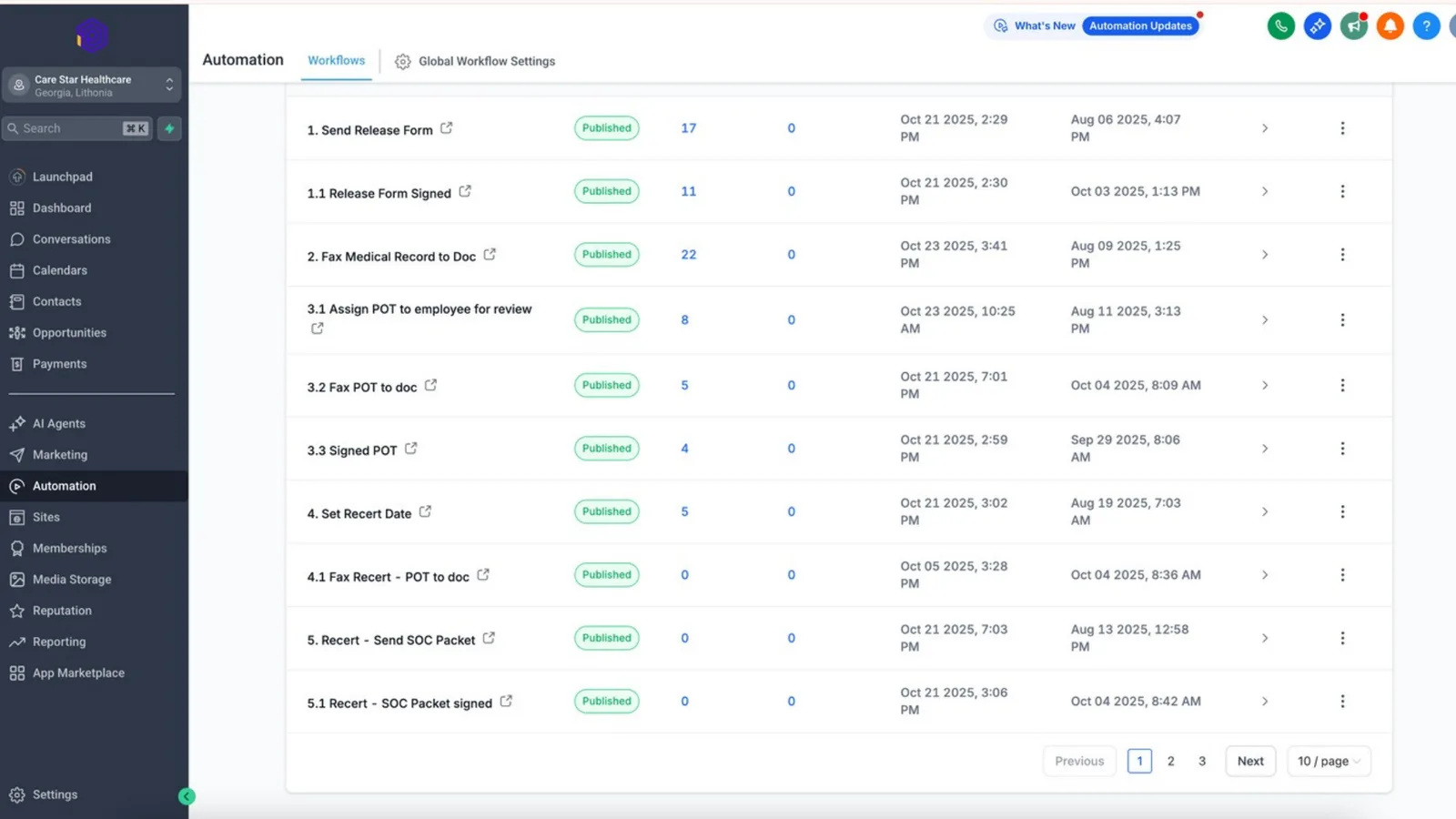
Autoesta builds healthcare automation for clinics, home care agencies and wellness practices, with privacy rules designed in from the start. Our Care Star Healthcare case study shows one of these builds.
What can healthcare automation handle for a clinic?
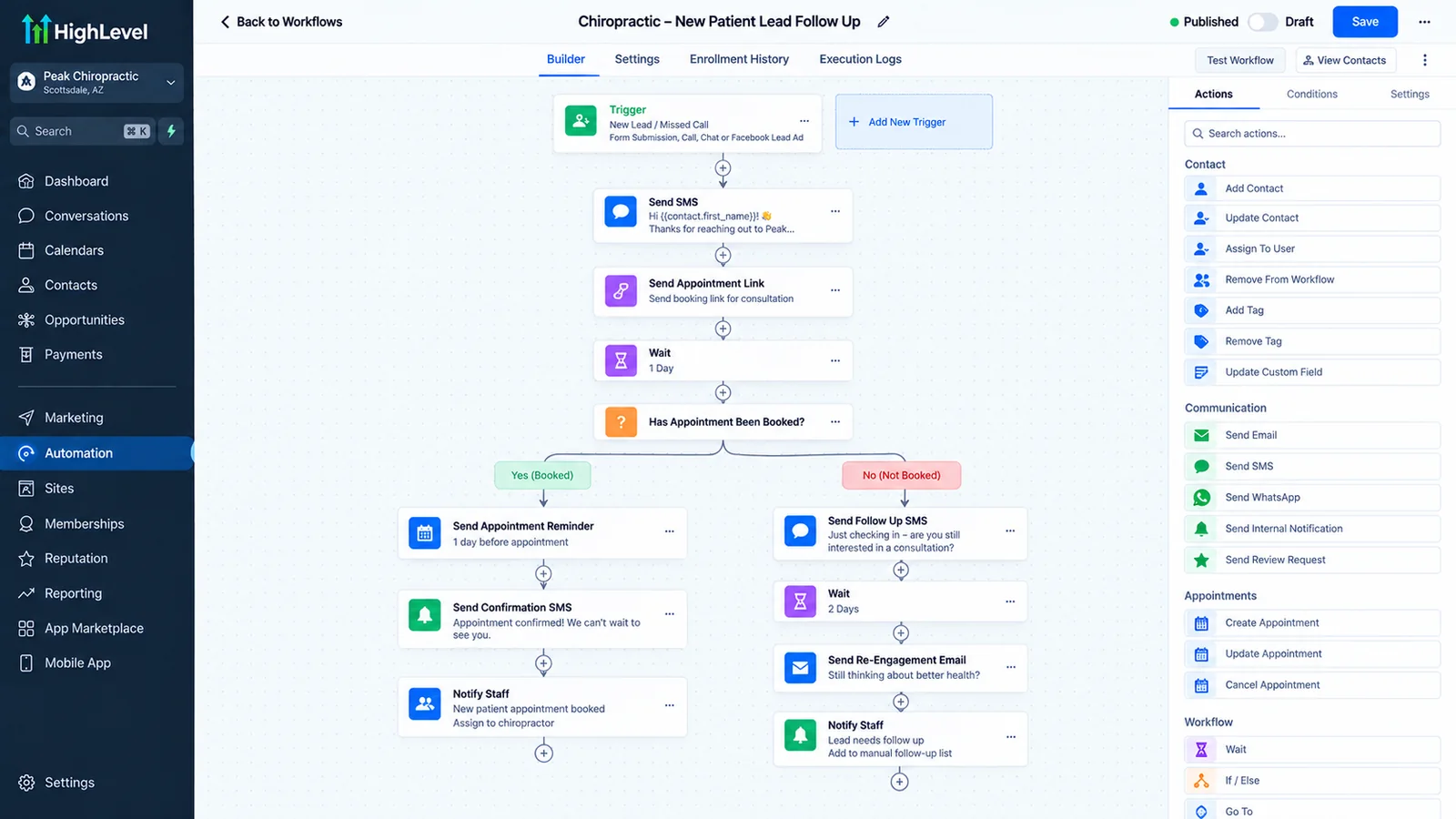
Healthcare automation can handle new-patient enquiries and callbacks, online booking, appointment confirmations and reminders, intake forms before the visit, recall and reactivation, post-visit follow-up and review requests, referral and fax intake, and staff alerts for anything that needs a person.
The patient journey, automated
| Patient stage | What gets automated | Related guide |
|---|---|---|
| Enquiry | Instant text reply, AI answers common questions, callback task | Speed up lead response |
| Missed call | Text-back, after-hours AI receptionist | AI receptionist |
| Booking | Online booking tied to provider calendars | Appointment booking automation |
| Before the visit | Confirmations, reminders, intake forms | Reduce no-shows |
| Referrals | Fax and email referrals read and routed to staff | AI workflow automation |
| After the visit | Follow-up, review request, recall | Get more reviews |
Is healthcare automation HIPAA compliant?
Healthcare automation can be HIPAA compliant when every tool that stores or processes protected health information signs a business associate agreement (BAA), access is limited to the people who need it, and messages avoid clinical details where a BAA is not in place. Compliance comes from the setup, not from a tool's marketing.
Some automation tools sign a BAA only on specific plans, and some do not sign one at all. Our HIPAA automation guide lists which of HighLevel, n8n, Zapier, Twilio and Airtable sign a BAA and under which plans. The HHS page on business associate contracts is the primary source for what a BAA must cover. We are not lawyers; confirm your setup with your compliance adviser.
Which healthcare practices use this kind of automation?
Healthcare automation is used most by practices that book appointments directly with patients and compete for new ones: dental, chiropractic, physical therapy, med spa and aesthetics, wellness and recovery clinics, home care agencies and specialist outpatient clinics.
- Dental practices: new-patient enquiries, reminders and recall.
- Chiropractic clinics: care-plan visits and reactivation.
- Med spas: consultations, packages and memberships.
- Home care agencies: enquiries, assessments and caregiver recruiting.
- Clinics on GoHighLevel: what the platform automates for US healthcare.
How much does healthcare automation cost?
Healthcare automation from Autoesta costs about $1,000 at the time of writing for a small build such as enquiry reply, missed-call text-back and reminders, $3,000 to $5,000 for a full CRM and automation system, and $5,000 to $10,000 for multi-location practices, plus software subscriptions and messaging usage.
Plans that include a BAA can cost more than basic plans, so we price the compliant option from the start. Every build includes six months of maintenance.
What should stay in your EHR, and what can move to automation?
Clinical records, diagnoses, treatment notes and billing codes should stay in your EHR or practice-management system. Patient communication, marketing, booking requests, reminders, reviews and non-clinical admin can run in a CRM and automation layer, connected to the EHR where an integration exists.
Where your EHR has an API, we connect it through API integrations so bookings and patient status stay in sync. Where it does not, we design the workflow so staff update one system and the automation handles the rest.
Healthcare automation examples by practice type
Healthcare automation starts in a different place for each practice: recall for dental, care-plan visits for chiropractic, consultations and packages for med spas, assessments and caregiver recruiting for home care, and referral intake for specialist clinics.
Where each practice type loses patients
| Practice type | Where patients are lost | First automation |
|---|---|---|
| Dental | Overdue recalls | Recall and reactivation sequence |
| Chiropractic and physical therapy | Patients dropping off a care plan | Visit reminders and missed-visit follow-up |
| Med spa and aesthetics | Consultations that never book | Consultation follow-up |
| Home care | Families who call once and go elsewhere | Instant reply and assessment booking |
| Specialist clinics | Referrals stuck in fax or email | Referral intake workflow |
What should a clinic measure after automating?
A clinic should measure new-patient response time, the share of enquiries that book, no-show rate, recall completion, and review volume. Those numbers show whether automation is filling the schedule. Message counts do not.
- Response time to new-patient enquiries.
- Enquiry-to-booking rate, by source.
- No-show rate; see reduce no-shows.
- Recall completion for returning patients.
- New reviews per month; see get more reviews.
For after-hours calls, an AI receptionist handles booking and admin questions. For the platform side, see GoHighLevel CRM.
When is healthcare automation the wrong fit?
Healthcare automation is the wrong fit for clinical decisions, triage and anything that needs a licensed professional's judgment, for practices whose EHR contract forbids outside access, and for any setup where a tool that touches patient data will not sign a BAA.
AI agents in healthcare answer admin questions and book; they never give medical advice. For a full picture of what we build, see our case studies or book a free call.
Frequently asked questions
Can a CRM be used in healthcare?
Yes, for patient communication, booking, reminders and marketing, as long as every tool that stores protected health information signs a business associate agreement and access is controlled.
Does healthcare automation replace my EHR?
No. It works beside your EHR or practice-management software and connects to it where an integration is available.
Can AI agents answer patient calls?
Yes, for admin such as hours, services, booking and directions. They should never give medical advice, and urgent calls should transfer to staff.
What does healthcare automation cost?
At the time of writing, about $1,000 for a small build, $3,000 to $5,000 for a full system and $5,000 to $10,000 for multi-location practices, plus subscriptions.
