Can GoHighLevel work for a healthcare clinic?
Yes, for the front office of a general or multi-specialty clinic: patient intake, scheduling, reminders, and referral follow-up. It runs beside your EHR or practice-management system, not in place of it.
GoHighLevel does not store clinical records, chart notes, or lab results, and it should not be asked to. What it does well is the part of a clinic that is not clinical at all. A new patient finds you online, fills out a form, needs a reminder the day before the visit, or arrives as a referral from another provider. That is CRM and scheduling work. It is the same work GoHighLevel already does for dental practices and med spas, applied to a business that runs several departments and several provider calendars at once.
If your clinic is one specialty in one location with one calendar, part of this guide will read like overkill. It is written for the case that trips people up: a family practice with a pediatrics arm, a multi-provider urgent care, or a group with two or three locations, where one generic pipeline stops working the moment a second specialty is added to it.
You will see the platform written as GoHighLevel, HighLevel, GHL or Go High Level. They are the same product. Whether you searched for GoHighLevel for healthcare providers, a GHL medical practice setup or a GoHighLevel expert for healthcare, the buying questions are the same, and they are the ones this page answers.
This page is general information, not legal advice. The HIPAA and messaging sections below describe what HighLevel, HHS, and the FCC publish. Your compliance officer or healthcare attorney decides what applies to your clinic.
What does GoHighLevel automate for a clinic's front office?
GoHighLevel automates new-patient intake, appointment booking and reminders, missed-call text-back, referral and lead follow-up, review requests, and outreach to patients who are overdue for a visit.
| Front-office task | How GoHighLevel automates it |
|---|---|
| New patient inquiry | A web form or call triggers an immediate reply and a pipeline entry, instead of a voicemail queue |
| Appointment booking | The calendar shows real provider availability and books directly, with two-way sync to Google or Outlook |
| Appointment reminders | A scheduled sequence of texts and emails runs off the booking, with no staff member sending them by hand |
| Missed calls | A caller who does not reach the front desk gets an automatic text back within seconds, or an AI calling agent answers after hours |
| Referral follow-up | The referral source is stored on the contact, and status updates can be routed back to the sender |
| Overdue patients | Patients due for a recall or follow-up visit get an outreach sequence instead of a manual call list |
None of this needs custom code. It is built with GoHighLevel's forms, pipelines, calendars, and workflow builder, configured around your clinic's actual patient journey instead of a generic template. For website questions, an AI chat agent can answer common questions and hand the patient to the booking calendar, though what it is allowed to say to a patient is a decision for your compliance lead.
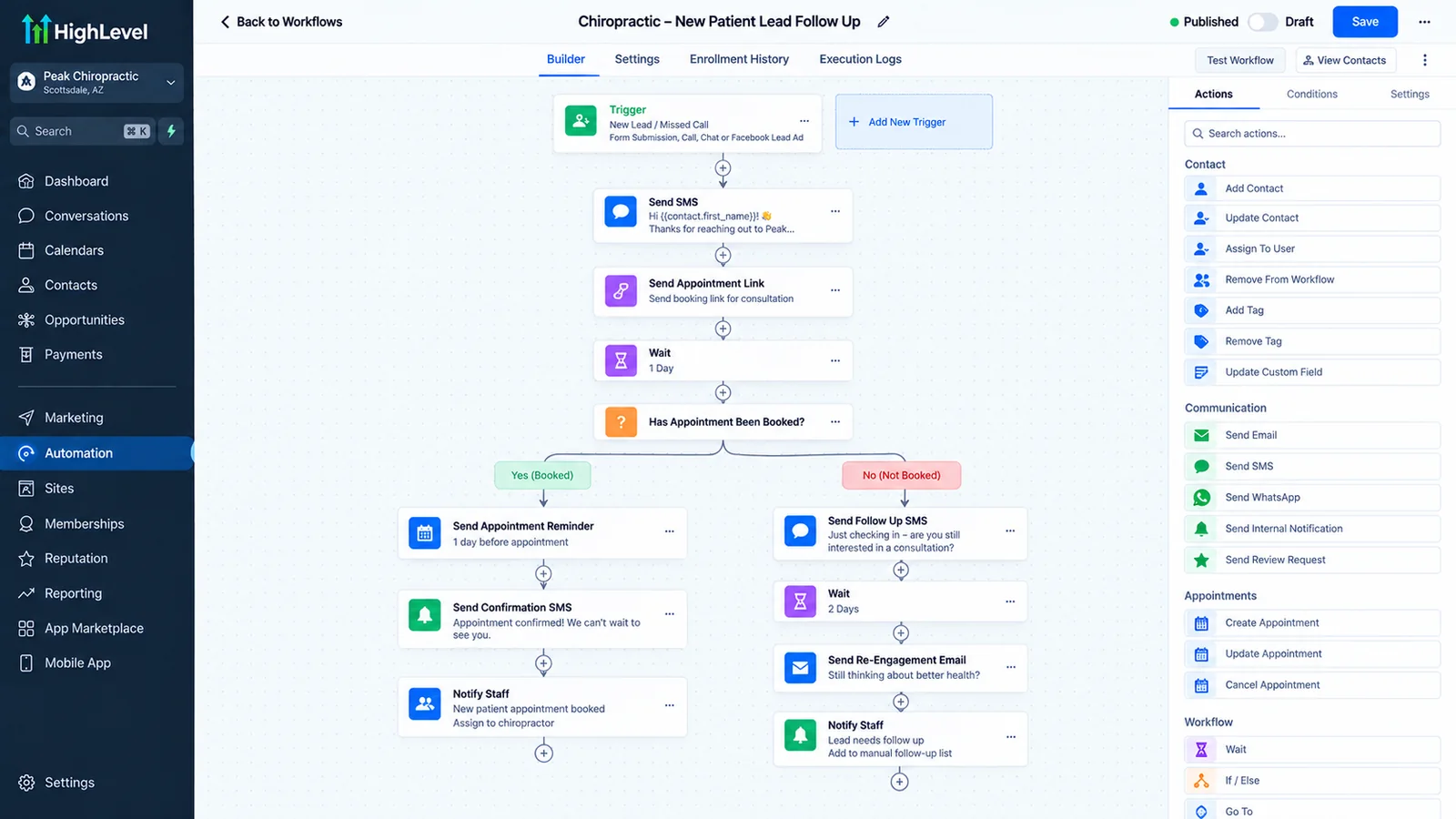
How does patient intake automation work in GoHighLevel?
A custom intake form feeds a pipeline: submitting it creates a contact, tags it by specialty and referral source, and sends a first response within minutes instead of waiting for a callback.
The intake form should ask different questions depending on which department the patient is trying to reach. A pediatrics intake and a physical therapy intake do not need the same fields. A clinic that builds one generic form for the whole practice ends up with intake data nobody can route on. The fix is one form per department or service line, each tagging the contact so the pipeline stage, the staff view, and the reminder sequence that follows all match the right specialty.
The workflow that matters most is the first response. GoHighLevel can send an acknowledgment the moment the form lands, with a link to book on the right provider's calendar, so the patient can pick a slot before the front desk has opened the notification. Our published dental case study, reported by Autoesta, describes the same pattern for one practice: first response cut from 45 to 90 minutes to under 5 minutes in the first 14 to 21 days. That figure describes one dental practice, not a clinic group, and we do not present it as a general benchmark.
One rule we hold to when scoping intake: collect the minimum needed to route and book. A form that asks for symptoms, diagnoses, or insurance details is collecting protected health information, which changes the compliance requirements covered below. Often the routing question ("which department") is enough at this stage, and clinical detail belongs in the EHR.
How do automated appointment reminders reduce no-shows?
A reminder sequence sends several automatic touches, a confirmation after booking, a day-before reminder, and a same-day text, so staff are not calling each patient by hand.
The clinic reminder sequence
- Booking confirmation. Sent right after the appointment is scheduled, with date, time, location, and provider.
- Day-before reminder. A text or email with an option to confirm or ask to reschedule.
- Same-day reminder. A shorter nudge a few hours ahead, timed to the appointment slot instead of a fixed hour for everyone.
- No-response follow-up. If the patient has not confirmed, a text or call goes out early enough for the front desk to refill the slot.
We are not quoting a no-show reduction percentage here, because we have not found a reachable primary source for one that fits a general clinic, and we have no clinic-group result of our own to report. What we can say from building these is what breaks them. Two-way calendar sync matters as much as the reminders. If a cancelled slot never returns to the calendar, the opening stays hidden and the reminder sequence keeps running against an appointment that no longer exists. Our appointment booking automation page covers the sync setup in more detail.
Are appointment reminder texts allowed under HIPAA and the TCPA?
Generally yes for genuine reminders, but two rule sets apply: HIPAA governs the health information in the message, and the FCC's TCPA rules govern automated texts and calls. This is a summary of published rules, not legal advice.
On the HIPAA side, HHS says appointment reminders are a treatment and operations activity that a covered entity can send without a separate patient authorization. What a clinic should still do is respect the patient's stated communication preferences and keep the message minimal: date, time, and a call-back number, not the reason for the visit. HHS also notes that a patient may ask to receive unencrypted text messages, but the clinic should warn them about the risk first.
On the TCPA side, the FCC's rule at 47 CFR 64.1200 has a specific carve-out for healthcare messages. Healthcare texts to a wireless number can qualify for an exemption if they meet all of these conditions, among others in the rule:
- The message is limited to purposes such as appointment and exam confirmations and reminders, wellness checkups, pre-registration and pre-operative instructions, lab results, post-discharge follow-up, prescription notifications, and home healthcare instructions.
- No more than one message per day per patient and three per week.
- The patient can opt out easily, and the clinic honors the opt-out immediately.
- No marketing content in the message.
The practical consequence for a build: a reminder workflow and a promotional workflow must be separate, and the promotional one needs proper consent. A "we miss you, book a cleaning special" text sent from the reminder sequence falls outside the healthcare exemption. We also register the clinic's number for carrier texting (A2P 10DLC) before launch, as we describe in our GoHighLevel setup guide, because unregistered business texting can be throttled or blocked.
Is GoHighLevel HIPAA compliant?
Not by default. HighLevel states that its accounts are not HIPAA compliant out of the box, and it sells an optional HIPAA add-on that includes a Business Associate Agreement, which the account holder must purchase, sign, and then switch on for each sub-account that will hold protected health information.
Here is what HighLevel's own help article says at the time of writing, and it is worth reading directly before you decide: HIPAA Compliance with HighLevel.
- The add-on is priced at US$297 per month. It is non-refundable, and once enabled it cannot be canceled, removed, or downgraded, because encrypted PHI cannot be reversed.
- After purchase, the agency owner reviews and signs the BAA inside HighLevel (Settings, then Compliance).
- Signing the BAA does not protect any sub-account yet. The agency owner then turns HIPAA on manually in each sub-account's advanced settings.
- When enabled, the safeguards cover items such as contacts, notes, custom fields, SMS and MMS, voice recordings, email bodies and attachments, form and survey submissions, and calendars, per the same article.
- HighLevel notes that agencies handling PHI must ensure their own HIPAA compliance in order to give their clients a BAA.
The same article (updated 11 June 2026) says agencies on any HighLevel plan can buy the add-on, and that it adds 256-bit AES encryption of stored health data, audit logs and enforced multi-factor authentication. We could not verify from it which third-party integrations and connected tools fall outside the BAA. Confirm that with HighLevel in writing before you build. We also cannot tell you whether your clinic's use case makes the data PHI, and the answer is not always obvious.
What HHS says matters here too. HHS guidance on cloud computing states that a cloud provider that creates, receives, maintains, or transmits ePHI for a covered entity is a business associate, and a covered entity that uses one without a BAA is in violation of the HIPAA rules. HHS also says the Office for Civil Rights does not endorse, certify, or recommend specific technology products. That means no vendor, HighLevel or Autoesta included, can be "HIPAA certified" in any official sense. Autoesta is a build partner. We do not hold a HIPAA certification and we do not certify your compliance.
What the account holder still has to do
- Decide, with your compliance officer, which data you will put in GoHighLevel and whether it counts as PHI.
- Buy the add-on, sign the BAA, and enable HIPAA on each sub-account that will hold PHI, before a real patient record goes in.
- Keep your own HIPAA policies, staff training, access controls, and risk analysis. The BAA covers the vendor's side of the arrangement, not yours.
- Sign a BAA with any other vendor that touches the same data, including an integration layer between GoHighLevel and your EHR.
- Review the setup after any workflow or integration change.
A name, a phone number, and "requested an appointment" may sit at the edge of what counts as PHI depending on who you are and how the data is used, and HHS treats data that identifies a patient in connection with care as protected. We do not draw that line for you. The rule we build to is conservative: if intake, notes, or messages will ever reference a patient's condition, treatment, or payment, the compliance settings and the BAA come first.
How does lead and referral follow-up work for a clinic?
Each contact is tagged with its referral source, so a referred patient's progress can be tracked through the pipeline and, where appropriate, a status update sent back to the referring provider.
Referral follow-up only works if the source is captured as a real field on the contact, not buried in a note. Tag each new contact by source (a specific referring physician, an ad campaign, a walk-in) at creation, and the pipeline can show which sources become booked and completed appointments, rather than only which generate the most form fills. Skip that step and referral tracking quietly turns into the same generic marketing pipeline every other lead runs through. Clinics rarely notice until a referring provider asks where their patients ended up and nobody can answer.
Whether a status update to a referring provider may include health information is a HIPAA question, since it is a disclosure of PHI. HHS treats disclosures for treatment purposes as generally permitted, but the wording and the channel are decisions for your compliance lead. We build the automation to send whatever wording you approve, and we keep the default minimal: "your referred patient has been scheduled."
What does a GoHighLevel build for a clinic include?
A proper build maps the real patient journey into pipeline stages first, then adds department-specific intake forms, provider calendars, reminder sequences, a referral pipeline, and compliance settings if PHI is involved.
- Map the patient journey per department before building any pipeline, the same rule as any GoHighLevel setup (see our setup guide for the general build order).
- Build one intake form per specialty or service line, tagging contacts so routing and reminders match automatically.
- Connect each provider's calendar with two-way sync and correct buffer times, tested one provider at a time.
- Build the reminder sequence for confirmation, day-before, and same-day touches, kept separate from promotional messages.
- Build a referral pipeline with source tagging and, if wanted, approved status updates to referring providers.
- Enable compliance settings and sign the BAA before any PHI enters the account, if your clinic's data requires it.
- Register SMS and set opt-out handling so a reply of STOP is honored immediately.
Where GoHighLevel does not integrate natively with an existing EHR or practice-management system, the connection usually runs through an integration layer. Our n8n automation page explains how that layer works. Any layer that carries PHI needs its own BAA and its own compliance review, so we scope it as a separate line item, not a footnote.
Which EHRs does GoHighLevel connect to?
GoHighLevel has no built-in sync for most EHRs. The connection runs through the EHR's own API or a healthcare integration tool: athenahealth, eClinicalWorks and DrChrono publish developer APIs, while Jane allows integrations only through its approved partner program.
We checked each vendor's developer documentation on 1 October 2026. Read the table as what is possible, not as a promise that a connection is quick: most EHR vendors put production access behind a partner or contract step, and anything that carries patient data needs a BAA with every party in the chain.
| EHR or practice system | How a connection works | Events useful to the front office | Watch out for |
|---|---|---|---|
| athenahealth | Developer portal with REST and FHIR APIs (athenahealth API access guide); apps reach practices through the athenahealth Marketplace | Appointment changes (booked, cancelled, rescheduled, checked in) and new patients | A third-party app needs athenahealth's partner approval for production access, so allow time for it |
| eClinicalWorks | Certified FHIR APIs for registered developers; patient-facing and scheduling apps register on the healow developer portal | Patient and encounter data; booking through healow's scheduling APIs | Writing appointments back is governed by eClinicalWorks and healow agreements; confirm terms before scoping |
| DrChrono | Documented REST API with webhooks (DrChrono API docs) | Appointment created or updated, patient created | You register an API application in the DrChrono account; the webhook then points at a GoHighLevel inbound webhook or an integration tool |
| Jane | No open API or API keys, per Jane's integrations FAQ; connections only through Jane's approved partner platform | None you can build yourself | Plan for Jane to stay the booking system; GoHighLevel handles enquiries before the first visit and follow-up marketing after it |
Healthcare integration platforms fill the gap between the two. Keragon, for example, lists ready-made GoHighLevel connectors for athenahealth, eClinicalWorks and DrChrono and says it signs a BAA with healthcare customers (Keragon GoHighLevel integrations, checked 1 October 2026). Treat that as a vendor claim to confirm in your own contract. General tools such as n8n or Zapier can also carry the data, but only on a plan and setup covered by a BAA.
The sync we usually build is small: an appointment booked, cancelled or completed in the EHR updates the contact in GoHighLevel, so reminders, review requests and recall run from what really happened. Charts, notes and results never leave the EHR. If the EHR already sends its own reminders, switch one of the two systems off, or patients get two texts for one visit.
Should a clinic buy a GoHighLevel healthcare snapshot or hire an expert?
Buy a medical snapshot if you have the time to adapt and test it yourself. Hire a GoHighLevel expert if you need it fitted to your departments, EHR, HIPAA settings and texting registration, because a snapshot copies templates and leaves those parts out.
HighLevel's snapshots overview (modified 30 September 2026) says a snapshot copies configuration: workflows, calendars, pipelines, custom fields, forms, templates and dashboards. Contacts, appointments, conversations, Stripe and other third-party integrations, and assigned phone numbers do not transfer. Most medical snapshots on sale are also built for one specialty, which is the problem the multi-specialty section below describes.
| What a clinic needs | Comes with a snapshot? | Who does it |
|---|---|---|
| Pipelines, calendars, forms, workflow templates | Yes, as a starting structure | Still split by department and fitted to your providers |
| EHR connection | No | Built per vendor, as in the EHR table above |
| HIPAA add-on, BAA and per-sub-account switch | No | Bought and signed at agency level, then enabled in each sub-account |
| Phone numbers and A2P texting registration | No | Filed for your clinic, with form wording that matches |
| Patient contacts and consent history | No | Imported and tagged, with consent status kept |
| Testing against real departments | No | Done before patients flow through it |
A good snapshot can save build hours, and if you already bought one, the free audit tells you how much of it is usable. Our answer on whether snapshots are worth buying covers the trade-off, and the GoHighLevel setup agency page shows what a full build includes.
What does it cost to build and run this?
At the time of writing, our typical pricing is a full GoHighLevel setup at about $3,000 to $5,000, multi-location builds at $5,000 to $10,000, and support from $200 a month, plus HighLevel's own subscription and the HIPAA add-on if you need it.
What a clinic pays each month for the platform
| Cost line | Amount at the time of writing | Source |
|---|---|---|
| HighLevel plan | Starter $97, Unlimited $297, Agency Pro $497 per month | HighLevel's pricing page |
| HighLevel HIPAA add-on | US$297 per month, permanent once enabled | HighLevel help article |
| Account audit | Free | Autoesta |
| Account cleanup or verification | From $200 | Autoesta |
| Full GoHighLevel setup | About $3,000 to $5,000 | Autoesta |
| Multi-location build (5+ locations) | $5,000 to $10,000 | Autoesta |
| Monthly support | From $200 | Autoesta |
Two cost details clinics miss. First, Starter caps you at three sub-accounts, so a group with several locations or departments as separate sub-accounts usually needs a higher tier. Second, the HIPAA add-on is a permanent monthly line, so plan for it as a fixed cost, not a trial. Our GoHighLevel pricing breakdown covers the platform costs in more detail. Builds include six months of maintenance.
What should a multi-specialty clinic watch out for that a dental-only guide won't cover?
A single pipeline and intake form built for one specialty breaks when a second department joins, because different specialties need different questions, different calendars, and often different referral sources.
Most GoHighLevel healthcare content is written for a single-specialty practice, usually dental, where one pipeline, one form, and one calendar cover the business. A multi-specialty clinic does not have that luxury. Pediatrics, physical therapy, and primary care under one roof each have their own intake questions, their own no-show patterns, and their own referral networks. Build one pipeline for all of them and you get a form asking every patient about medication history when half are booking a sports physical, and a reminder sequence timed for one specialty's appointment length that is wrong for the other two.
The fix is to scope each department as its own sub-pipeline (or sub-account, for larger groups) with its own form, calendar, and tags, while rolling reporting up into one view for the practice owner. That takes longer to plan than copying a dental-style template, and it is the difference between a build that survives a third specialty and one that gets rebuilt. It also helps compliance: keeping the departments that touch PHI in separate sub-accounts from the ones that only run marketing means you switch HIPAA on only where you need it. Remember the add-on cannot be undone once enabled, so decide that boundary deliberately.
If you run a home care agency, see our GoHighLevel guide for home care agencies, which covers caregiver recruiting and EVV.
If your clinic is dental only, our dental CRM automation case study covers that single-specialty build. For cosmetic and med spa clinics, see the GoHighLevel guide for aesthetic clinics.
Some services have their own page, so this one does not repeat them: GoHighLevel med spa setup covers booking software, packages and deposits, and GoHighLevel for weight loss and TRT clinics covers cash-pay programs such as GLP-1.
When is GoHighLevel the wrong choice for a healthcare clinic?
GoHighLevel is the wrong choice if you need a system of record for clinical documentation, if you run a large hospital system with enterprise tooling, or if you are unwilling to do the HIPAA setup and staff training properly.
| Situation | Why GoHighLevel does not fit | Better option |
|---|---|---|
| You need chart notes, lab results, or e-prescribing | It is a CRM, not a clinical record system | An EHR |
| Hospital system with enterprise scheduling and referral tools | A department-by-department replacement is unrealistic | Keep the enterprise stack |
| You do not want a permanent monthly HIPAA add-on but will handle PHI | Skipping it puts PHI in an account not covered by a BAA | A vendor whose BAA terms you accept |
| No one owns compliance | The BAA covers the vendor, not your policies or training | Assign an owner first |
| Single provider, few patients, phone-first | A calendar link and a text reminder may be enough | Your EHR's built-in reminders |
For a general or multi-specialty outpatient clinic that wants intake, scheduling, reminders, and referral tracking handled consistently across departments, it is a reasonable fit once it is built around your real patient journey and your compliance decisions are made first. A free strategy call is the fastest way to find out which side of that line you are on.
If you run a dental practice, our GoHighLevel for dentists guide covers the practice-management integration and consent questions in more detail.
For a dental example of recall and inactive-patient outreach, read our guide to recall and patient reactivation.
Other regulated professions face similar questions; our legal CRM comparison covers where GoHighLevel fits for law firms.
Automation tools beyond HighLevel raise their own BAA questions. Our guide to HIPAA and automation tools covers n8n, Zapier, Airtable and Twilio.
Frequently asked questions
Can doctors and private medical practices use GoHighLevel?
Yes, for the front office: new-patient enquiries, booking, reminders, recall and reviews, with the HIPAA add-on active. Charting, prescribing and billing stay in the EHR and practice-management system.
Can GoHighLevel be used for addiction treatment or rehab centers?
Yes, with extra care. Substance use disorder records can fall under the federal confidentiality rule at 42 CFR Part 2, which is stricter than HIPAA, and advertising treatment on Google, Meta and Microsoft requires LegitScript addiction treatment certification. Have counsel confirm what may be stored and sent before launch.
What GoHighLevel plan does a multi-specialty clinic need?
At the time of writing, HighLevel's pricing page lists Starter at $97 a month, Unlimited at $297, and Agency Pro at $497. Starter is limited to three sub-accounts, so a clinic with several departments or locations as separate sub-accounts usually needs Unlimited or Agency Pro. HighLevel's HIPAA article says the add-on can be bought on any of these plans.
Does GoHighLevel replace our EHR or practice-management software?
No. GoHighLevel handles front-office marketing, scheduling, and communication. Clinical documentation stays in your EHR, and the two run side by side, connected where a native integration exists or through an automation layer where it does not.
Is Autoesta HIPAA certified?
No, and no one can be in an official sense, because HHS does not certify products or vendors. We build and configure GoHighLevel accounts. Your clinic remains responsible for its own HIPAA compliance and should confirm requirements with HighLevel and your attorney.
How long does a clinic build take?
A single-specialty clinic with one calendar follows the timeline of a standard build, roughly one to two weeks of part-time work, or about a week with an agency, per our setup guide. A multi-specialty clinic with several departments, provider calendars, and a referral pipeline more commonly takes three to four weeks. Waiting on a BAA or an EHR integration can add time.
Can Autoesta set this up for our clinic?
Yes. Autoesta was founded in 2021 in San Francisco and has completed 320+ projects across 15+ countries, led by HighLevel Certified Admin Alpit Patel. Start with a free strategy call where we look at your departments, provider calendars, and referral sources and tell you what we would build, including whether your data needs the HIPAA add-on. See our GoHighLevel expert page for audits and fixes, the GoHighLevel setup agency page for full builds, or our case studies, including the real estate case study, for finished builds in other industries. You can also contact us directly.
How much does the GoHighLevel HIPAA add-on cost?
HighLevel lists it at US$297 a month on top of your plan, and agencies on any plan can buy it. It includes a signed BAA, encryption of stored health data, audit logs and enforced multi-factor authentication, and it cannot be cancelled or refunded once bought (HighLevel HIPAA article, updated 11 June 2026).
Can GoHighLevel book telehealth visits?
Yes for the booking. HighLevel calendars can add a unique Zoom or Google Meet link to each appointment and put it in the confirmation (HighLevel Zoom article). The video visit itself must meet HIPAA: the COVID-era leniency ended with a transition period that closed on 9 August 2023, per HHS. Use your EHR's telehealth or a video service that signs a BAA.
Can an AI receptionist answer patient calls in GoHighLevel?
Yes, for admin: hours, directions, insurance accepted, booking and rescheduling. GoHighLevel's Voice AI agents can answer calls and book into your calendars. We set them to pass anything clinical or urgent to staff and never to give medical advice. Our AI receptionist page covers scope and cost.
How much does texting registration cost for a clinic?
HighLevel lists a one-time fee of $22.50 for a low-volume or sole-proprietor brand, or $64 for a high-volume brand, each including the first campaign and Fast Track review, plus a campaign fee of $1.50 to $10 a month (HighLevel A2P fees, updated 24 September 2026). Messages are billed on top. Our A2P registration guide covers approval.
Can GoHighLevel collect a deposit or no-show fee when a patient books?
Yes, for cash-pay services. HighLevel calendars can take a fixed deposit or a percentage at booking through Stripe or another connected gateway (HighLevel calendar payments). Insurance billing and copays stay in your practice-management system. Put the cancellation policy in writing first so the fee, the refund rule and the reminder wording match.
Do you set up GoHighLevel for clinics outside San Francisco?
Yes. We build remotely for clinics across the US and in other countries, with the team split between San Francisco, India and Nepal. Calls run on video, so your state mainly changes which rules your counsel checks, not how the build works.
Is GoHighLevel suitable for a medical practice?
For the front office, yes: GoHighLevel for healthcare providers handles enquiries, reminders, intake forms and reviews. A GoHighLevel medical practice setup that stores protected health information needs HighLevel's HIPAA add-on and a signed BAA.
Related: healthcare automation case study, GoHighLevel pricing calculator, CRM automation by industry and the FCC opt-out rule changes.
Industry pages: dental practice automation, med spas and chiropractic. For patient reviews that follow Google policy, see review automation.
For healthcare automation beyond GoHighLevel, including referral intake and EHR connections, see healthcare CRM automation.
