What is GoHighLevel CRM?
GoHighLevel CRM is the contact, pipeline and conversation system inside HighLevel, an all-in-one sales and marketing platform. It stores every lead and customer, tracks deals through pipeline stages, and keeps texts, emails, calls and social messages in one inbox, with calendars, forms, workflows and reporting built into the same account.
Most small businesses use three or four tools for this: a CRM, a texting app, a booking tool and an email platform. GoHighLevel puts those in one place, which is why it is popular with clinics, home-service companies, real estate teams and agencies. The trade-off is that it only works well when it is set up with care. An empty GoHighLevel account is a pile of features. A configured one is a sales system.
Autoesta sets up, fixes and runs GoHighLevel CRM for service businesses. We are a 16-person team led by a HighLevel Certified Admin, and GoHighLevel is the backend for most of the systems in our case studies.
What does the GoHighLevel CRM include?
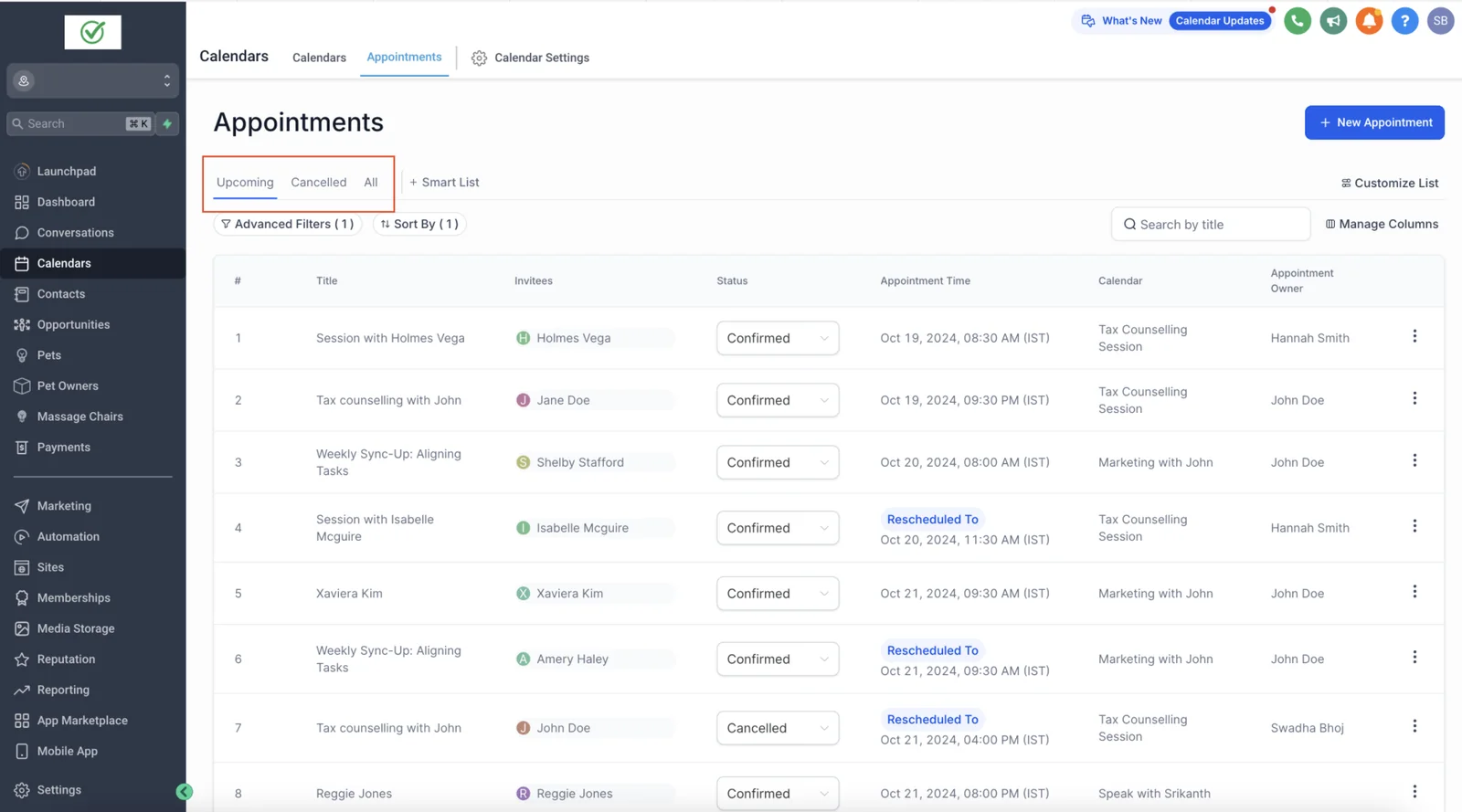
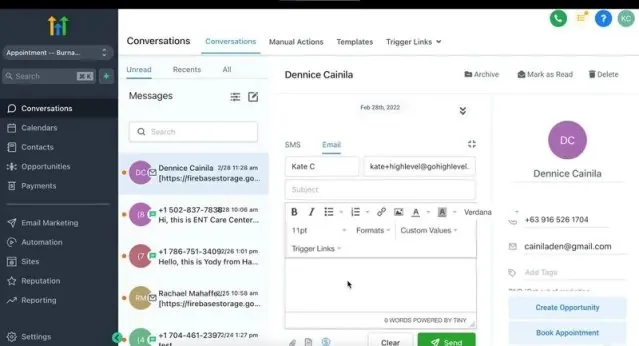
The GoHighLevel CRM includes contacts and smart lists, opportunity pipelines, a unified conversations inbox (SMS, email, calls, Facebook, Instagram and more), calendars, forms and surveys, workflows, review requests, invoices and payments, and reporting dashboards, all in one account.
What is inside GoHighLevel CRM
| GoHighLevel CRM area | What it does | What we usually configure |
|---|---|---|
| Contacts and smart lists | One record per person, with tags, custom fields and activity history | Custom fields for your service, source tagging, duplicate rules |
| Opportunities and pipelines | Deals moving through stages you define | Stages that match how you actually sell, stage-based tasks |
| Conversations | Texts, emails, calls and social DMs in one inbox | Assignment rules, templates, missed-call text-back |
| Calendars | Online booking tied to staff availability | Round-robin, buffers, confirmations and reminders |
| Forms, surveys and funnels | Lead capture pages and forms | Forms that write to the right fields and start the right workflow |
| Workflows | Automation triggered by events | Follow-up, reminders, routing, review requests |
| Reputation | Review requests and review monitoring | Requests sent after a completed job or visit |
| Reporting | Dashboards for leads, calls, appointments and revenue | A dashboard the owner reads every week |
The features are the same in every account. What differs is the setup: which fields exist, which stage a lead lands in, who gets notified, and what happens when nobody replies. That is where most of our GoHighLevel account fixes start.
How much does GoHighLevel CRM cost?
At the time of writing, GoHighLevel CRM costs $97 a month on the Starter plan, $297 a month on Unlimited and $497 a month on Agency Pro, with texts, emails, calls and AI usage billed on top. Annual billing lowers each plan to roughly ten months' price.
Plan prices, monthly vs annual billing
| Plan | Monthly price (at the time of writing) | Best fit |
|---|---|---|
| Starter | $97 | One business, up to 3 sub-accounts |
| Unlimited | $297 | Agencies or multi-location businesses with many accounts |
| Agency Pro | $497 | Agencies reselling the platform under their own brand |
Usage is where bills surprise people. Every text, email, phone minute and AI conversation has its own rate. Our GoHighLevel pricing guide breaks those charges down, and the GoHighLevel pricing calculator estimates a monthly bill from your own volumes. Always confirm current plan prices on HighLevel's pricing page before you buy.
Autoesta's setup work is separate from the subscription. At the time of writing, a small build of two or three automations is about $1,000, a full GoHighLevel CRM setup is $3,000 to $5,000, and support starts from $250 a month. Every build includes six months of maintenance on what we built.
How does Autoesta set up GoHighLevel CRM?
Autoesta sets up GoHighLevel CRM in five steps: an audit of how you sell today, a pipeline and field design, the build (calendars, conversations, workflows, forms), testing with real leads, and a handover with training and a written map of every automation.
- Audit. We map where leads come from, who answers them, and where they get lost. This is the free strategy call plus, for existing accounts, a paid audit from $250.
- Design. Pipeline stages, custom fields, tags and naming rules are agreed before anything is built, so reports mean something later.
- Build. Calendars, the conversations inbox, forms, GoHighLevel automation for follow-up and reminders, and phone numbers with A2P 10DLC registration where texting is involved.
- Test. We push test leads through every path: form, call, missed call, chat and booking, and check that each lands in the right stage with the right owner.
- Handover. Your team gets a walkthrough and a written list of what each workflow does. Six months of maintenance starts from launch.
A small build takes days. A full CRM with several integrations usually takes 20 to 30 days. If you want the whole process explained step by step, read how to set up GoHighLevel properly, or hire us through the GoHighLevel setup service.
GoHighLevel CRM vs HubSpot and Salesforce
GoHighLevel CRM costs less than HubSpot or Salesforce for a small service business because texting, calendars, funnels, review requests and automation come in one flat plan. HubSpot and Salesforce are stronger for larger sales teams that need deep reporting, complex permissions and a big app ecosystem.
| GoHighLevel CRM | HubSpot | Salesforce | |
|---|---|---|---|
| Pricing model | Flat plan plus usage | Per seat and per hub | Per seat, with add-ons |
| Business texting (SMS) | Built in | Through integrations | Through add-ons or integrations |
| Booking and funnels | Built in | Meetings built in, landing pages on paid hubs | Needs other products |
| Best for | Service businesses and agencies | Marketing-led teams | Large sales organizations |
For the numbers, see GoHighLevel vs HubSpot and whether GoHighLevel can replace Salesforce. If none of them fits your process, a custom CRM is the other route.
Which businesses get the most from GoHighLevel CRM?
GoHighLevel CRM fits businesses that sell through appointments and fast replies: clinics, med spas, dental practices, home-service companies, real estate teams, coaches and marketing agencies. Its strengths are speed to lead, booking and follow-up, not complex B2B account management.
- Dental practices use it for new-patient enquiries, reminders and recall.
- Med spas use it for consultations, packages and reactivation.
- Real estate teams use it for instant replies to portal leads and long nurture.
- Agencies use it to run many client accounts from one login.
How do you keep GoHighLevel CRM data clean?
Keep GoHighLevel CRM data clean by agreeing on field names, tags and pipeline stages before anything is built, blocking duplicates at the form and import level, tagging every lead with its source automatically, and reviewing unused tags and fields every quarter.
| Rule | Why it matters |
|---|---|
| One custom field per fact, named the same way everywhere | Reports and workflow branches read the right value |
| Source tag added by the form or integration, never by hand | You can see which channel brings booked customers |
| Duplicate matching on phone and email | One person, one record, one conversation history |
| Pipeline stages that mean one thing each | Stage-based tasks and reports stay accurate |
| Quarterly clean-up of tags and fields | New staff are not confused by years of leftovers |
Clean data is what makes the rest work: lead routing needs the right fields, automated reporting needs consistent sources, and the GoHighLevel Voice AI agent needs somewhere to save what callers tell it. If you are moving data in from another system, read GoHighLevel migration first.
When is GoHighLevel CRM the wrong choice?
GoHighLevel CRM is the wrong choice when you need enterprise permissions and audit trails, when your sales cycle runs through complex quotes and account hierarchies, or when you need a HIPAA business associate agreement on a plan that does not include one.
- Large, multi-team sales. Territory rules, approval chains and forecasting are thinner than in Salesforce.
- Protected health information. Check which plan includes a BAA before storing patient data. Our HIPAA automation guide covers this.
- Heavy custom data. If your business runs on records GoHighLevel cannot model, pair it with Airtable or build custom software.
We will tell you on the first call if GoHighLevel is not the right fit. It costs you nothing to ask.
Frequently asked questions
Is GoHighLevel a good CRM?
GoHighLevel is a good CRM for small service businesses and agencies that sell through fast replies and booked appointments, because texting, calendars, funnels and automation are built in. It is a weaker fit for large sales teams that need enterprise permissions and forecasting.
Is GoHighLevel CRM free?
No. GoHighLevel offers a free trial, then plans start at $97 a month at the time of writing, with usage such as texts, calls and AI billed separately.
Can I use GoHighLevel CRM without the marketing features?
Yes. Many businesses use only contacts, pipelines, conversations and calendars. You still pay for the plan, but you do not have to switch on funnels, websites or memberships.
How long does a GoHighLevel CRM setup take?
A small build of two or three automations takes days. A full GoHighLevel CRM setup with pipelines, calendars, AI agents and integrations usually takes 20 to 30 days.
Does GoHighLevel CRM have a mobile app?
Yes. HighLevel has a mobile app for iOS and Android so your team can reply to leads, manage contacts and check appointments from a phone.
