What is AI document processing, and what do we build?
AI document processing reads documents such as invoices, receipts, purchase orders, intake forms, contracts and IDs, pulls out the fields you need, checks them against your rules, and sends clean data into your accounting system, CRM or database.
The older name for the same idea is intelligent document processing, or IDP. The work has four parts, and a system that skips any of them ends up creating more cleanup than it saves:
- Capture: documents arrive from a shared inbox, an upload form, a Google Drive folder, a scanner or a customer portal.
- Extraction: an OCR or AI model reads each page and returns named fields: vendor, invoice number, dates, totals, tax, line items, or a patient name and date of birth on an intake form.
- Validation: rules check the result. Do the line items add up to the total? Does the vendor exist? Is there a matching purchase order? Have we seen this invoice number before?
- Posting and review: clean documents go straight into QuickBooks Online, Xero, your CRM, Airtable or Google Sheets. Anything uncertain goes to a person in a review queue first.
We build that whole chain on n8n, Make or Zapier, in your own accounts, with the extraction service you choose. We do not sell a document app. The finished system is a set of workflows and connections that you own, and we can fit it inside a wider business process automation project or keep it as a single focused build.
How does AI invoice processing automation work, step by step?
An invoice arrives by email or upload, an AI model extracts the header and line items, rules check totals, vendor and purchase order, low-confidence results wait for a person, and approved invoices become bills in QuickBooks Online or Xero.
From inbox to posted bill
Invoice processing automation is the most common document job we are asked about, so here is the flow we build for it in detail:
- Intake. A dedicated inbox such as bills@yourcompany.com, or a watched Drive folder. The workflow saves the original file first, so nothing is lost if a later step fails.
- Classify. Is this an invoice, a credit note, a statement or a reminder for an invoice you already have? Statements and reminders are filed, not posted.
- Extract. The model returns a fixed set of fields as structured data: vendor name and tax ID, invoice number, invoice date, due date, currency, subtotal, tax, total, PO number and each line item.
- Validate. Line items plus tax must equal the total. The vendor must match one vendor record. The invoice number must be new for that vendor. If a PO number is present, quantities and prices are checked against the PO.
- Review. Anything that fails a rule, or any field the model marked uncertain, goes to a review queue in Airtable, Google Sheets or Slack with the original page beside the extracted values.
- Post. Approved invoices become a bill in the accounting system with the PDF attached, and the workflow records the bill ID it got back so the same file can never be posted twice.
n8n has ready-made nodes for both systems: its QuickBooks Online node can create, get and update bills and vendors, and its Xero node can create and update contacts and invoices (n8n QuickBooks Online node docs, checked October 30, 2026). Where a node lacks a field we need, we call the accounting API directly, which is the kind of work on our API integration page.
Which documents can AI process besides invoices?
Receipts, purchase orders, supplier statements, intake and application forms, contracts, ID documents and property or legal paperwork. The method is the same; what changes is the field list, the checking rules and where the data goes.
| Document | Fields we usually extract | Typical checks | Where the data goes |
|---|---|---|---|
| Supplier invoice | Vendor, invoice number, dates, totals, tax, line items, PO number | Totals add up, vendor match, duplicate number, PO match | QuickBooks Online or Xero bill |
| Receipt | Merchant, date, total, tax, payment method | Date inside the claim period, amount limits | Expense sheet or accounting system |
| Purchase order | PO number, buyer, items, quantities, prices, delivery date | Known customer, item codes exist | Order sheet, CRM deal or ERP |
| Intake or application form | Name, contact details, dates, answers, signature present | Required fields filled, consent ticked | CRM contact and custom fields |
| Contract | Parties, start and end dates, renewal terms, value, notice period | Dates make sense, value matches the deal | CRM deal, Airtable contract register |
| ID document | Name, date of birth, document number, expiry | Not expired, name matches the record | Onboarding record, with access limited |
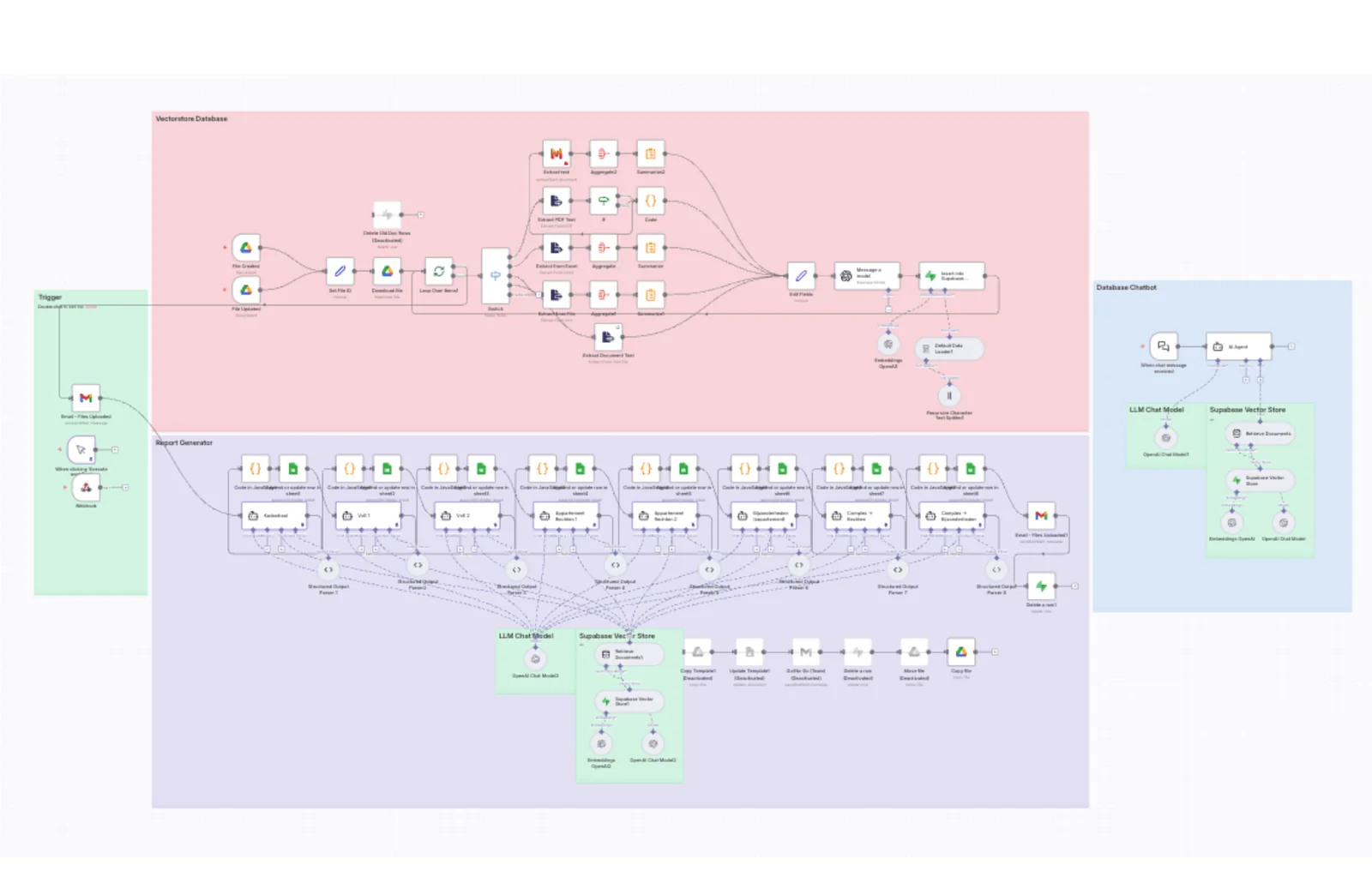
Not every job is field extraction. In our Dutch property report case study, an n8n pipeline routes PDFs, scans, Excel files and text to the right extractor (Mistral OCR for scans), stores the content in a Supabase vector database, and eight AI agents each fill one section of a property report in Google Sheets. That page publishes no time-saved or accuracy figures, so we do not quote any here. For jobs where the AI has to reason across many documents, our custom AI agent development page covers the agent side.
How much does AI document processing cost per 1,000 invoices?
At list prices on October 30, 2026, extracting 1,000 one-page invoices costs about $2 on Gemini 2.5 Flash, $7 to $8 on Claude Haiku 4.5 or GPT-6.1-terra, $10 on Textract or Azure, and $100 on Google's Invoice parser.
Newer, cheaper models keep arriving: Anthropic now lists Claude Haiku 5.5 at $0.10 input and $0.50 output per million tokens, well below Haiku 4.5. Our document AI cost per page research prices 34 options, including the newest models, with the same assumptions.
Extraction cost for 1,000 one-page invoices
These are extraction costs only. Your automation platform, accounting software and our build are separate, and covered below the table. Every price comes from the provider's own page, checked October 30, 2026.
| Extraction option | List price | 1,000 invoices, 1 page each | 1,000 invoices, 2 pages each |
|---|---|---|---|
| Google Document AI, Invoice parser | $0.10 per document of up to 10 pages | 1,000 x $0.10 = $100 | 1,000 x $0.10 = $100 |
| Google Document AI, Form parser or Custom extractor | $30 per 1,000 pages | 1,000 pages = $30 | 2,000 pages = $60 |
| Amazon Textract, Analyze Expense | $10 per 1,000 pages (first 1 million pages) | 1,000 pages = $10 | 2,000 pages = $20 |
| Azure AI Document Intelligence, prebuilt invoice | $10 per 1,000 pages (East US, pay as you go) | 1,000 pages = $10 | 2,000 pages = $20 |
| GPT-6.1-terra (OpenAI) | $1 input, $5 output per million tokens | 5.3M in x $1 + 0.6M out x $5 = $8.30 | 9.8M in + 0.6M out = $12.80 |
| Claude Haiku 4.5 (Anthropic) | $1 input, $5 output per million tokens | 3.868M in x $1 + 0.6M out x $5 = $6.87 | 6.936M in + 0.6M out = $9.94 |
| Gemini 2.5 Flash (Google) | $0.30 input, $2.50 output per million tokens | 1.058M in x $0.30 + 0.6M out x $2.50 = $1.82 | 1.316M in + 0.6M out = $1.89 |
Assumptions behind the AI model rows. Each invoice uses an 800-token instruction and field list and returns about 600 tokens of structured output, with no extended thinking. Per page, Gemini counts 258 tokens and does not charge for text already embedded in a PDF (Gemini document processing docs). Claude sends each page as text plus an image; Anthropic says text uses 1,500 to 3,000 tokens per page, and we used the low end, 1,500, because invoices are sparse, plus Haiku 4.5's image cap of 1,568 tokens (Claude PDF support, Claude vision). For OpenAI we assumed the same 1,500 text tokens plus a full-detail page image of 3,000 tokens, which is the 2,500-patch high-detail budget times the 1.2 multiplier OpenAI lists for its current vision models (OpenAI images and vision guide). Real counts vary with page size and density, so we measure them on your own documents before quoting a running cost.
Free allowances help with testing. Azure's free tier covers 500 pages a month, Textract gives new customers 100 Analyze Expense pages a month for three months, and Google prices the first 1,000 Enterprise Document OCR pages at $0. Batch modes also cut the AI model prices: Anthropic's Batch API is 50 percent off, and Gemini 2.5 Flash batch input is $0.15 per million tokens.
What does the rest of the system cost?
Three other costs sit on top of extraction:
- The automation platform. n8n, Make or Zapier, each priced differently. Our n8n and Zapier pricing research works through real monthly costs.
- Your accounting or database plan. Xero's developer pricing matters if you build your own app connection: the free Starter tier allows 1,000 API calls per day per organisation, and Core ($35 AUD a month) raises that to 5,000 (Xero developer pricing).
- Our build. At the time of writing, the strategy call and audit are free, a small build of two or three workflows (for example invoice intake, extraction with validation, and posting to QuickBooks) is about $1,000, and larger systems get a fixed price after the audit. Fixes to anything we built are free for 6 months, and monthly support from $200 is optional after that. More on how projects are priced is in what an automation project costs.
Is AI document processing accurate enough to post without a human?
For clean, typed documents from regular suppliers, most fields come out right, but no extraction service is perfect. We let a document post on its own only after it passes every validation rule, and send everything else to a person.
Accuracy is a property of your documents as much as the model. A typed PDF from a supplier you pay every month is easy. A phone photo of a crumpled receipt, a handwritten delivery note or a 14-page invoice with tables that run across pages is not. So we do not promise a percentage. We build the checks that catch mistakes before they reach your books:
- Arithmetic: the line items plus tax must equal the stated total, within a rounding tolerance you set.
- Vendor match: the vendor must match exactly one record, by tax ID or bank details first and name second.
- Duplicates: vendor plus invoice number plus total must be new, checked against what is already in the accounting system.
- PO match: when a PO number is present, the quantity and price on each line are compared with the purchase order, and differences above your tolerance are flagged.
- Thresholds: invoices above an amount you choose always go to a person, whatever the model says.
- Confidence: where the service returns a confidence score for each field, low scores route the document to review.
The review queue shows the original page next to the extracted values, so checking takes seconds instead of retyping. Each correction is logged, and the log shows which suppliers or fields cause trouble, which is where we tune the instructions first. The same approach of rules before automation runs through our AI workflow automation builds.
How do you get extracted invoice data into QuickBooks, Xero, Airtable or Google Sheets?
Through the system's API, usually via an n8n, Make or Zapier connector. The build has to respect each API's rate limits, look up the vendor before creating the bill, and store the returned ID so a retry never creates a duplicate.
API limits that shape the posting step
The rate limits we design around, from each provider's own documentation, checked October 30, 2026:
| System | Limit | What it means for a document workflow |
|---|---|---|
| QuickBooks Online API | 500 requests per minute per company (realm ID); 10 requests per second per company and app; HTTP 429 when exceeded, wait 60 seconds | Bursts after a big upload need a queue; a few hundred bills an hour is well inside the limit |
| Xero Accounting API | 5 calls in progress at once, 60 calls per minute and 5,000 per day per organisation; app-wide 10,000 per minute; HTTP 429 with a Retry-After header | If each bill takes about 3 calls (vendor lookup, create, attach the PDF), which is our design estimate, the 60 per minute limit allows about 20 bills a minute |
| Xero Starter tier | 1,000 calls per day per organisation | About 330 bills a day on the same 3-call estimate, so higher volumes need the Core tier |
Sources: Intuit API call limits and throttles, Xero limits FAQ, Xero developer pricing.
Airtable and Google Sheets are common for the review queue and for documents that do not belong in accounting, such as contracts or intake forms. Our Airtable database automation page shows how we structure those bases with linked records, so a contract links to its customer and each invoice links to its vendor.
Should you use Document AI, Textract, Azure or a model like Gemini or Claude?
Use a dedicated invoice or expense model when your documents are standard invoices and receipts and you want fixed per-page pricing. Use a general AI model when documents vary, when you need custom fields, or when you want to keep costs low at volume.
| If this is true | We usually choose | Why |
|---|---|---|
| Standard supplier invoices and receipts, predictable formats | Textract Analyze Expense or Azure prebuilt invoice | Built for these documents, $10 per 1,000 pages, fields come back named |
| You already run on Google Cloud and need its data terms | Google Document AI | Google states it never uses customer data to train Document AI models |
| Mixed documents, custom fields, or several languages | A general AI model with a fixed output schema | One instruction covers many layouts; you define the fields |
| High volume and cost matters most | Gemini 2.5 Flash, or a batch API | Under $2 per 1,000 one-page invoices in our arithmetic |
| Poor scans or photos | OCR first, then the AI model on the text and image | Two passes catch more than either alone |
| Fewer than a few dozen invoices a month | Possibly no custom build | Your accounting system's own bill capture may be enough |
That last row matters. If you only receive a handful of invoices a month and they all go to one accounting system, the capture feature inside that system or an off-the-shelf accounts payable tool may do the job without any build from us. A custom pipeline earns its place when volume is high, when documents go to several systems, when you need checks the packaged tools do not have, or when the documents are not invoices at all.
The automation platform is a separate choice. n8n suits high volume and self-hosting, since it does not charge per step when you host it yourself. Zapier is quickest for simple, low-volume flows. Make sits between them, and we cover it on its own page.
What goes wrong with invoice automation, and how do you fix it?
The common failures are duplicate bills, the wrong vendor, totals that do not add up, missed scanned pages and silent stops. Each has a clear cause, and each is fixed with a rule or a check in the workflow.
| Symptom | Likely cause | Fix |
|---|---|---|
| The same invoice is posted twice | The supplier emailed it twice, or a retry re-ran after a timeout | Check vendor plus invoice number plus total before posting; store the bill ID returned and skip files already done |
| Bill lands on the wrong vendor | Name matching on "ABC Ltd" versus "ABC Limited", or a parent company name on the header | Match on tax ID or bank details first; keep an alias table; send any ambiguous match to review |
| Totals do not match | A line item missed on page two, a discount line read as a charge, or tax counted twice | Arithmetic check with a tolerance; process all pages together; review queue on failure |
| Scanned PDFs come back empty | The PDF has no text layer and the step only read embedded text | Detect an empty text layer and route the file to OCR or a vision model |
| Dates are wrong by months | 03/04/2026 read as 4 March in one place and 3 April in another | Set the date format per vendor or country; reject dates outside a sensible window |
| Statements and reminders become new bills | No classification step before extraction | Classify first; file statements and reminders without posting |
| Bills stop appearing and nobody notices | An expired accounting connection or a hit rate limit | Error workflow with alerts, retry with backoff on HTTP 429, and a daily count check |
The scanned PDF row is the one that hides best. A pipeline that only reads text PDFs skips photographed pages without any error, which is why the document pipeline in our Dutch property case study has a separate OCR branch for scans.
Is AI document processing secure, and where does the data go?
The document goes to the extraction provider you choose, under that provider's data terms, and the results stay in your own accounts. Terms differ by provider, so we pick one whose terms fit your documents before we build.
Two examples of how much the terms differ, from the providers' own pages, checked October 30, 2026:
- Google Document AI says it never uses customer data to train its Document AI models, that online requests are processed in memory and not persisted to disk, and that Document AI is HIPAA compliant (Document AI security).
- Amazon Textract says it may store and use document inputs to improve the service unless you opt out with an AWS Organizations AI services opt-out policy, and that it is a HIPAA eligible service when you have a Business Associate Agreement with AWS (Amazon Textract FAQ).
For health, ID or financial documents we also limit who can open the review queue, keep originals in your storage instead of in the automation tool's logs, and delete temporary files after posting. If you handle patient data, read our guide to HIPAA compliant automation with n8n, Zapier and Airtable before choosing tools, because a Business Associate Agreement has to cover every tool the data touches.
How does a document processing build work, and how long does it take?
We start with a free call and audit using 20 to 50 of your real documents, agree the fields and rules, build and test against those documents, then run in parallel with your team before switching over. A small build typically takes days.
- Free call and audit. You share a sample of real documents, including the awkward ones. We list the fields, the checks and where each field goes, then send a fixed price.
- Test set. We keep the sample, with the correct values typed in, as a test set. Every change to the instructions is re-run against it.
- Build. Intake, extraction, validation, review queue and posting, in your n8n, Make or Zapier account and your accounting system's sandbox where one exists.
- Parallel run. For the first batch, your team keeps entering documents as before and compares results with the system.
- Switch over and support. Once the results match, the system posts on its own for documents that pass every rule. Fixes are free for 6 months.
Our FAQ on how long an automation build takes explains what speeds builds up and slows them down. The most common delay is waiting for access to the accounting system and the shared inbox.
Who owns the workflows, API keys and extracted data?
You do. The automation platform, the extraction service account, the API keys, the review queue and every document stay in accounts under your name, and we work inside them with access you can remove.
That matters more for documents than for most automation, because invoices, contracts and IDs are records you may need for years. If you change providers later, nothing has to be rebuilt from an export. Our FAQ on who owns automations and data covers how to check each part of a system, including the parts built by someone else.
Read next:
- automating bills in QuickBooks Online
- OCR vs AI extraction
- automating bills in Xero
- does Autoesta build Xero bill automation
More questions about AI document processing
What is intelligent document processing (IDP)?
Intelligent document processing is the industry name for software that classifies documents, extracts fields with OCR and AI, validates them and sends the data on to other systems. AI document processing is the same idea, usually built on newer AI models that read layouts they have never seen before. In practice both mean the same chain: capture, extract, check, review and post.
Can AI read invoices and receipts accurately?
Yes, for most typed invoices and clear receipts the fields come out correctly, and dedicated models such as Textract Analyze Expense are built for exactly these documents. Accuracy drops on poor photos, handwriting and long multi-page tables. That is why we check totals, vendor and duplicates on every document and send anything that fails to a person before it reaches your books.
What is the difference between OCR and AI document processing?
OCR turns an image of text into plain text. It does not know which number is the total or which name is the vendor. AI document processing adds that understanding: it returns named fields, reads tables and line items, and follows layout. Many pipelines use both, running OCR on poor scans first and then an AI model to pick out the fields.
Can n8n process invoices?
Yes. n8n can watch an inbox or Drive folder, send each file to an OCR or AI model, run validation in code or IF steps, and create bills through its QuickBooks Online node or invoices through its Xero node. Self-hosting n8n also keeps execution costs flat as volume grows, which suits document work that runs on every incoming file.
How do you extract data from invoices into Excel or Google Sheets?
The workflow extracts each invoice into a fixed set of fields, then appends one row per invoice, or one row per line item, to a sheet. Google Sheets works well as a review queue: a status column marks rows as approved, and approved rows are then posted to the accounting system. Excel in OneDrive or SharePoint can be used the same way.
Can AI handle handwritten or poorly scanned documents?
Sometimes. Modern vision models read neat handwriting and reasonable phone photos, but faint scans, skewed pages and messy handwriting still produce errors. We detect files with no text layer, route them to OCR or a vision model, and send low-confidence results to review. If most of your documents are handwritten, we test a sample before agreeing on a fixed price.
Is there a free way to try AI document processing?
Each major provider has a free allowance at the time of writing: Azure AI Document Intelligence includes 500 free pages a month, Amazon Textract gives new customers 100 Analyze Expense pages a month for three months, and Google prices the first 1,000 Enterprise Document OCR pages at $0. Our strategy call and audit are free too.
Do you work with companies that already have an accounts payable tool?
Yes. Often the tool handles the invoices well and the gap is elsewhere: documents that are not invoices, data that needs to reach a CRM or project system, or approvals that live outside the tool. We connect around what you already use instead of replacing it, and we tell you on the free call if no build is needed.
How do I get started?
Book a free strategy call and bring 20 to 50 real documents, including the difficult ones. We look at your formats, volumes and target systems, and send a written plan with a fixed price. You can also describe the job on our contact page first if you prefer to start by email.
Sources and further reading
- Google Cloud: Document AI pricing (Invoice parser, Form parser, Enterprise Document OCR), checked October 30, 2026
- AWS: Amazon Textract pricing (Analyze Expense, free tier), checked October 30, 2026
- Microsoft: Azure AI Document Intelligence pricing (free tier) and the Azure Retail Prices API (East US per-page rates), checked October 30, 2026
- Google: Gemini API pricing and Gemini document processing, checked October 30, 2026
- Anthropic: Claude pricing, PDF support and vision, checked October 30, 2026
- OpenAI: API pricing and images and vision guide, checked October 30, 2026
- Intuit: QuickBooks Online API call limits and throttles, checked October 30, 2026
- Xero: API limits FAQ and Xero developer pricing, checked October 30, 2026
- n8n: QuickBooks Online node and Xero node, checked October 30, 2026
- Google Cloud: Document AI security and Amazon Textract FAQ, checked October 30, 2026
