Case study at a glance
| Client | A real estate firm in the Netherlands that works on apartment purchases. The client is not named on this page. |
|---|---|
| The job | Every apartment deal comes with a stack of documents: land registry extracts, owners' association (VvE) paperwork, the deed that splits the building into apartment rights, spreadsheets and scans. The team needed the key facts pulled out of that stack into a fixed report, and a way to ask questions about the documents without reading them all again. |
| What we built | An n8n system with three parts: a document pipeline that reads PDFs, scans, Excel and text files and stores them in a Supabase vector database; a report generator where eight AI agents each fill one section of the property report in Google Sheets; and a chatbot that answers questions from the same documents. |
| Platforms | n8n, Google Drive, Gmail, Mistral OCR, OpenAI (chat models and embeddings), Supabase vector store, Google Sheets |
This page describes the system from the client's own n8n canvas, shown below. We have not published time-saved or accuracy figures for this client, so this page does not claim any. The report supports the people who review a property. It does not replace a notary, a lawyer or a surveyor.
What problem does an AI property report solve?
Reviewing an apartment purchase in the Netherlands means reading many long documents to find a handful of facts: who owns what, what the owners' association has decided and saved, and what rights and rules come with the apartment. An AI property report pulls those facts into one structured report, so the team reviews answers instead of hunting for them.
In Dutch law, an apartment is an apartment right (appartementsrecht), created when a notarial deed of division (splitsingsakte) is registered with the Kadaster, the Dutch land registry, and every owner is a member of the owners' association, the VvE. The Kadaster keeps the public register of property rights (Kadaster: Basisregistratie Kadaster). A buyer's side has to check all of it, which typically means:
- the Kadaster extract: the registered owner, the parcel and anything registered against it;
- VvE documents: annual accounts, budget, reserve fund, meeting minutes and the monthly contribution;
- the deed of division and its rules: what is private, what is shared, and each owner's share of costs and votes;
- and anything particular to the apartment or the building.
Those documents arrive as a mix of PDFs, scans, spreadsheets and emails. Reading them for every deal is slow, and the same handful of questions comes up every time. That is the work this system takes on.
How are the documents read and stored?
When a file is added to or updated in a watched Google Drive folder, n8n downloads it, picks the right text extractor for the file type, summarises it, and stores it as searchable chunks in a Supabase vector database.
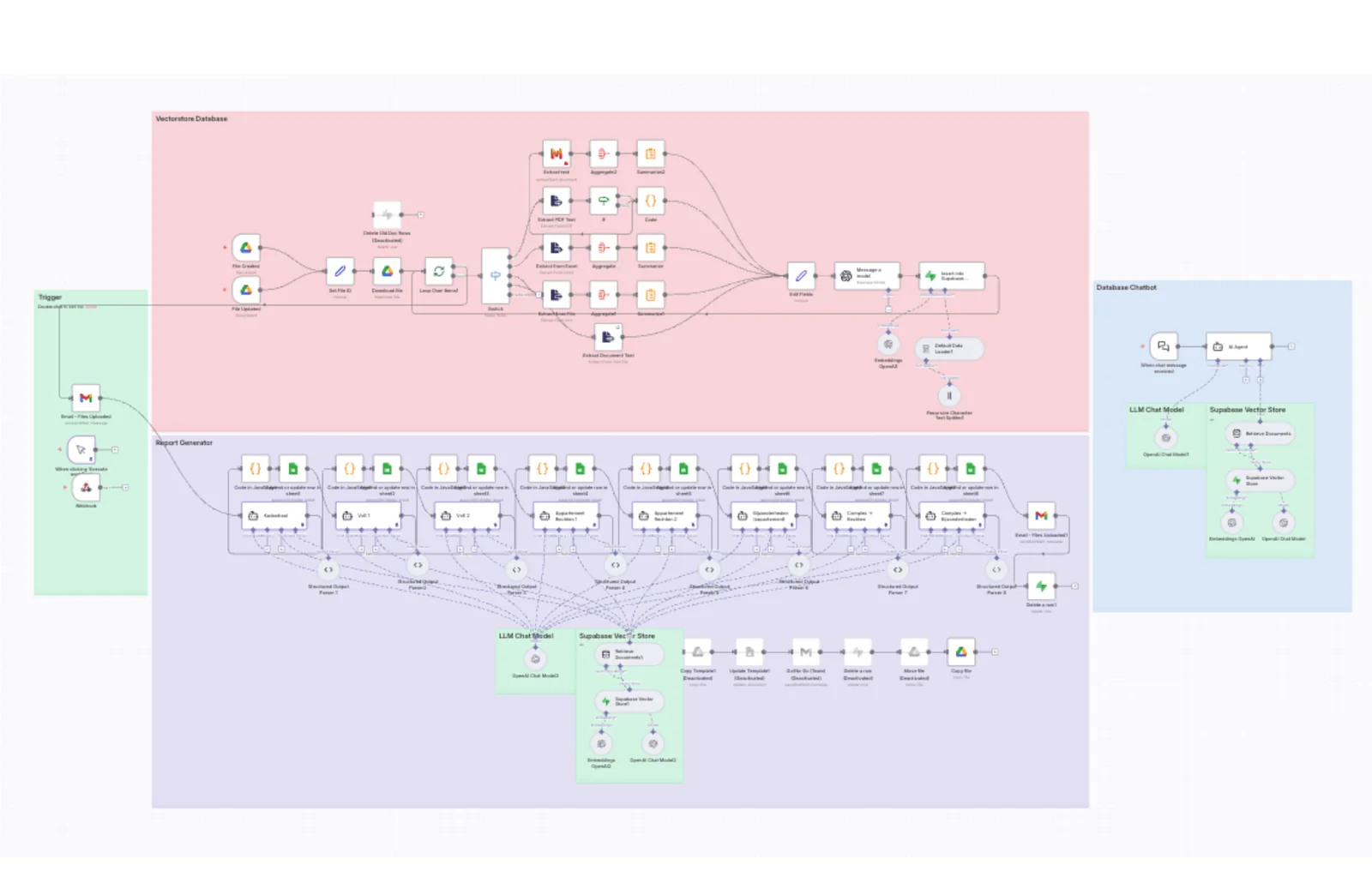
From a Drive upload to searchable knowledge
The pipeline has one branch per kind of file:
| File type | How the text is extracted | Then |
|---|---|---|
| Documents routed to OCR, such as scans | Mistral's OCR, through n8n's Mistral AI node (n8n docs) | Aggregate, summarise |
| PDFs with a text layer | Extract PDF Text, with a check and a Code step for cleanup | Passed on |
| Excel spreadsheets | Extract from Excel | Aggregate, summarise |
| Other files | Extract from File | Aggregate, summarise |
| Plain text documents | Extract Document Text | Passed on |
Every branch ends in the same place. The fields are tidied, a model call prepares the content, and the text is split into chunks, embedded with OpenAI embeddings and inserted into the Supabase vector store (n8n docs: Supabase Vector Store). From then on, any agent can search the documents by meaning, so a question finds the right passage even when it uses different words.
Handling scans separately matters more than it sounds. Plenty of property paperwork arrives as photographed or scanned pages with no text layer. A pipeline that only reads text PDFs would quietly skip those, and the report would be missing facts without anyone noticing.
How does the AI write the property report?
Eight AI agents run one after another. Each one is responsible for a single section of the report, searches the vector store for the documents it needs, returns its answer in a fixed structure, and writes it to its own tab in Google Sheets.
Eight agents, one report
| Agent (as named in the workflow) | Report section |
|---|---|
| Kadastraal | Land registry (Kadaster) details |
| VvE 1 and VvE 2 | The owners' association, split over two agents |
| Appartementsrechten 1 and 2 | The apartment rights, split over two agents |
| Bijzonderheden (appartement) | Particulars of the apartment itself |
| Complex + Rechten | The building complex and its rights |
| Complex + Bijzonderheden | Particulars of the building complex |
Each agent has the same four parts: an OpenAI chat model, the Supabase vector store as a retrieval tool, a Structured Output Parser that forces the answer into fixed fields, and a JavaScript step that formats those fields for an "append or update row" in its sheet. When all eight are done, an email goes to the team and a working row is deleted in Supabase.
Why eight agents instead of one big prompt? A single prompt asked to "write the whole report" has to search for everything at once and tends to blur sections together. A narrow agent with one question and one output format searches for exactly what it needs, and its answer lands in the same columns every time. That makes the report comparable from one property to the next, and when a section looks wrong, there is one agent to check, not one giant prompt.
The canvas also keeps an earlier route, now switched off, that filled a Google Docs template and emailed the team a go/no-go request. The live route writes to Google Sheets and copies a file in Drive. If your own agent is not using its tools as expected, see why an n8n AI agent does not call its tools.
How does the document chatbot work?
A chat trigger sends each question to an AI agent that searches the same Supabase vector store and answers from the deal's own documents, so the team can ask a follow-up question without opening the files.
The report covers the questions that come up every time. The chatbot covers the rest: "what did the VvE decide about the roof?", "is there a reserve fund figure in the accounts?", "which documents mention the parking space?". It reuses the same embeddings and the same store as the report, so there is one copy of the documents and one place to keep them current. For more on agents that answer from your own data, see our AI chat agent service.
What should you check before using AI on property documents?
- Keep a person in the loop. The report is a first read for a professional, not advice to a buyer. Someone qualified still checks it.
- Handle scans properly. Run OCR on anything without a text layer, or the system will miss facts silently.
- Use a fixed output structure. Structured output turns AI answers into data you can compare and check, not prose you have to re-read.
- One agent per section. Narrow agents are easier to test, fix and trust than one long prompt.
- Mind personal data. Property documents name owners and other people. Under the GDPR you need a lawful basis, data processing agreements with every service in the chain (here OpenAI, Mistral, Supabase and Google), and a deletion policy. This is operational guidance, not legal advice.
- Clean up after each run. This build deletes its working row when the report is done, so temporary data does not pile up.
How does Autoesta work on a project like this?
We start with a free call about the documents and the decision they support, design the report sections with the people who use them, build in the client's own accounts, test against real past deals, and support the system after launch.
- Strategy call (free). Which documents arrive, what decision they feed, and which questions get asked every time?
- Design the report. Here: eight sections, each with fixed fields.
- Build in the client's accounts. n8n, Supabase, Google Drive and the sheets belong to the client.
- Test on real past files, comparing the AI's sections with what the team found by hand.
- Hand over and support. Builds include six months of maintenance. Monthly support is available after that.
See also n8n automation services, automated reporting and our real estate automation page. For a lead-handling build in real estate, read the Realeshome case study.
Frequently asked questions
Can AI read property documents accurately?
AI can pull facts out of property documents reliably when the text is extracted properly, scans go through OCR, and each answer is forced into fixed fields. It still makes mistakes, so the output should be a first read that a qualified person checks, never the final word on a purchase.
What is a RAG chatbot?
RAG stands for retrieval-augmented generation. The documents are split into chunks and stored as embeddings in a vector database. When someone asks a question, the system finds the most relevant chunks and gives them to the AI model, so the answer comes from your documents rather than from the model's general knowledge.
Why use Supabase as the vector store?
Supabase runs on Postgres with vector search, and n8n has a ready-made Supabase Vector Store node for inserting and retrieving documents. One store can then serve both the report agents and the chatbot, which keeps a single, current copy of each deal's documents.
Can n8n read scanned PDFs?
Not on its own. n8n's Extract from File node reads PDFs that have a text layer. For scans and images you need OCR, such as the Mistral AI node's document text extraction, which this build uses for image-based files.
Is it safe to put client documents into AI tools under the GDPR?
It can be, with the right setup: a lawful basis for processing, data processing agreements with each provider, data stored in the region you need, and deletion when a deal closes. Check each provider's terms and get legal advice for your own case.
How much does an AI document system like this cost?
It depends on the number of document types, report sections and integrations. At the time of writing, a small automation build is about $1,000, and larger multi-agent systems are quoted after a free strategy call. Model and database usage are billed by the providers on top.
Can you build an AI report from our documents?
Yes. Book a free strategy call and bring two or three real example files. For a data pipeline without AI, see the job board feed automation case study.
