What does GoHighLevel automation for local service businesses actually mean?
It means four automations built on one customer record instead of four separate tools: missed-call text-back, dispatch and scheduling handoff, review requests, and estimate follow-up. Each stage hands off to the next through the same pipeline, so the system tracks a job from first contact to paid invoice.
Most write-ups treat these as a menu: turn on missed-call text-back here, set up review requests there, add a reminder sequence somewhere else. Sold that way, a local service business ends up with three or four workflows that never talk to each other. A text-back with nobody watching the reply only delays the same missed job. A review request on a fixed timer gets sent to a customer whose appointment was rescheduled twice.
The fix is structural, not a longer feature list. One pipeline per job, with stages that mean something specific (new lead, estimate sent, booked, en route, complete, paid), and each automation triggered by a stage change instead of a clock. That is the difference between GoHighLevel as a marketing add-on and GoHighLevel as the system that runs the lead-to-review side of an HVAC, plumbing, roofing, cleaning, landscaping, or electrical business.
The rest of this guide walks through each stage, what breaks at the handoff between stages, what the US texting rules mean for the build, and when a different tool is the better choice. It is a description of how we would design the system, not a report of results from a specific contractor.
How does missed-call text-back stop a local service business losing jobs to voicemail?
GoHighLevel can send an automatic text to a caller the moment their call goes unanswered, so the person gets a reply while your number is still open on their phone instead of calling the next company in the search results.
Phone-first trades lose leads to voicemail in a specific way. A homeowner with a broken water heater does not leave a message and wait. They hang up and call the next result. According to GoHighLevel's own support documentation, the Missed Call Text Back setting lives under Settings, Phone System, Voice, and sends a text to a caller when an inbound call is missed. It supports merge fields for personalization, counts toward your messaging limits, and respects do-not-disturb and contact preferences.
One detail from that documentation matters for trades. The built-in feature texts on every missed call, so a customer who rings three times in ten minutes can receive three identical texts. GoHighLevel itself suggests building a customized workflow if you want to avoid duplicates. We build the workflow version for that reason: it can check whether the contact already received a text recently before sending another.
What that first text needs to do matters more than the fact that it exists:
- Acknowledge the call and say when someone will follow up, so the person stops looking for another option.
- Ask the one detail dispatch needs (the problem, the address, or the urgency), not a long form.
- Offer a booking link for anyone who would rather schedule than wait for a call back.
A missed-call text sent into a void fixes nothing by itself. It helps only once a person or an automated workflow picks up the reply and moves the job forward, which is why dispatch has to be built at the same time.
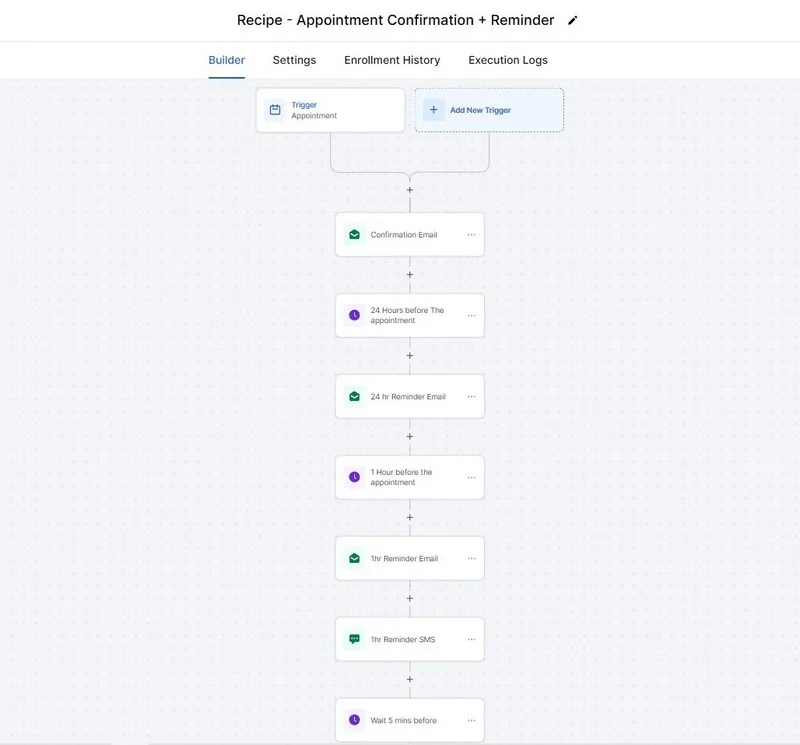
How does GoHighLevel handle dispatch and scheduling for a field team?
Through calendars with per-technician availability and drive-time buffers, connected to a pipeline where each stage change (booked, en route, on site, complete) fires the matching text automatically.
Booking windows tend to work better for field jobs than exact appointment times. "Between 9 and 12" gives a technician room for the previous job to run long without every customer behind it getting a late arrival and no warning. In a pipeline, the handoff looks like this:
| Pipeline stage | What moves it there | Automated action |
|---|---|---|
| Booked | Customer confirms a time slot | Confirmation text and a calendar hold for the assigned technician |
| En route | Technician marks the job started, or the scheduled window opens | "On our way" text with an arrival estimate |
| On site | Technician checks in on arrival | Internal note logged so the office knows not to call the customer |
| Complete | Technician marks the job finished | Job status updates; review-request and invoice workflows become eligible to fire |
Assignment can be round-robin across available technicians, routed by service area, or routed by skill, since a drain job and a water heater install are rarely the same technician's job. The "on our way" text is a small detail. It is meant to cut the "are you still coming?" calls the office fields, because the customer already knows.
The human step is the weak link. Someone has to tap "started" and "complete" in the field. If technicians skip it, every automation downstream reads stale data. We build the stage change into the tool the crew already uses, and we treat a job that has been "en route" for eight hours as an alert for the office, not as a success.
The stage that matters most for everything downstream is "complete." Reviews and next-service follow-up should read from that stage, not from a separate timer. The next two sections show why. For the calendar and reminder mechanics in more detail, see our guide to appointment booking automation.
How do you automate review requests after a job is finished?
Trigger the review request from the pipeline stage that means the job is done and the invoice is settled, not from a fixed number of days after the estimate or the booking.
GoHighLevel's support documentation describes a "Send Review Request" action you can add inside a workflow, delivered by email or SMS, and it can come from the user assigned to the contact. The setting that matters for a field-service business is what fires that action.
A review request timed off "estimate sent plus three days" or "booking confirmed plus one week" will sooner or later land on a customer whose appointment was rescheduled, whose job is unfinished, or who cancelled. That reads as tone-deaf and can invite a bad review from someone who has nothing to review yet. Trigger it from the "complete" stage instead, ideally after the invoice is marked paid, so the ask arrives right after the customer has seen the finished work.
Two guardrails belong in the workflow. First, apply a tag such as "Review Requested" once the sequence finishes, so a repeat customer is not asked twice for the same visit. This matters most for HVAC tune-ups, recurring cleaning, and seasonal landscaping. Second, send every completed customer the same request. Google's own guidance on reviews says to remind customers to leave them with a link or QR code, and it prohibits offering incentives for reviews or for changing or removing negative ones. Routing only happy customers to Google and unhappy ones to a private form is a gating pattern we do not build. Our local SEO automation guide covers how reviews feed your Google Business Profile.
How do you follow up automatically between sending an estimate and booking the job?
Build a follow-up sequence tied to the "estimate sent" stage that checks in at set intervals until the customer books or declines, because an estimate that gets no second touch tends to go quiet instead of getting a clear yes or no.
The estimate follow-up sequence
An estimate sent and never followed up on is the most common leak we design against in a local-service pipeline. From the business's side the sales conversation is finished, and nothing forces a second touch. A workable sequence:
- Estimate sent. Tag the contact and start the sequence. Log the quoted amount and job type in a custom field so later messages can reference specifics.
- Two days later. A short check-in asking whether the customer has questions about the estimate. No discount offer.
- Five days later. A direct booking link, plus a reminder that the estimate expires if you price seasonally.
- Ten days later. A final message asking whether to keep the estimate open or close it out. A plain question often surfaces the real objection.
- No response. Move the contact to a "cold estimate" stage and into a slower, seasonal nurture sequence, out of the active pipeline.
The intervals above are a starting point we would tune to the trade, not a benchmark. A same-day plumbing quote and a roof replacement estimate do not share a decision cycle. Every step should stop the moment the customer replies or books, and that stop condition is the first thing to test. Our explainer on workflows, triggers, and campaigns covers why the trigger choice matters here.
How does this change for HVAC, plumbing, roofing, and cleaning?
The four automations stay the same, but the qualifying question, the meaning of "complete," and the follow-up rhythm change with the trade. Emergency trades need speed at the first text, while roofing and recurring cleaning need patience and a longer follow-up.
Use this table as a design starting point. It reflects how we would configure each pipeline, not results from any particular contractor.
For HVAC specifically, see GoHighLevel for HVAC: field-service integrations, emergency call routing and maintenance-agreement renewals.
| Trade | Best first-text question | What "complete" should mean | Follow-up rhythm |
|---|---|---|---|
| HVAC | Is the system not heating or cooling at all, or is it a maintenance visit? | Repair finished and invoice paid; install signed off | Seasonal tune-up reminders; separate pipelines for repair, install, and maintenance plans |
| Plumbing | Is water actively leaking right now? | Fix finished and invoice paid | Fast emergency triage; slower nurture for remodel and repipe estimates |
| Roofing | Is this a leak, storm damage, or a replacement quote? | Inspection done, or job finished and paid | Longer estimate sequence, since inspections and insurance steps stretch the decision |
| Cleaning | Is this a one-time clean or a recurring schedule? | First clean finished; then the recurring cycle begins | Recurring-visit reminders; review ask after the first clean only |
The pattern we return to most: a single company often runs two or three job types with different urgency. An HVAC company that sells repairs, installs, and maintenance plans is running three pipelines, and forcing them into one is how emergency calls end up waiting behind a quote for a new system. Separate the pipelines first, then build the automations on top.
What does a complete local-service-business automation setup look like end to end?
One pipeline that a job moves through from the first missed call to the paid invoice and review, with each automation firing at the stage it belongs to instead of on its own separate timer.
One job, from missed call to review
Laid out as a single job's path through the system:
- A call comes in after hours and goes unanswered.
- Missed-call text-back replies and asks the one qualifying question dispatch needs.
- The customer replies. The contact is tagged and enters the "new lead" stage.
- An estimate is sent and the contact moves to "estimate sent," starting the follow-up sequence above.
- The customer books. The contact moves to "booked" and a confirmation goes out with the arrival window.
- On the day, the technician starts the job and an "on our way" text fires automatically.
- The technician marks the job complete. The review request becomes eligible and fires once the invoice is marked paid.
- Weeks or months later, a next-service reminder (a filter change, a seasonal tune-up, a recurring clean) starts a new pass through the same pipeline.
This is a system description, not a client's reported result. Autoesta has not published a local-service case study on this site yet. See our case studies for the client work that is published, including a dental intake system built on the same idea of one pipeline driving every stage of contact. That dental result, reported by Autoesta, does not transfer to a roofing company, and we do not suggest it does.
What do A2P 10DLC and the TCPA mean for texting customers?
In the US, business texts sent from standard 10-digit numbers need carrier registration (A2P 10DLC), and the federal Telephone Consumer Protection Act (TCPA) sets consent and opt-out rules. This section is general information and not legal advice, so have a lawyer review your own texting practices.
Registration. HighLevel's support portal states that A2P 10DLC registration is required when a business sends SMS or MMS messages to US recipients using standard 10-digit local numbers, and that businesses using its LC Phone system register their brand and campaigns through The Campaign Registry. Twilio's documentation says registered traffic sees lower message filtering and higher throughput. Approval is not instant. HighLevel offers an optional paid fast-track that it says can expedite approval within 3 business days. Start registration before you build anything that texts, or your missed-call text-back may not deliver on launch day.
Consent and opt-outs. The federal rule (47 CFR 64.1200) requires prior express consent before autodialed calls or prerecorded voice calls to wireless numbers. For advertising or telemarketing by autodialer it defines "prior express written consent" as a signed written agreement that states the signer is not required to agree as a condition of purchase. On opt-outs, the rule says a consumer may revoke consent by any reasonable method, treats replies such as "stop" as valid revocation, and requires the sender to honor the request within a reasonable time not to exceed ten business days. It also sets 8 a.m. to 9 p.m. at the called party's location as the window for telephone solicitations.
The rules are moving. In February 2026 the Fifth Circuit held in Bradford v. Sovereign Pest Control of Texas that the TCPA requires only "prior express consent," not written consent, for telemarketing calls to cellphones. Law firm summaries note that the ruling binds courts in that circuit only and that state laws may impose stricter rules. Do not build your consent flow around one appellate decision.
What we build in practice, for review by your own counsel:
- Keep the missed-call text informational: acknowledge the call and ask about the job, without promotions.
- Capture consent wording on your forms and booking pages, and store it on the contact record.
- Honor STOP and similar replies immediately, and confirm the contact is excluded from every workflow.
- Schedule marketing sends inside sensible local hours, and keep transactional reminders separate from promotions.
Whether a customer's inbound call counts as consent to a reply text is a legal question, and we do not answer it for you. Rules also differ by state. Verify the current text of the rules you rely on, since this area changes.
How much does this cost to set up and run?
At the time of writing, a small automation set (missed-call text-back, one review sequence, one estimate follow-up) starts from about $1,000, and a full GoHighLevel setup with dispatch pipelines, several sequences, and reporting runs about $3,000 to $5,000.
Most single-location trade businesses fit the small-to-medium range: one or two pipelines, missed-call text-back, a dispatch workflow, a review sequence, and an estimate follow-up. A business that spans five or more locations is priced as a multi-location build, typically $5,000 to $10,000. Audits are free, cleanup or verification starts from $200, and monthly support starts from $200 with six months of maintenance included on builds. See the full breakdown on our GoHighLevel setup page.
GoHighLevel's own subscription is paid directly to GoHighLevel and is separate from any build cost. Texting also carries pass-through registration and messaging fees; HighLevel's support portal states that these are charged by The Campaign Registry, Twilio, and the carriers with no markup from HighLevel. Our GoHighLevel pricing breakdown covers the platform tiers.
How long does setup take for a local service business?
A small build (missed-call text-back, one dispatch pipeline, one review sequence) typically takes 5 to 7 business days, and a fuller build with several service lines or technician calendars runs 2 to 3 weeks.
Three things push a build toward the longer end. The first is the number of distinct job types, since each usually needs its own pipeline. The second is the number of technicians who need separate calendars. The third is whether A2P registration is already approved. Approval time is outside anyone's control and can add days regardless of how fast the build itself moves. You also need your own input: real job stages, real service areas, and the wording you are comfortable sending under your name.
When is GoHighLevel the wrong choice for a local service business?
GoHighLevel is a weak fit when the core need is deep route optimization, parts and inventory tracking, or job-costing and payroll depth, which dedicated field-service platforms are built around.
GoHighLevel is strong at the communication layer around a job: answering a lead, keeping a customer informed between booking and arrival, and asking for a review at the right moment. It is not built to replace a purpose-built field-service management system for a large, multi-crew operation that needs live GPS routing across many trucks, inventory synced to a warehouse, or job costing tied to payroll. Businesses at that scale often run both, with the field-service platform handling operations and GoHighLevel handling lead-to-review communication, connected through n8n or Zapier.
It is also the wrong choice when nobody will own the system. Automations that nobody monitors drift: a technician forgets to mark jobs complete, a new service line never gets a pipeline, and a paused workflow goes unnoticed. If you cannot spare someone for a few minutes a week, or you do not want to register for A2P texting, hold off. A single-location or small multi-crew trade business whose main levers are speed to answer, consistent follow-up, and asking for reviews is a good fit.
More questions about GoHighLevel automation for local service businesses
Does this replace my existing field-service software?
Not necessarily. If your field-service platform already handles routing, parts, and job costing well, GoHighLevel can sit alongside it and own the lead-to-review communication. The two can be connected so a job status in one system updates the pipeline stage in the other.
Can one person run this without a dedicated dispatcher?
For a single-location business with a small crew, yes. The pipeline stages and automated texts do coordination work a dispatcher would otherwise do by phone. A person still assigns the job to a technician and marks it complete.
What if I already have a messy GoHighLevel account?
A messy account usually does not need a full rebuild. Our guide to fixing a messy GoHighLevel account covers a cleanup order that keeps your existing contacts and history intact.
Does the review request work for multi-technician teams?
Yes. Trigger it from the pipeline's "complete" stage regardless of which technician did the job, and tag the contact once the request goes out so nobody is asked twice for the same visit.
What about after-hours emergency calls?
Missed-call text-back sends whenever a call goes unanswered, including after hours. If you want a live conversation instead of a text, an AI calling agent or chat agent can qualify the job and offer the earliest slot. Outbound and automated calling carry their own consent rules, so read the compliance section above first.
How do I get started?
Book a free 30-minute strategy call or use the contact page. Tell us how jobs move through your business today, from first call to paid invoice, and we will tell you what we would build and roughly what it would cost. If an account already exists and needs a diagnosis first, start with our GoHighLevel audit and fix service. For the wider service menu, see our AI automation services.
Does GoHighLevel work for HVAC companies and plumbers?
Yes. GoHighLevel for HVAC and GoHighLevel for plumbers follow the same pattern: missed-call text-back, booking, estimate follow-up and review requests, next to the field service tool that handles dispatch.
Is GoHighLevel a good CRM for a cleaning business?
It works well as a cleaning business CRM for quotes, recurring booking reminders, reviews and reactivation of past customers. Route planning and staff scheduling usually stay in a dedicated tool.
Related: GoHighLevel pricing calculator, CRM automation by industry, the FCC opt-out rule changes, how to register A2P 10DLC in GoHighLevel and what time businesses can text customers.
If you already run trucks on Housecall Pro, Jobber or ServiceTitan, see how they compare in our GoHighLevel vs Housecall Pro vs Jobber vs ServiceTitan breakdown.
Sources
- HighLevel support: Missed Call Text Back
- HighLevel support: How to send review requests
- HighLevel support: A2P 10DLC brand and campaign registration and A2P 10DLC messaging fees
- Twilio: A2P 10DLC overview
- Electronic Code of Federal Regulations: 47 CFR 64.1200
- Holland & Knight: TCPA Reset: Fifth Circuit Rejects "Prior Express Written Consent" Rule
- Google Business Profile Help: Get more reviews
This guide is general information, not legal advice. Pricing reflects Autoesta's typical ranges at the time of writing.
Missed calls are the biggest leak for most local service businesses. See how to recover missed calls and get more Google reviews.
Heating and cooling companies have their own guide: HVAC automation.
