What is lead automation?
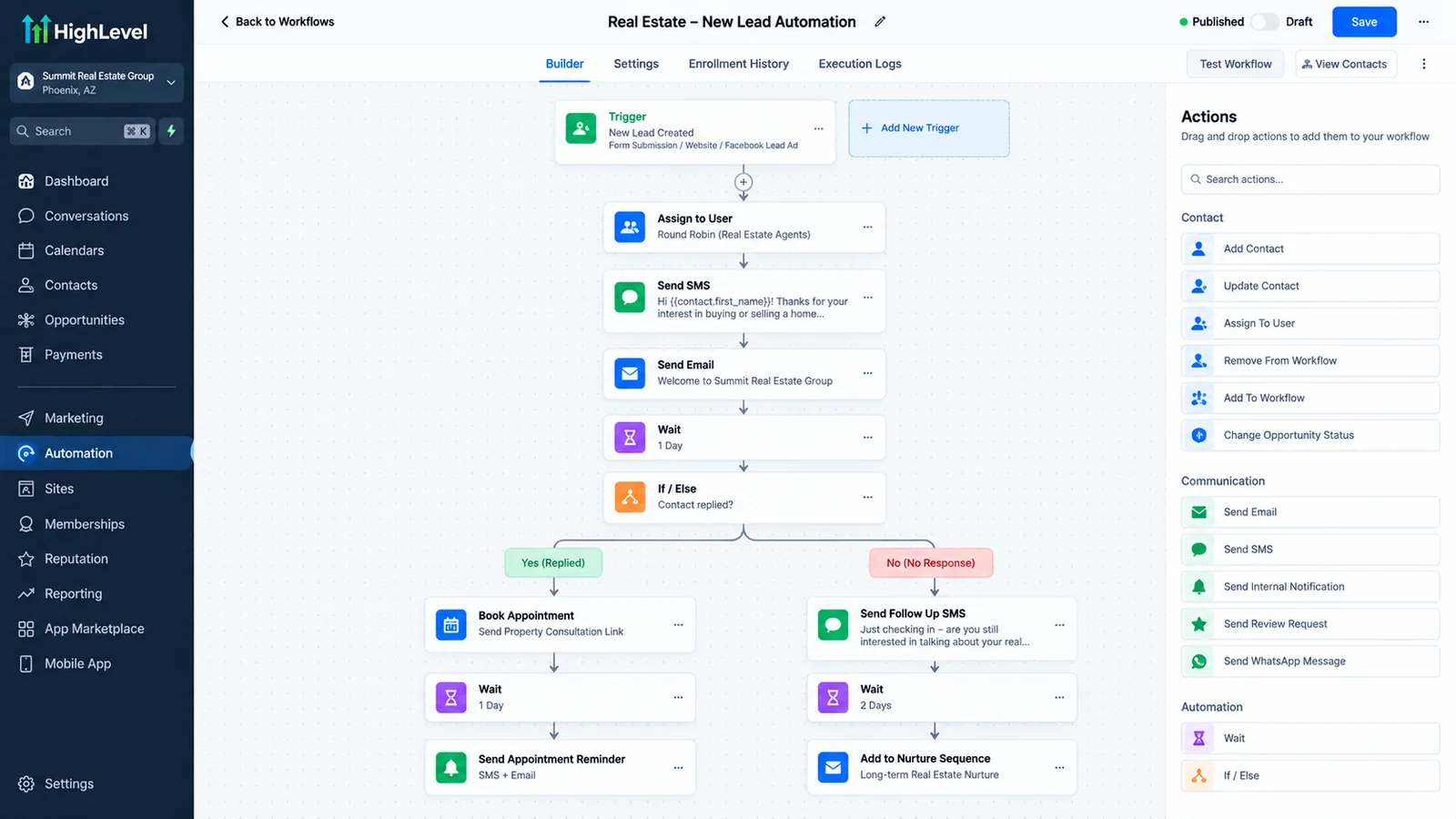
Lead automation is software that captures every new enquiry, replies to it within minutes, qualifies it, routes it to the right person and follows up until the lead books or says no, without anyone on your team doing those steps by hand.
Most service businesses do not have a lead problem. They have a response problem. Leads arrive from the website, Google, Facebook, portals and phone calls, land in different inboxes, and wait for someone to notice. By the time a person calls back, the lead has booked with whoever answered first. Lead automation closes that gap by making the first reply and the follow-up automatic.
Autoesta builds lead automation on a CRM backend, usually GoHighLevel, with AI agents for conversations and integrations for the tools you already use.
What does lead automation do, step by step?
Lead automation runs six steps: capture the lead from every source into one CRM, send an instant reply, qualify the lead with a few questions, route it to the right person, follow up across text and email until it replies, and report where every lead came from and what happened to it.
The six steps of lead automation
| Step | What happens | Where we cover it |
|---|---|---|
| 1. Capture | Forms, calls, chats, ads and portal leads land in one CRM, tagged by source | API integrations |
| 2. Instant reply | A text and email within a minute, day or night | Speed up lead response |
| 3. Qualify | An AI agent asks budget, timing and need, and scores the lead | AI lead qualification |
| 4. Route | The lead goes to the right person by service, location or score | Lead routing |
| 5. Follow up | A sequence that stops the moment the lead replies | Follow-up that converts |
| 6. Report | Leads, response time and bookings by source | Automated reporting |
Why does lead response speed matter so much?
Lead response speed matters because the chance of reaching and qualifying a lead drops quickly after it arrives. A widely cited Harvard Business Review study of online leads found that firms contacting a lead within an hour were far more likely to qualify it than firms that waited longer.
The exact multiplier depends on the study, the industry and how "contact" was measured, so we do not promise one number. Our speed to lead statistics page traces each commonly quoted figure to its original source and explains what it does and does not prove. The lead response time calculator lets you put your own numbers in.
What does a lead automation system cost?
A lead automation system from Autoesta costs about $1,000 at the time of writing for a small build that covers instant reply, missed-call text-back and a follow-up sequence, and $3,000 to $5,000 for a full system with AI qualification, routing, reporting and integrations, plus your CRM subscription and messaging usage.
Every build includes six months of maintenance on what we built, and support starts from $250 a month after that. The automation ROI calculator shows the payback period with your own lead volume.
Which lead sources can be automated?
Almost every lead source can feed lead automation: website forms, phone calls and missed calls, website chat, Facebook and Instagram lead ads and messages, Google Business Profile messages, email enquiries, and industry portals that send leads by email or API.
- Calls. Missed calls get a text-back; after-hours calls go to an AI receptionist.
- Chat. An AI chat agent answers and books on your site.
- Ads. Lead-ad forms sync straight into the CRM.
- Portals. Real estate and home-service portals are parsed from email or pulled by API.
Lead automation vs hiring another person
Lead automation replies in seconds at any hour and never forgets a follow-up, while a person handles judgment, relationships and difficult conversations. The best setup uses automation for the first reply and the chasing, and people for the conversations that close.
Automation vs another hire
| Lead automation | Extra staff member | |
|---|---|---|
| First reply speed | Seconds, 24/7 | Minutes to hours, business hours |
| Follow-up consistency | Every lead, every time | Depends on workload |
| Judgment and empathy | Limited | Strong |
| Cost | One-time build plus usage | Ongoing salary |
Lead automation examples by industry
Lead automation follows the same six steps in every industry, but the source and the first question change: portal leads and "buying or selling?" in real estate, new-patient calls and "which treatment?" in dental and med spas, emergency calls and "what is the problem?" in HVAC.
| Industry | Main lead sources | First qualifying question |
|---|---|---|
| Real estate | Portals, ads, website | Buying, selling or renting, and when? |
| Dental | Calls, Google, website forms | New or existing patient, and what for? |
| Med spa | Instagram, ads, website | Which treatment, and have you had it before? |
| HVAC | Calls, Google Business Profile | Emergency or routine, and where? |
| Healthcare | Calls, referrals, website | Referral or self-referral, and which service? |
What should you measure in a lead automation system?
Measure median first-response time, the share of leads reached, the share qualified, the share booked, and bookings by source. Those five numbers show where leads are lost and whether the automation is fixing it.
- Median first-response time, not the average, which a few slow leads distort.
- Contact rate: leads who replied or answered.
- Qualification and booking rate, per source.
- Cost per booked appointment, per source, once ad spend is connected.
The lead response time calculator turns these into a monthly revenue figure. For the AI side of qualification and follow-up, see the AI sales agent and GoHighLevel automation.
When is lead automation not worth it?
Lead automation is not worth it for businesses with very few leads a month that the owner already answers quickly, or when the real problem is the offer, the price or the service quality rather than response time.
It also cannot fix leads you are not allowed to contact. Texting needs consent and A2P 10DLC registration, and AI calling needs prior express consent under US rules. We build around both. See how lead automation worked for a real client in the real estate case study, and how it fits into the wider business process automation and CRM automation services. When leads turn into deals, sales automation takes over.
Frequently asked questions
What is the difference between lead automation and marketing automation?
Lead automation focuses on what happens after someone enquires: reply, qualify, route and follow up. Marketing automation usually covers campaigns to larger audiences, such as newsletters and nurture emails.
Does lead automation work with my current CRM?
Usually yes. We build on GoHighLevel, HubSpot or other CRMs with an API, and connect lead sources through native integrations, n8n, Zapier or direct APIs.
Will lead automation make my business sound robotic?
Not if it is written well. Messages come from a named person, sound like your team, and stop the moment the lead replies so a person can take over.
How fast should a lead get a reply?
Within minutes, ideally within one. The studies behind speed to lead are summarized on our speed to lead statistics page.
