Case study at a glance
| Client | A medical job board for Germany and Austria, listing jobs for doctors, nursing staff and other healthcare roles. The client is not named on this page. |
|---|---|
| The job | Pull every new medical job from the board's Talent.com partner feeds, filter out what does not belong, map each job to the board's own categories, professions and specialties, retire jobs that have left the feed, and tell the team which companies are new. |
| What we built | A production n8n workflow that runs on a schedule. It downloads six XML feeds, converts them to JSON, processes the jobs in batches through a sub-workflow, updates the job database with SQL, marks old jobs, and emails a CSV of newly added companies. |
| Platforms | n8n, Talent.com partner XML feeds, Google Sheets (filter and mapping lists), a SQL job database, email |
| Status | In production. The workflow is named "PRODUCTION - Talent - Parent workflow" and was switched on (Active) in the client's n8n when this screenshot was taken. |
This page describes the system from the client's own n8n canvas, shown below with the feed URLs blurred. We have not published job counts, run times or hours saved for this client, so this page does not claim any.
What problem does job feed automation solve for a job board?
A job board lives or dies on fresh listings. Job feed automation brings in new jobs from partner XML feeds every day, drops the ones that do not fit, files the rest in the right category, and removes jobs that have closed, without anyone copying and pasting.
Job boards rarely write their own listings. They take them from feeds: large XML files that aggregators and employers publish for partner sites. Talent.com, one of the large job search engines, runs a publisher program that offers customisable XML job feeds to partner sites (Talent.com publisher program).
A feed is only raw material, though. Before a job can go live on a specialist medical board, someone has to answer four questions about it:
- Does it belong here? A broad feed can carry jobs that do not fit a specialist board, so some need filtering out.
- Where does it go? The board has its own categories, professions and specialties. The feed's labels do not match them one to one.
- Is it still open? A job that drops out of the feed should drop off the board.
- Who is new? New employers are sales leads for the board, so the team wants to know who started posting.
Doing that by hand on every feed refresh is not realistic. The workflow answers all four on every run.
Where do the jobs come from?
From six Talent.com partner feeds: one each for doctors (Arzt), nursing (Pflege) and other medical roles (Andere), for Germany and for Austria.
| Feed group | Germany | Austria |
|---|---|---|
| Doctors (Arzt) | Feed 1 | Feed 2 |
| Nursing (Pflege) | Feed 3 | Feed 4 |
| Other medical roles (Andere) | Feed 5 | Feed 6 |
The canvas also carries a sticky note with the command line the team uses to download all six feeds directly and count the jobs in them. That gives them an independent number to compare with what the workflow imported, which is the simplest way to catch a feed that silently shrank or a run that stopped halfway.
How does the n8n workflow import the feeds?
On each scheduled run, the workflow loads its rule lists from Google Sheets, builds the six feed URLs, downloads them, converts the XML to JSON, pulls out the job records, and sends them through a sub-workflow in batches.
How each run imports the feeds
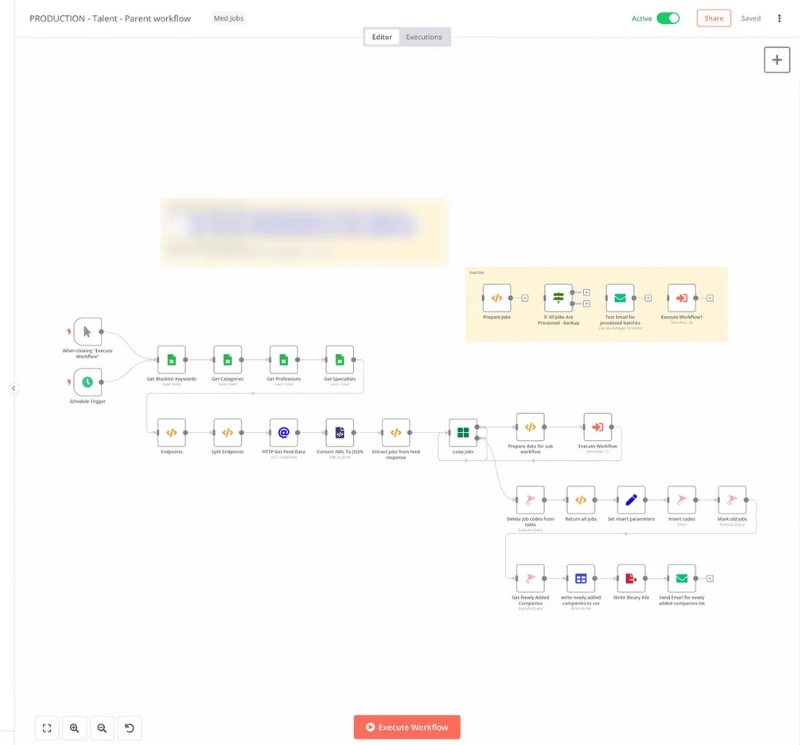
Step by step:
- Schedule Trigger starts the run. A manual trigger sits next to it for test runs.
- Four Google Sheets reads load the rules: blacklist keywords, categories, professions and specialties. The rules live in a spreadsheet, not in the workflow, so changing a rule never means touching the automation.
- Endpoints and Split Endpoints (two Code nodes) build the six feed URLs and turn them into one item each.
- HTTP Get Feed Data downloads each feed.
- Convert XML to JSON, then a Code node, Extract Jobs from feed response, pulls the individual job records out of each file.
- Loop Jobs splits them into batches, and Prepare data for sub workflow hands each batch to a separate sub-workflow, which processes the jobs.
Splitting the per-job work into a sub-workflow is a deliberate design choice. The parent stays short enough to read on one screen, large feeds do not have to sit in memory as one huge run, and a batch that fails can be traced on its own. For more on how we structure n8n builds, see n8n automation services.
How are old jobs removed and the database kept clean?
After all batches are processed, the workflow refreshes the job codes table, inserts the current codes, and runs a query that marks jobs no longer in the feed as old, so closed jobs stop showing on the board.
Keeping the database current
- Delete job codes from table clears the previous run's list of job codes.
- Return all jobs and Set insert parameters collect the codes of every job seen in this run.
- Insert codes writes them to the database.
- Mark old jobs runs a SQL query that flags every job whose code is not in the current list.
This "rebuild the list of live codes, then mark everything else" pattern is easier to trust than deleting jobs one by one. It does not depend on the feed telling you which jobs closed, which feeds often do not do.
How does the team hear about new employers?
At the end of every run, the workflow queries the database for companies added in that run, writes them to a CSV file, and emails the file to the team.
For a job board, a new company in the feed is a commercial signal: an employer who is now hiring in the market and may pay for premium listings or direct postings. The four final nodes, Get Newly Added Companies, write newly added companies to csv, Write Binary File and Send Email for newly added companies list, turn that signal into a list the sales side can act on the same day.
A separate, switched-off section of the canvas holds a backup check ("IF All Jobs Are Processed") and a test email for processed batches, kept ready for debugging a run.
What can other job boards and recruiting sites take from this?
- Keep the rules in a sheet. Blacklists and category maps change weekly. Editors should change them, not developers.
- Count the feed outside the workflow. A one-line download-and-count check catches silent feed failures that the workflow itself cannot see.
- Batch through a sub-workflow. Large XML feeds are easier to run, debug and retry in pieces.
- Mark old jobs, do not delete them. Expiry by "not in this run's list" works even when the feed never says a job closed.
- Turn data into leads. New employers in your feed are your next customers. Email the list, or push it into your CRM.
- Watch your platform version. If you run n8n yourself, read the n8n 3.0 breaking changes before upgrading a production workflow like this one.
How does Autoesta work on a project like this?
We start with a free call to understand the data, the rules and the people who need the output, then build in the client's own n8n, test against real feeds, and support the workflow after launch.
- Strategy call (free). Where does the data come from, what makes a record valid, and who needs to know what at the end?
- Map rules and outputs. Here: the six feeds, four rule lists, the database tables, and the new-company email.
- Build in the client's account. The client owns the n8n instance, the database and the sheets.
- Test against real data, with a separate count of each feed to check the import.
- Hand over and support. Builds include six months of maintenance. Monthly support is available after that.
Choosing a platform first? See n8n vs Zapier. For broader builds, see AI workflow automation and API integrations.
Frequently asked questions
Can n8n read XML job feeds?
Yes. n8n downloads the feed with an HTTP Request node and converts it with its XML node, which turns XML into JSON that the rest of the workflow can use. In this build, a Code node then pulls the individual job records out of the converted feed before processing.
How do job boards get their job listings?
Most job boards combine listings posted directly by employers with jobs from partner feeds. Aggregators such as Talent.com offer XML feeds to publisher sites. The board then filters, categorises and refreshes those jobs automatically so the listings stay current.
How do you remove expired jobs from a job board automatically?
Record the codes of every job in the current feed on each run, then mark any job in your database whose code is missing as old. This works even when the feed never announces that a job has closed, which is common.
How do you filter a job feed by keyword?
Keep a blacklist of keywords in a sheet or table that the workflow reads at the start of every run, and drop any job whose title or text matches. Editors can then change the filter without touching the automation itself.
Is n8n a good fit for a job board?
For feed imports, it fits well: it handles HTTP downloads, XML, batching, SQL and email in one place, and it can be self-hosted for large volumes. A job board's public website and search are usually custom software, connected to the same database.
How much does a workflow like this cost to build?
It depends on the number of feeds, rules and outputs. At the time of writing, a small automation build is about $1,000, and larger multi-system builds are quoted after a free strategy call. Builds include six months of maintenance.
Can you build feed automation for my job board?
Yes. Book a free strategy call and we will look at your feeds, rules and database. For an AI document build, see the AI property report case study.
Sources and further reading
- Talent.com: publisher programs and XML feeds, checked 21 October 2026
- n8n docs: XML node
- n8n docs: Execute Sub-workflow node
