Case study at a glance
| Client | Noma Home Pros, a handyman and property maintenance company based in Champaign, Illinois, serving Urbana, Savoy, Mahomet, Homer and the surrounding towns for homeowners, landlords and property managers |
|---|---|
| The job | Jobber already ran quotes, scheduling and invoices. The business needed the customer side around it: every call and form answered, every finished job followed by a review request, and texting and calling that carriers trust. |
| What we built | GoHighLevel connected to Jobber, with job-completed and invoice-paid workflows that end in a review request, a missed-call auto reply, Facebook lead capture, source tags for Google Business Profile and website leads, and a fully registered phone system. |
| Platforms | GoHighLevel (CRM, workflows, phone system, social planner), Jobber, Facebook lead ads, Google Business Profile |
| Account snapshot (13 October 2026) | 353 runs of the review request workflow since April 2026. A2P brand and campaign, SHAKEN/STIR, CNAM and Voice Integrity all approved. 93 contacts in the CRM. |
Every figure on this page is read from Noma Home Pros' own GoHighLevel account on 13 October 2026. We have not published a before-and-after comparison for this client, and the review workflow counter is a count of runs, not of reviews received.
Why connect Jobber to GoHighLevel?
Jobber is built to run the job: quotes, scheduling, visits and invoices. GoHighLevel is built to run the conversation: calls, texts, lead follow-up and review requests. Connecting them lets a finished job in Jobber start the customer follow-up in GoHighLevel without anyone retyping it.
A small trades business usually feels the gap between the two the same way. The work gets done and invoiced, but the follow-up depends on someone remembering. The review request goes out on a good week and not on a busy one. A missed call from a new customer becomes a voicemail nobody returns until evening.
Jobber and HighLevel have an official integration. HighLevel's help article describes the client and contact sync and a snapshot of prebuilt workflows and message templates (HighLevel help, modified 22 October 2025). Jobber's announcement in September 2025 also describes job information flowing between the two, and review requests after a job is complete (Jobber product update). The "Jobber Snapshot Workflows" folder in Noma's account is that snapshot, installed on 15 April 2026. We built Noma's own workflows on top of it.
What happens after a job is finished?
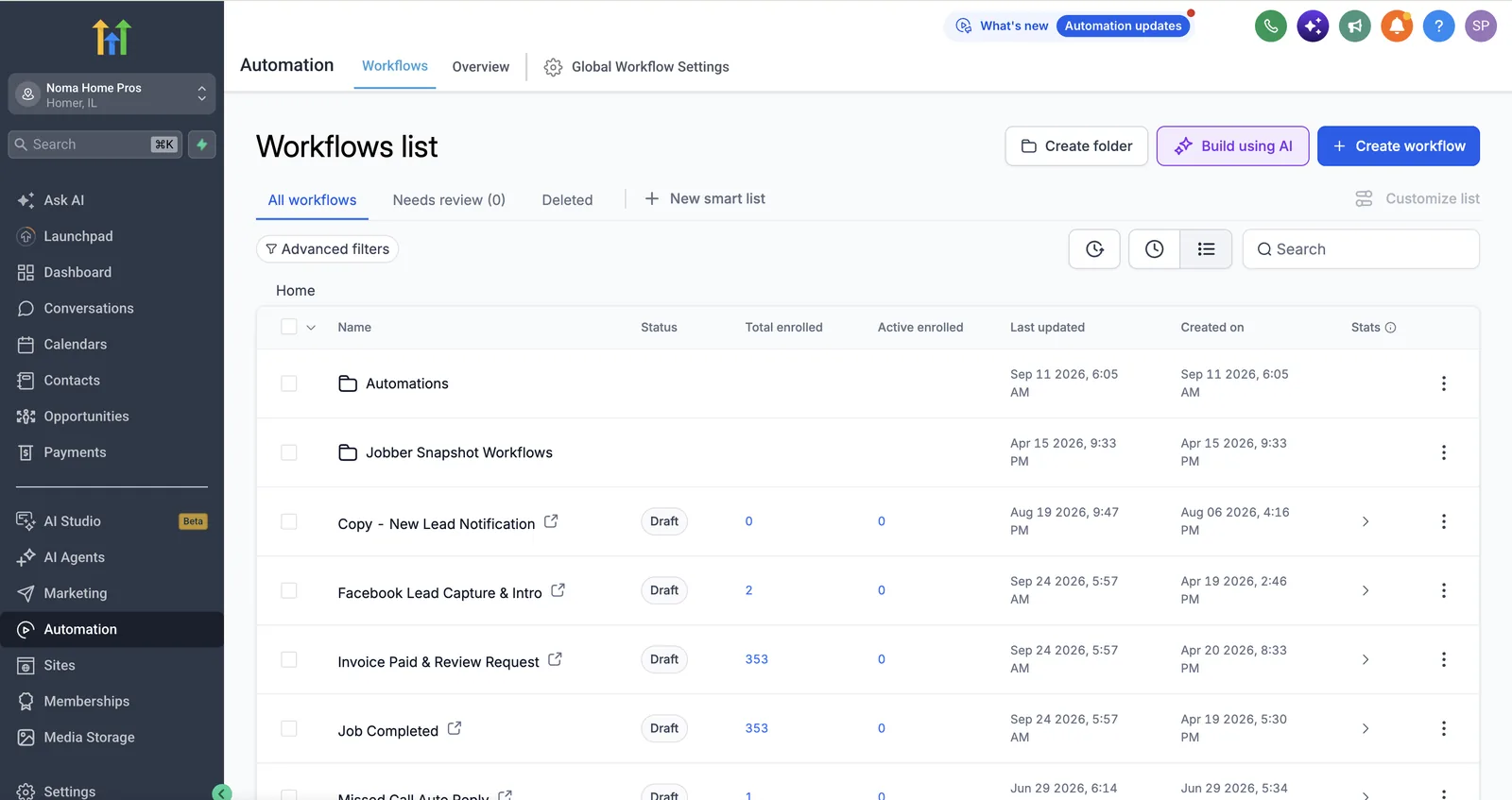
When a job is marked complete and the invoice is paid, two workflows run in GoHighLevel, and the second one sends the customer a review request. By 13 October 2026, each had run 353 times.
From finished job to review request
The workflows are deliberately simple, and their names say what they do:
- Job Completed (created 19 April 2026) runs when a job is marked complete.
- Invoice Paid & Review Request (created 20 April 2026) waits for payment, then asks for the review.
Tying the request to a job event, not a date, means it lands while the visit is still fresh. Which event to use depends on how you bill. Jobber's own community shows why: when Jobber's built-in requests only went out on invoice paid, customers who prepaid could get a review link before the work was done, and users asked for a job-completed trigger (Jobber community, review request triggers). Having both events in GoHighLevel means the rule can follow how the business actually bills. If you take payment up front, trigger on job completed instead.
A note on the number. GoHighLevel's enrolment counter counts workflow runs. It does not count unique customers (the account held 93 contacts that day) and it does not count reviews posted. These first versions of the workflows were switched to draft on 24 September 2026, after an Automations folder was added to the account on 11 September, so 353 is the record of what they ran from April to September. For more on getting reviews from finished jobs, see review request automation.
How are missed calls and new leads handled?
A missed call gets an automatic text back, and Facebook leads get an intro message as soon as they arrive. Every lead is tagged by where it came from, such as Google Business Profile or the website.
- Missed Call Auto Reply (created 29 June 2026) texts a caller back when nobody picks up, so a homeowner with a leaking pipe hears back before they call the next handyman on the list. If yours is not firing, see why missed call text back stops working.
- Facebook Lead Capture & Intro (created 19 April 2026) brings Facebook lead form contacts into the CRM and sends the first message.
- Source tags mark contacts from the Google Business Profile (
source-gbp) and the website (source-website), and acontactedtag shows who has already had a reply.
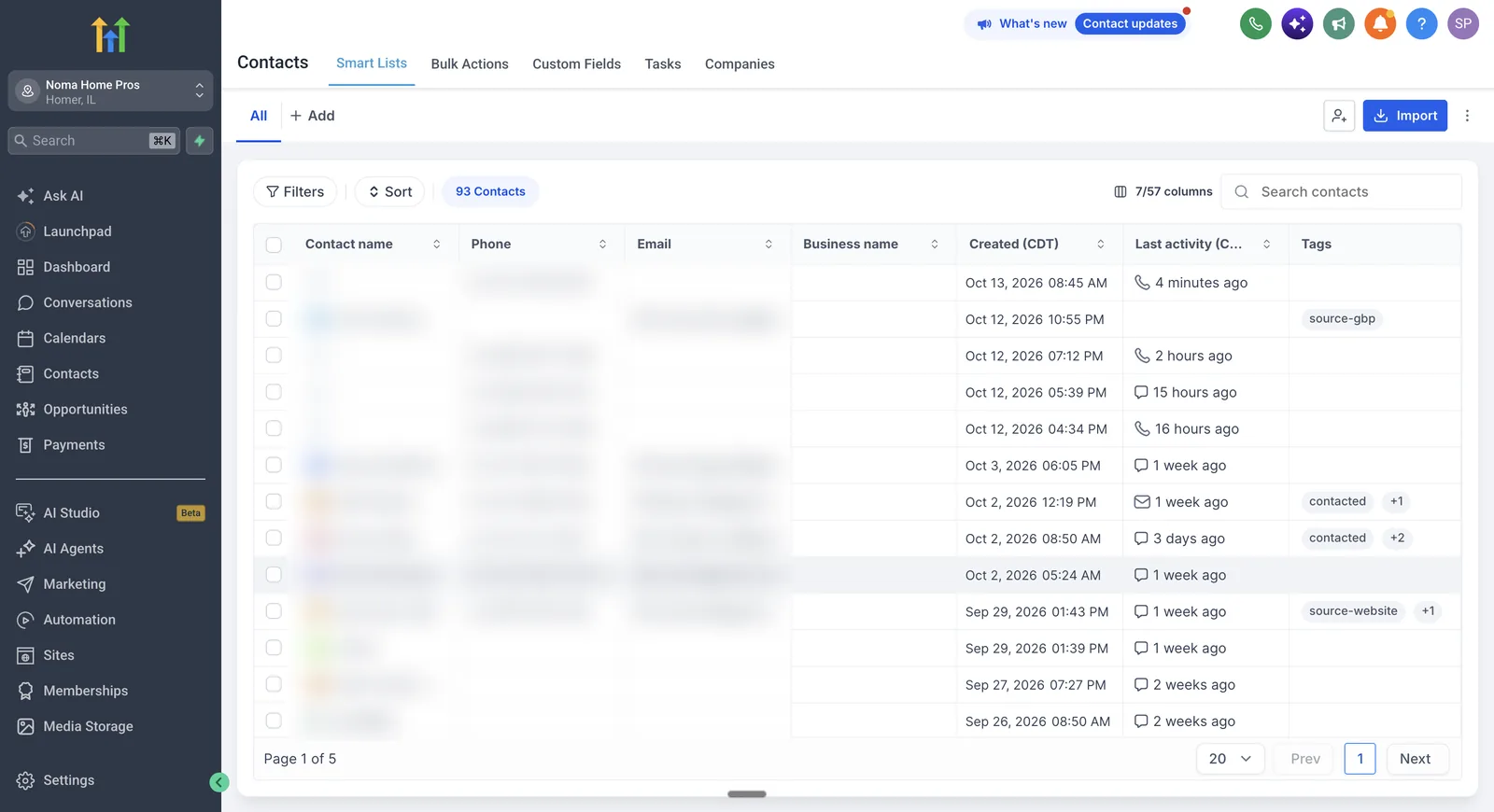
Most of the recent activity in that list is phone calls and texts. For a handyman business the phone is the main channel, which is why the phone system mattered as much as the workflows.
Why does the phone system need registering?
In the US, business texts sent from a local number have to be registered for A2P 10DLC or carriers can filter or block them. Caller ID registrations such as SHAKEN/STIR and CNAM make outgoing calls more likely to be answered. Noma's account has all four approved.
| Registration | What it does | Status (13 Oct 2026) |
|---|---|---|
| A2P messaging (SMS), brand and campaign | Registers the business and its texting use case with US carriers | Approved |
| SHAKEN/STIR (voice) | Caller ID authentication against spoofing | Approved |
| CNAM (voice) | Shows the business name on outgoing calls | Approved |
| Voice Integrity | Improves caller ID reputation and reduces spam labels | Approved |
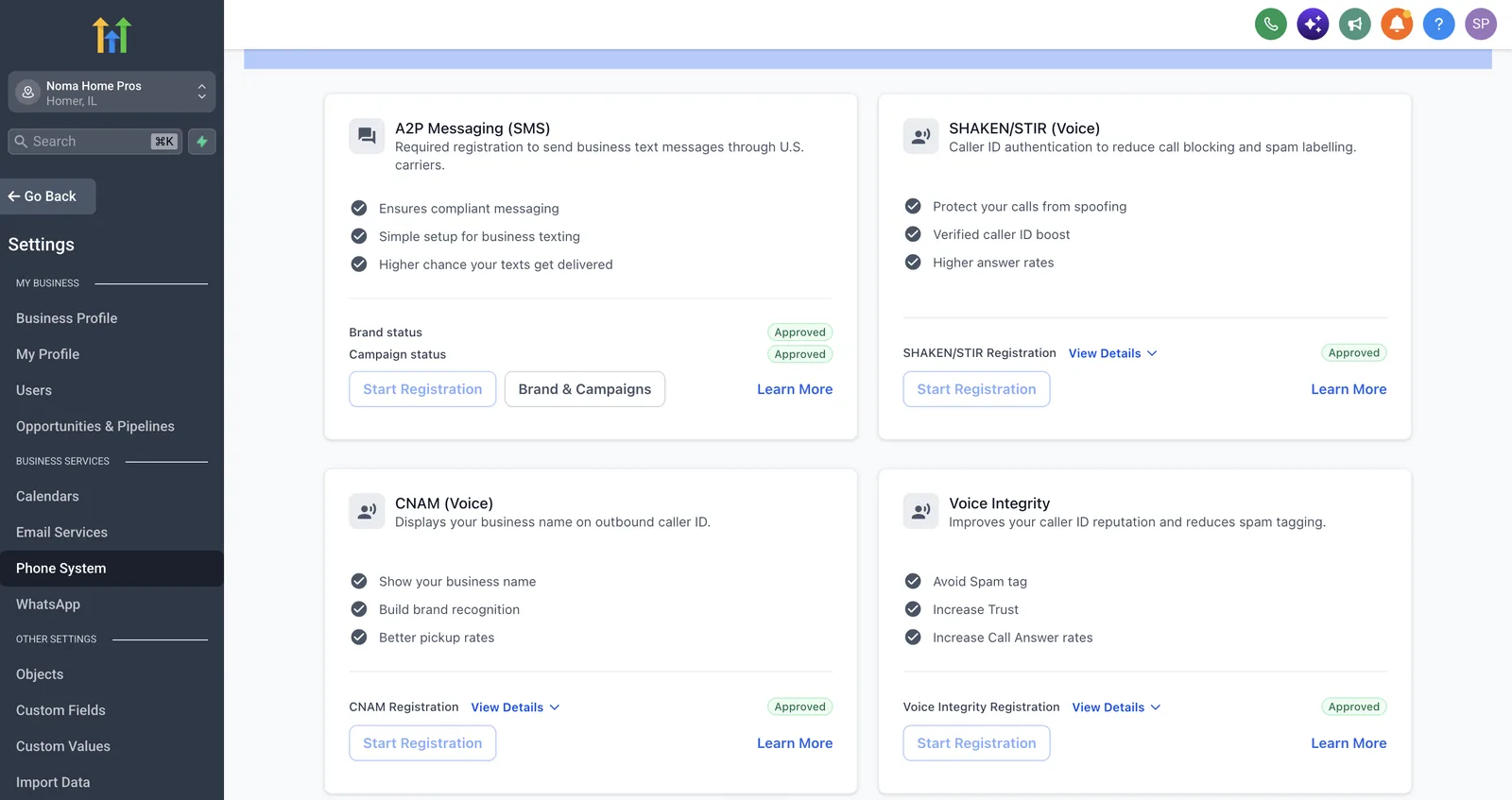
Without the A2P approval, the missed-call text and the review request would be the messages most likely to be filtered. Our A2P 10DLC registration guide walks through the steps and the common rejection reasons.
What else runs from the same account?
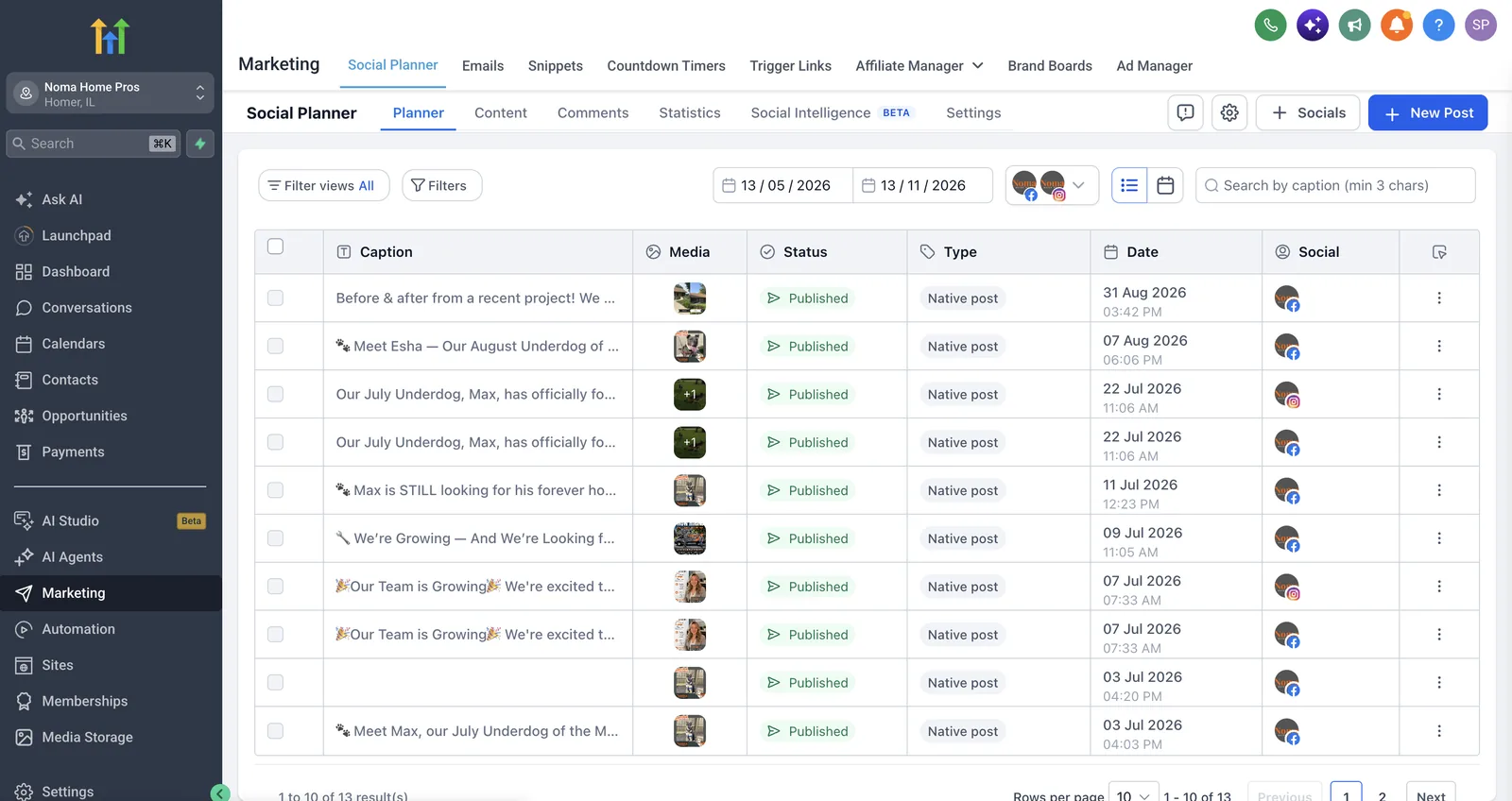
Noma's Facebook and Instagram posts are scheduled from GoHighLevel's social planner in the same account. By 31 August 2026 the planner showed 13 published posts. The most recent ones, from July and August, are before-and-after project photos, hiring posts as the team grew, and a monthly "Underdog" post about a dog looking for a home. Running posts, leads, calls and reviews from one account means one login and one contact record per customer.
How did the build come together?
The core was built in April 2026: the Jobber connection, the job-completed and review workflows, and Facebook lead capture. Missed-call handling followed in June, and a new Automations folder was added in September.
How the Noma build came together
The dates come from the workflow list in the account. The review workflows went first because they work on jobs that are already happening. Missed-call handling came after.
How does Autoesta work on a project like this?
We start with a free audit or strategy call, keep the tools the business already relies on (here, Jobber), connect GoHighLevel around them, test each trigger with real jobs, and support the account after launch.
- Audit or strategy call (free). How do calls, forms and jobs move today, and where does follow-up get forgotten?
- Keep the system of record. Jobber stayed the place for quotes, visits and invoices. We did not move the business off it.
- Connect and build. The Jobber integration first, then workflows for finished jobs, paid invoices, missed calls and new leads.
- Register the phone system before the texts start, so the first messages are not filtered.
- Hand over and support. Builds include six months of maintenance. Monthly support is available after that.
If you are comparing field service tools before you choose, see GoHighLevel vs Housecall Pro vs Jobber vs ServiceTitan. For a heating and cooling business, see GoHighLevel setup for HVAC.
What can other handyman and home service businesses take from this?
- Do not replace the job software. Keep Jobber (or your field service tool) for the work, and put the customer follow-up next to it.
- Tie the review request to a real event. A finished job or a paid invoice, never a fixed date, so the request lands when the customer is happy.
- Answer missed calls by text. A caller who hears nothing back usually tries the next number (our speed-to-lead research collects the published data). See missed call recovery.
- Register before you text. A2P approval comes before any automated SMS, not after the first messages bounce.
- Tag every lead by source. Google Business Profile, website and Facebook leads cost different amounts, so you need to know which ones turn into jobs.
- Read the counters carefully. A workflow run is not a review. Check the reviews you actually got against the requests sent.
Frequently asked questions
Does Jobber integrate with GoHighLevel?
Yes. Jobber announced an official HighLevel integration in September 2025. HighLevel's help article covers syncing clients and contacts and installing a snapshot of prebuilt workflows. Noma's account uses that snapshot, with custom workflows built on top.
When should a handyman send a review request?
Soon after the job is finished, while the customer still remembers the visit. Noma's request is tied to the invoice-paid event, alongside a job-completed workflow. If customers pay up front, trigger on job completed so nobody is asked before the work is done.
Do I need A2P 10DLC registration to text customers from GoHighLevel?
Yes, for business texting from a US local number. Without an approved A2P brand and campaign, carriers can filter or block the messages. Register before switching on missed-call texts or review requests.
How does a missed call text back work?
When a call to the business number goes unanswered, a workflow sends the caller a text within moments, so they can reply in writing instead of calling the next company. It needs an approved A2P registration and the right call-status trigger.
Can GoHighLevel replace Jobber?
Not for most trades businesses. Jobber is built for quotes, scheduling, visits and invoicing. GoHighLevel is built for leads, messages and marketing. Most home service teams are better served by connecting the two than by forcing one to do both.
How much does a setup like this cost?
At the time of writing, a small build of two or three automations is about $1,000, and a full GoHighLevel setup is $2,000 to $5,000, with six months of maintenance included. The audit and strategy call are free.
Can you build this for my home service business?
Yes. Book a free strategy call and we will look at your job software, phone setup and review process, then tell you what we would build. For a consult-led business, read the SVNP gym case study.
If your account already exists and something in it is not working, a GoHighLevel consultant can run the same checks on it, starting with a free audit.
Sources and further reading
- Noma Home Pros (client website), checked 21 October 2026
- HighLevel Help Center: How to integrate Jobber with HighLevel (modified 22 October 2025)
- Jobber product update: the HighLevel integration (September 2025)
- Jobber community: review request triggers
