What is GoHighLevel automation?
GoHighLevel automation is the workflow builder inside HighLevel that runs actions on its own when something happens in your account: a form is submitted, a call is missed, an appointment is booked, a tag is added or a deal changes stage. Each workflow is a trigger followed by actions such as texts, emails, tasks, waits, if/else branches and AI steps.
A business with good GoHighLevel automation answers every new lead within minutes, reminds every booked client, chases every unpaid invoice and asks every happy customer for a review, without anyone remembering to do it. A business with bad GoHighLevel automation sends duplicate texts, double-books calendars and texts people who already said stop. The builder is the same. The difference is design and testing.
Autoesta designs, builds and maintains GoHighLevel automation for service businesses and agencies. This page explains what the builder can do, what we build first, what it costs, and where GoHighLevel automation needs help from other tools.
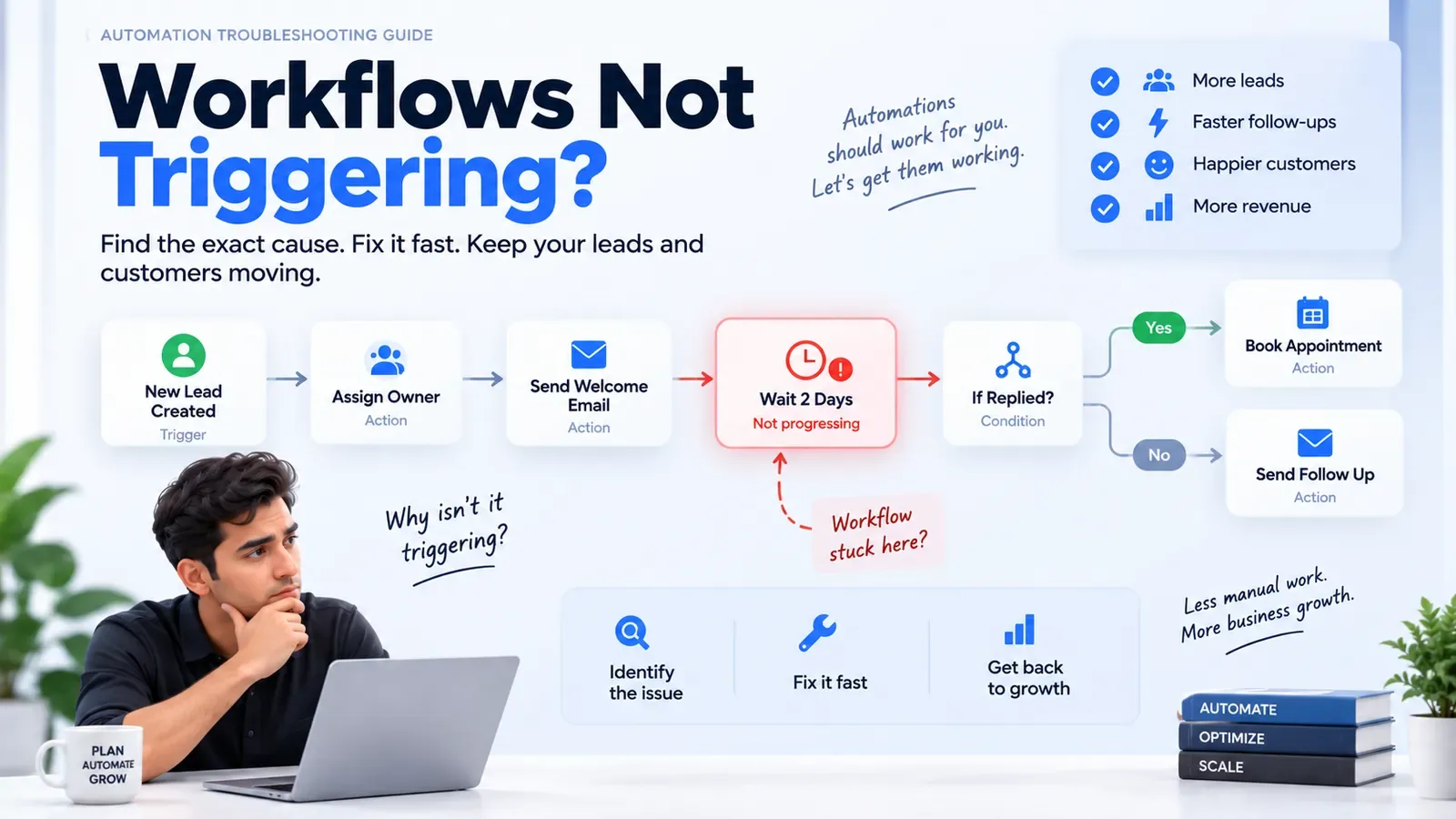
How do GoHighLevel automation workflows work?
Every GoHighLevel automation workflow starts with one or more triggers, then runs a list of actions in order. Branches decide which path a contact takes, wait steps pause the workflow, and goal events end it early when the contact does what you wanted, such as booking or replying.
The building blocks of a workflow
| Building block | What it does | Example |
|---|---|---|
| Trigger | Starts the workflow | Form submitted, call missed, appointment booked, tag added |
| Action | Does something | Send SMS, send email, create task, update field, move pipeline stage |
| Wait | Pauses for time or an event | Wait 1 day, wait until 2 hours before the appointment |
| If/else | Splits contacts into paths | Has the lead replied? Is the service type "consultation"? |
| Goal event | Ends the workflow when the goal is met | Appointment booked, reply received |
| AI actions | Runs a language model inside the workflow | Classify an enquiry, draft a reply, summarize a call |
We cover the difference between workflows, triggers and the older campaigns feature in GoHighLevel workflows vs triggers vs campaigns. In September 2026 HighLevel added GPT-6 Sol and GPT-6 Luna to the AI Agent and GPT workflow actions; our news note explains which to use.
Which GoHighLevel automation should you build first?
Build the GoHighLevel automation that stops leads from going cold first: instant reply to new enquiries, missed-call text-back, and appointment reminders. Those three recover the most revenue for the least work in almost every service business we set up.
Build order for most service businesses
- Speed to lead. Every new form, chat or call gets a reply within minutes, then a follow-up sequence that stops when the person answers. See speed up lead response.
- Missed-call text-back. A caller who reaches voicemail gets a text straight away. See recover missed calls.
- Reminders. Confirmation, a reminder the day before and one a few hours before, with a reschedule link. See reduce no-shows.
- Pipeline tasks. Every stage change creates the next task for the right person. See sales pipeline automation.
- Review requests. Sent after a completed job or visit, to every customer. See get more reviews.
The automation ROI calculator will show which of these pays back fastest with your own numbers.
Why do GoHighLevel automation workflows break?
GoHighLevel automation usually breaks for five reasons: two workflows fire on the same trigger, a wait step never resolves, a contact is missing the field a branch checks, texts are blocked because A2P 10DLC registration is incomplete, or email fails authentication and lands in spam.
- Overlapping triggers. A form trigger and a tag trigger both start follow-up, so the lead gets two sequences.
- Stuck waits. A "wait until appointment" step on a contact with no appointment waits forever.
- Empty fields. An if/else that checks "service type" sends everyone down the "no" path when the form never filled that field.
- Blocked texts. Unregistered 10DLC traffic is blocked by US carriers, so texts silently fail.
- Spam folder. A sending domain without SPF, DKIM and DMARC loses inbox placement.
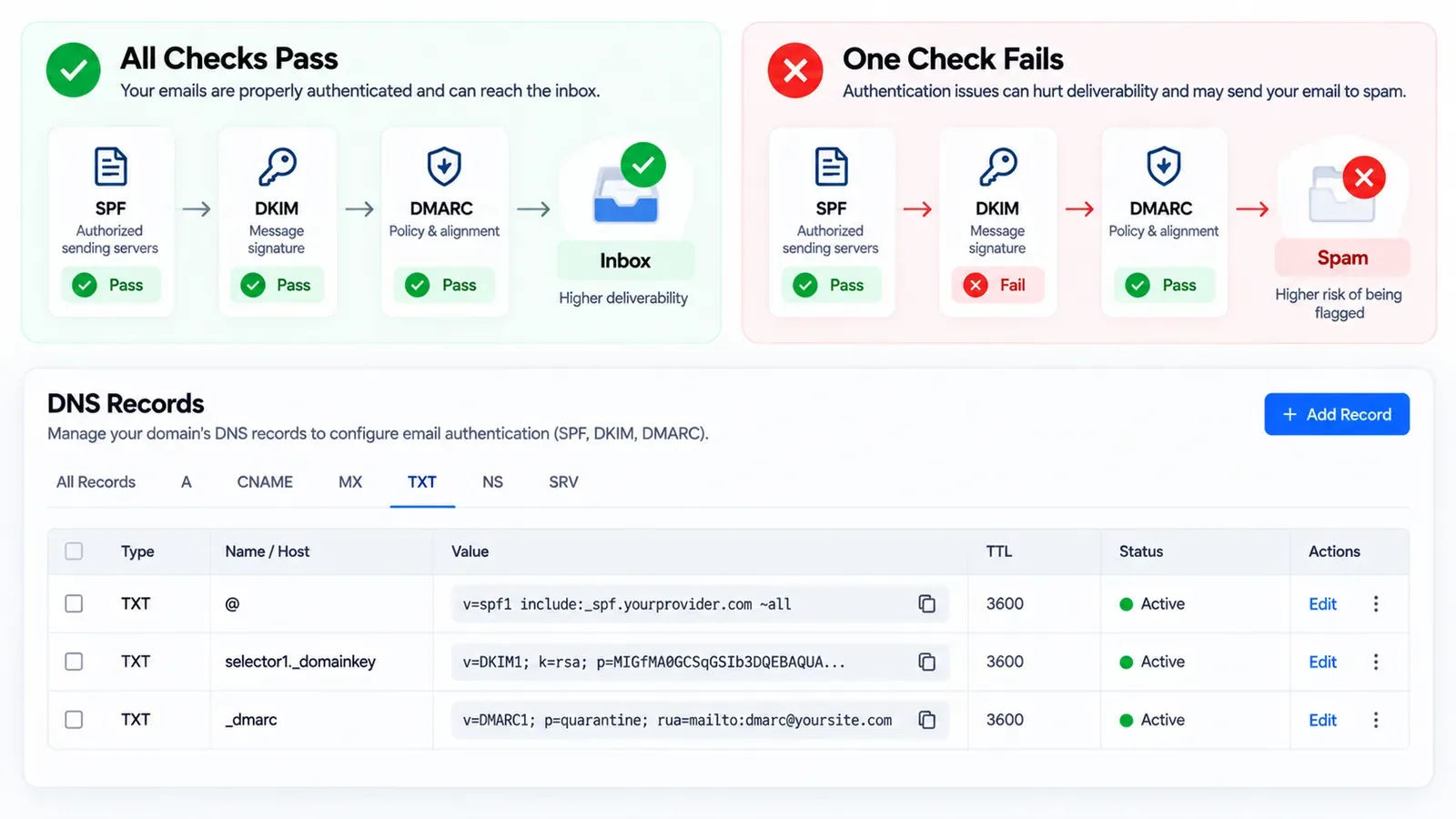
If your account already has these problems, start with a GoHighLevel account audit. The common GoHighLevel mistakes guide lists more.
How much does GoHighLevel automation cost?
GoHighLevel automation costs two things: the HighLevel plan (from $97 a month at the time of writing, with texts, emails and AI billed by use) and the build. Autoesta charges about $1,000 for two or three automations and $3,000 to $5,000 for a full GoHighLevel setup, with six months of maintenance included.
Workflows themselves have no per-run fee inside HighLevel. The messages they send do. A workflow that texts 1,000 leads a month costs the texting rate for 1,000 or more messages, which is why the GoHighLevel pricing calculator asks for your volumes.
When does GoHighLevel automation need n8n, Zapier or custom code?
GoHighLevel automation needs outside help when the data lives in a system HighLevel does not connect to natively, when a step needs heavy data processing, or when an action must run on a schedule across many records. In those cases we add n8n, Zapier or a direct API integration.
| Need | Best tool |
|---|---|
| Sync with practice-management or field-service software | API integration |
| High-volume or complex multi-step logic | n8n automation |
| Quick link to a common SaaS app | Zapier automation |
| Structured records GoHighLevel cannot model | Airtable |
For the full picture of how these fit together, see our business process automation service and the GoHighLevel automation limits guide.
GoHighLevel automation examples by industry
GoHighLevel automation looks different in each industry because the moment that loses customers is different: new-patient enquiries in dental, consultations in med spas, portal leads in real estate, peak-season calls in HVAC, and onboarding in agencies.
| Industry | First automation we usually build | Industry page |
|---|---|---|
| Dental | New-patient enquiry reply, reminders and recall | Dental |
| Med spa | Consultation booking and package follow-up | Med spa |
| Real estate | Instant reply and long nurture for portal leads | Real estate |
| HVAC and home services | Missed-call text-back and estimate follow-up | HVAC |
| Healthcare and home care | Enquiry reply, intake and referral handling | Healthcare |
| Agencies | Client onboarding and reporting across sub-accounts | Agencies |
The pattern underneath is the same: capture, reply, qualify, book, remind, follow up, review. Our lead automation page explains that pattern outside GoHighLevel, and GoHighLevel funnels covers the pages that feed it.
What does GoHighLevel automation look like in a real business?
In a real business, GoHighLevel automation looks like a new enquiry answered by text within minutes, qualified by an AI agent, booked into the right calendar, reminded twice, and asked for a review after the visit, with the owner seeing all of it on one dashboard.
Our dental case study and real estate case study show those builds with the numbers the clients reported. For agencies running many accounts, see GoHighLevel automation for agencies.
Frequently asked questions
What can you automate in GoHighLevel?
You can automate lead replies, missed-call text-back, appointment confirmations and reminders, pipeline stage tasks, follow-up sequences, invoice reminders, review requests, internal alerts and AI-drafted replies, all from workflows triggered by events in the account.
Is GoHighLevel automation hard to set up?
Simple workflows are easy to build, but a reliable system is harder: triggers must not overlap, every branch needs data to check, and texting needs A2P 10DLC registration. Most problems we fix come from workflows that were never tested end to end.
Does GoHighLevel charge per workflow run?
No. At the time of writing, workflows themselves have no per-run fee, but the texts, emails, calls and AI steps they trigger are billed by use.
Can GoHighLevel automation connect to other software?
Yes, through native integrations, webhooks, its API, or tools such as n8n and Zapier. We use those when data lives in a system GoHighLevel does not connect to directly.
